Gesture
ZepetoWorldContent API를 사용하면 원하는 제스처/포즈 카테고리에 대한 썸네일을 설정하고 썸네일을 클릭할 때 특정 제스처/포즈를 활성화할 수 있습니다.
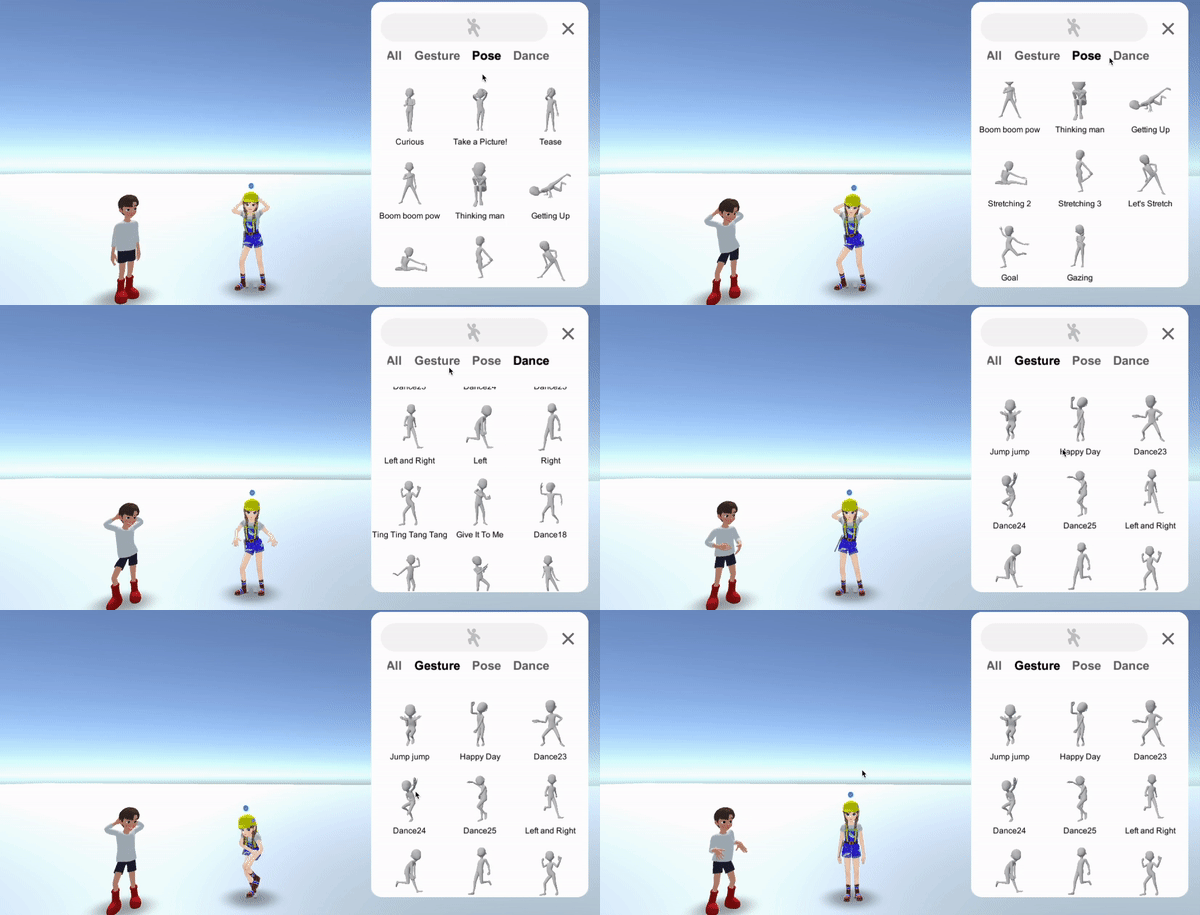
ZepetoWorldContent API를 사용하려면 다음과 같이 import 문을 작성해야 합니다.
import { OfficialContentType, WorldService, ZepetoWorldContent, Content } from 'ZEPETO.World';
제스처/포즈 정보를 포함하는 Content 클래스의 멤버 변수 및 함수 정보는 다음과 같습니다:
API | 설명 |
|---|---|
public get Id(): string | 콘텐츠 고유 ID |
public get Title(): string | 제스처, 포즈 제목 텍스트 - 언어는 장치 언어에 따라 자동으로 번역됩니다. |
public get Thumbnail(): UnityEngine.Texture2D | 2D 썸네일 |
public get AnimationClip(): UnityEngine.AnimationClip | 제스처 애니메이션 클립 |
public get IsDownloadedThumbnail(): boolean | 이 썸네일을 이전에 다운로드했는지 확인하는 기능 |
public get IsDownloadedAnimation(): boolean | 이 애니메이션 클립을 이전에 다운로드했는지 확인하는 기능 |
public DownloadAnimation($complete: System.Action):void | 완료 콜백을 받는 애니메이션 클립 다운로드 기능 - IsDownloadedAnimation()이 false인 경우 DownloadAnimation()을 호출하도록 구현합니다. |
public DownloadThumbnail($complete: System.Action):void | 썸네일을 다운로드하는 기능 - IsDownloadedThumbnail()이 false인 경우 DownloadThumbnail()을 호출하도록 구현합니다. |
OfficialContentType : enum | 콘텐츠 유형 (World 1.9.0 이상) - 제스처 = 2 - 포즈 = 4 - 셀카 = 8 - 제스처인사 = 16 - 제스처포즈 = 32 - 제스처확인 = 64 - 제스처댄스 = 128 - 제스처거부 = 256 - 제스처기타 = 512 - 모두 = 14 |
- 기존 기능을 사용할 수 있습니다, public DownloadThumbnail($character: ZEPETO_Character_Controller.ZepetoCharacter, $complete: System.Action):void, 기능에 대한 문제 없이. 그러나 이제 Zepeto 캐릭터를 인수로 받지 않으므로, 새로 수정된 기능을 사용하십시오 public DownloadThumbnail($complete: System.Action):void 대신에.
1단계 : UI 설정
1-1단계 : 제스처 버튼 만들기
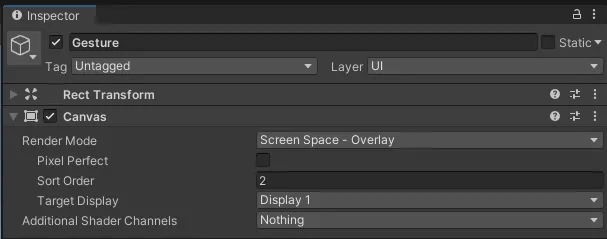
1) 계층 구조 > UI > 캔버스를 추가하고 정렬 순서를 2로 설정하여 다른 UI에 가려지지 않도록 합니다.
2) 계층 추가 > UI > 버튼.
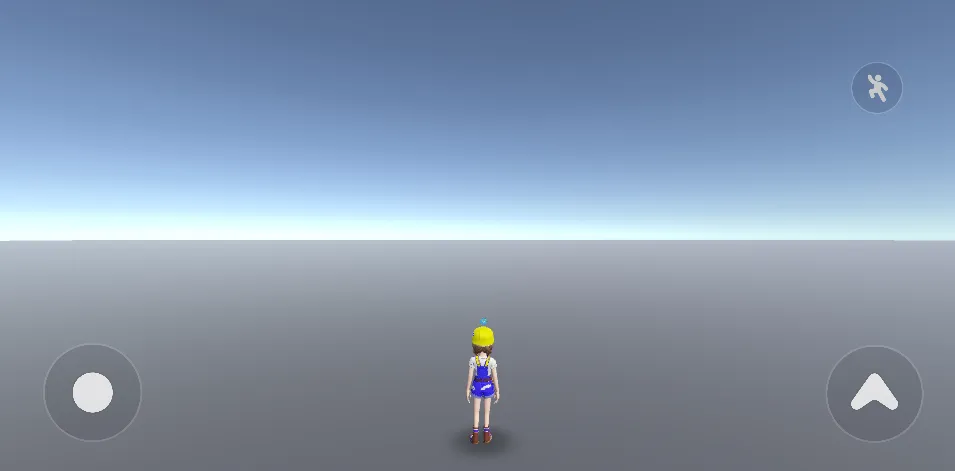
1-2단계 : 제스처 패널 정리
1) 계층 추가 > 빈 객체 만들기 및 이름을 PanelParent로 변경합니다.
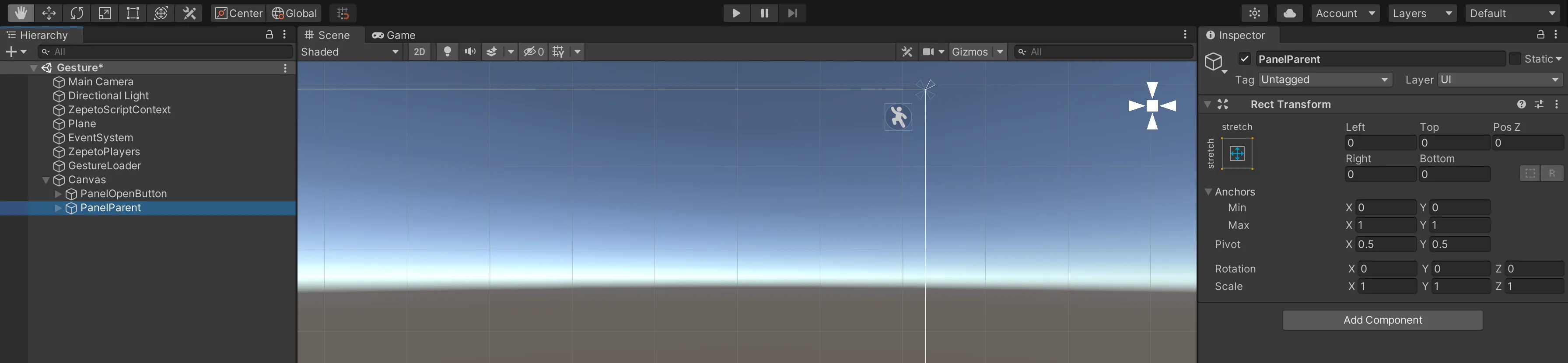
2) 계층 추가 > UI > Panel을 PanelParent의 자식으로 추가합니다.
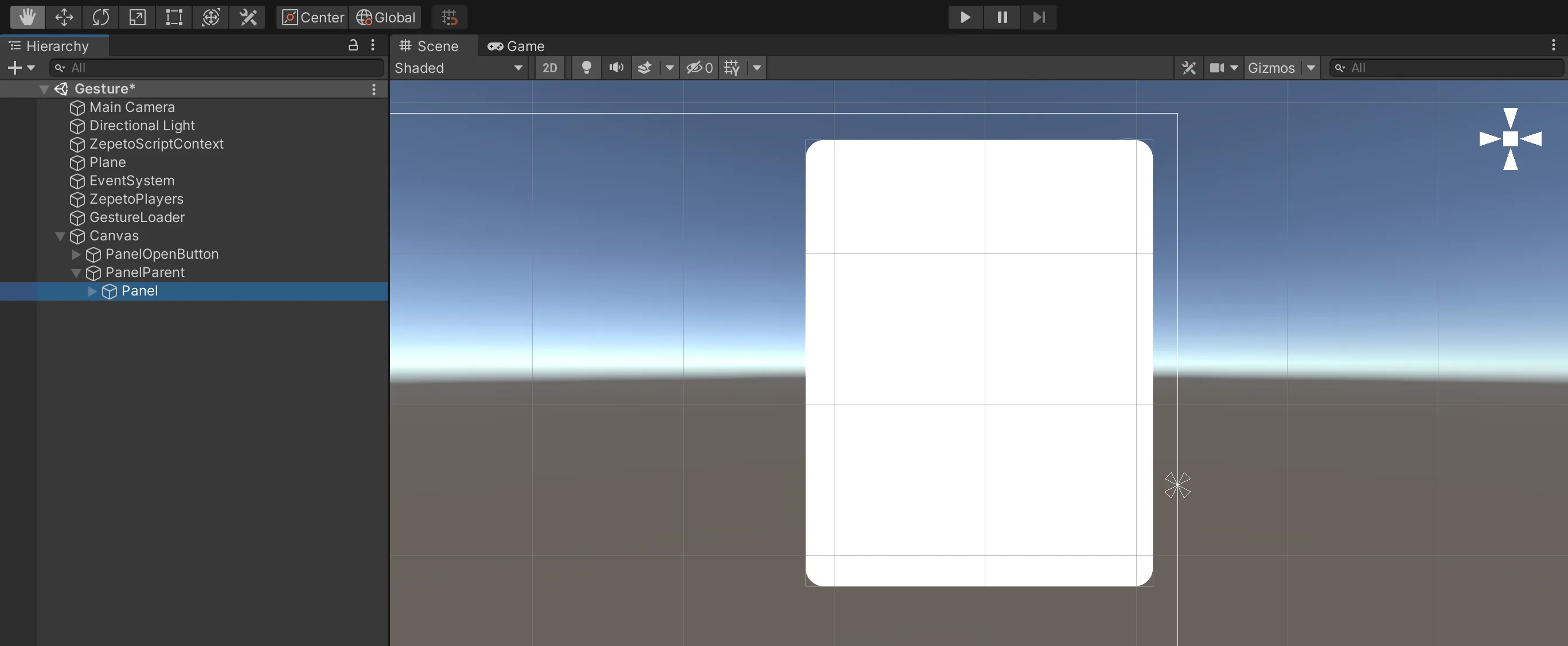
3) 닫기 버튼: UI > 버튼을 추가한 후 제스처 패널을 비활성화하는 onClick 이벤트를 추가합니다.
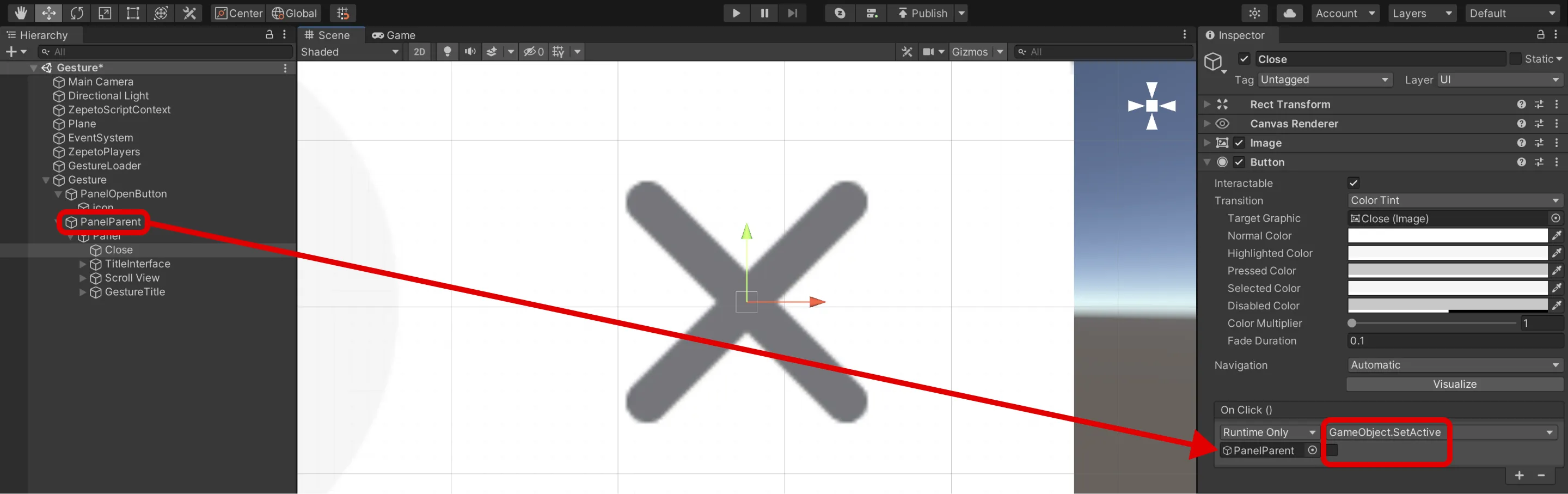
4) 열기 버튼: 위에서 생성한 열기 버튼에 제스처 패널을 활성화하는 onClick 이벤트를 추가해 주세요.
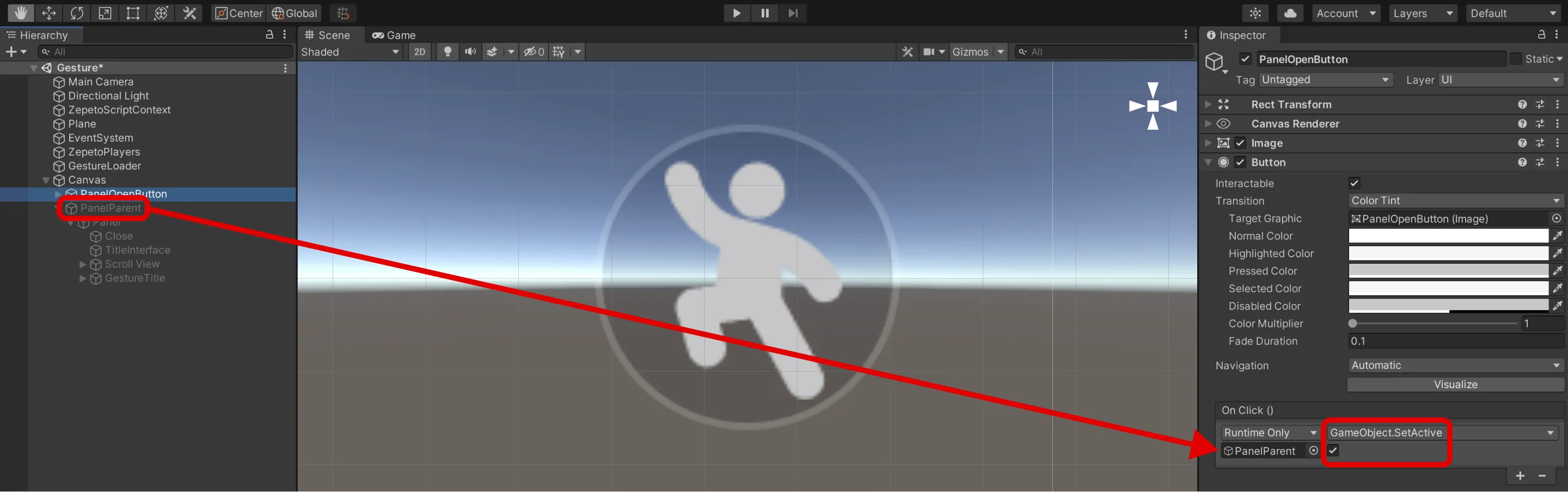
5) 제목 영역으로 사용할 이미지를 추가하세요.

6) 제스처 썸네일을 표시하기 위해 스크롤 뷰를 구성하세요.
- 계층 추가 > UI > 스크롤 뷰.
- 수평을 체크하고 스크롤 바 이미지를 비활성화하세요. 수직 스크롤만 사용할 것이며 수평 스크롤은 필요하지 않습니다.
- 스크롤 뷰의 콘텐츠에 그리드 레이아웃을 추가하여 썸네일을 그리드 패턴으로 정렬하세요.
- 객체의 크기를 콘텐츠의 크기에 맞게 조정하기 위해 콘텐츠 사이즈 피터를 추가하세요.
- 스크립트를 구현할 때, 스크롤 뷰의 콘텐츠를 제스처 썸네일의 부모로 설정해야 합니다 (전체 영역이 인식되고 스크롤되도록).
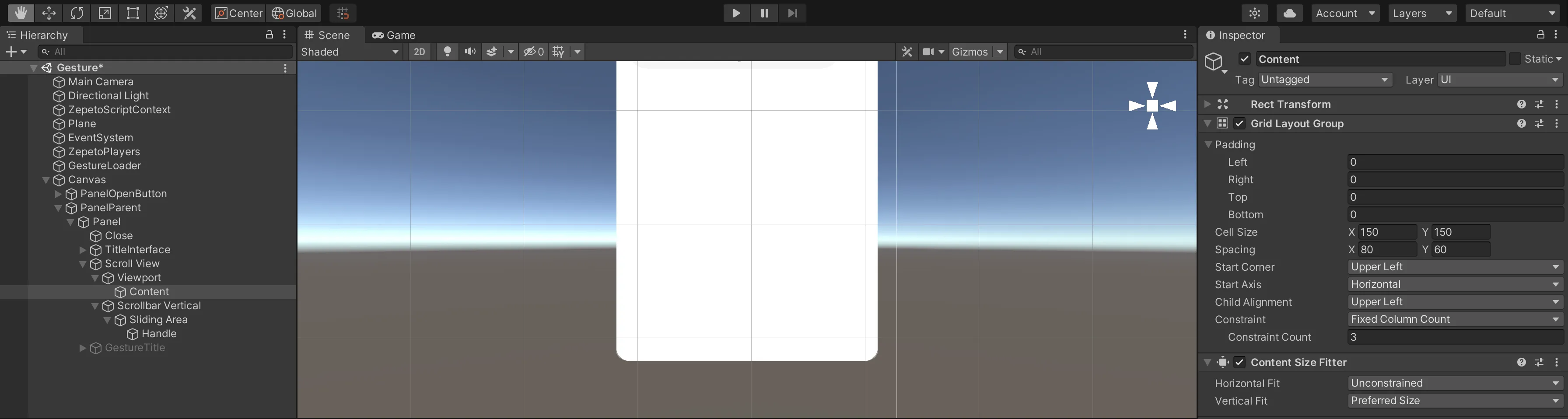
7) 제스처 유형별로 탭을 구성하세요.
- 계층 추가 > 패널의 자식으로 빈 객체 생성하고 이름을 GestureTitle로 변경합니다.
- 이것은 토글 버튼의 부모 객체입니다.
- 탭을 수평으로 정렬하기 위해 수평 레이아웃을 추가합니다.
- 토글 그룹 컴포넌트를 추가합니다.
👍 더 많은 탭을 구성하려면 계층 추가 > UI > 스크롤 뷰를 추가하고 스크롤 뷰 옵션에서 수평을 체크합니다.
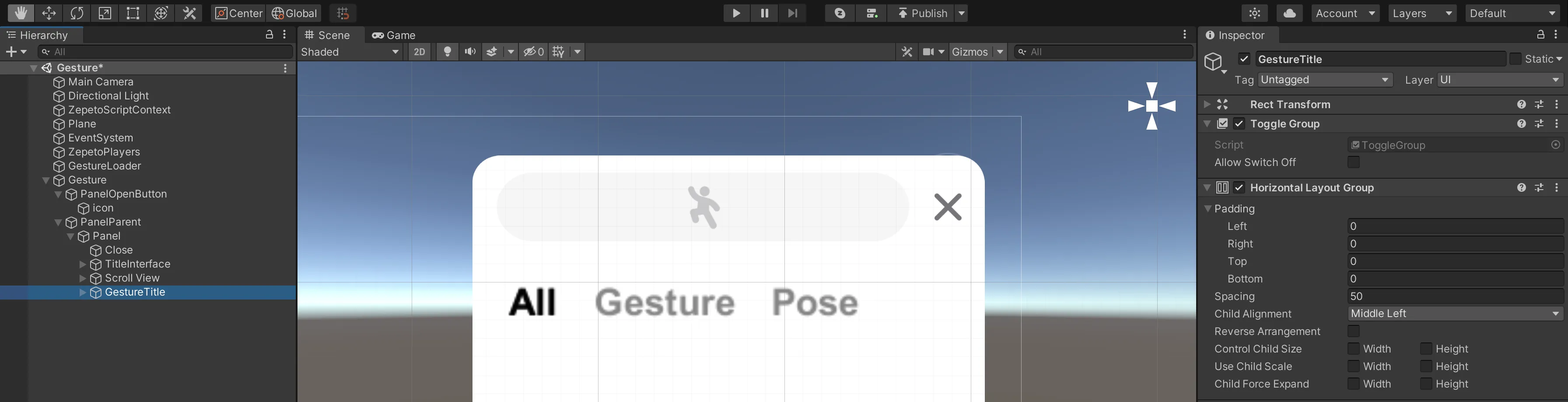
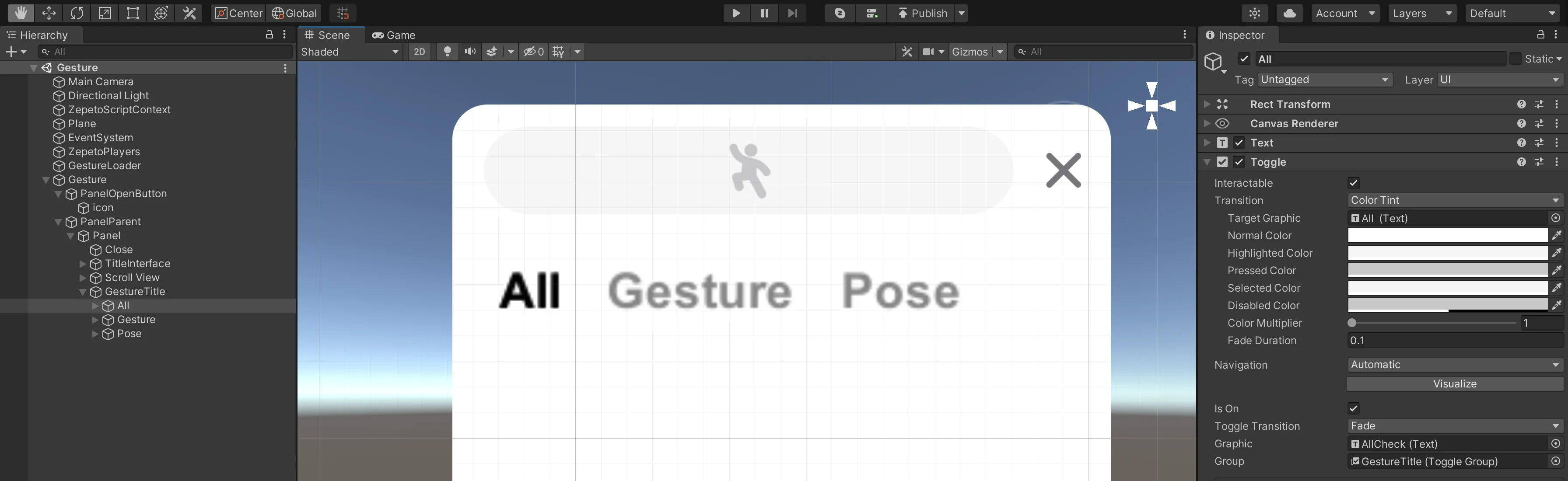
8) GestureTitle의 자식으로 토글 버튼으로 사용할 텍스트를 추가하고, 이를 All로 교체합니다.
- 텍스트의 색상을 회색으로 설정합니다.
- 체크할 때 표시될 강조된 텍스트를 텍스트의 자식으로 추가합니다.
- 폰트 내용, 크기 및 두께를 동일하게 설정하고 색상을 검정으로 설정합니다.
- Toggle 구성 요소를 추가합니다.
- 그룹에서 부모 객체를 지정합니다.
- Graphic에 자식으로 추가한 강조된 텍스트를 추가합니다.
- 먼저 표시될 All 토글 구성 요소에 대해서만 isOn을 확인합니다.
- Gesture와 Pose 토글 버튼을 동일한 방식으로 생성합니다.
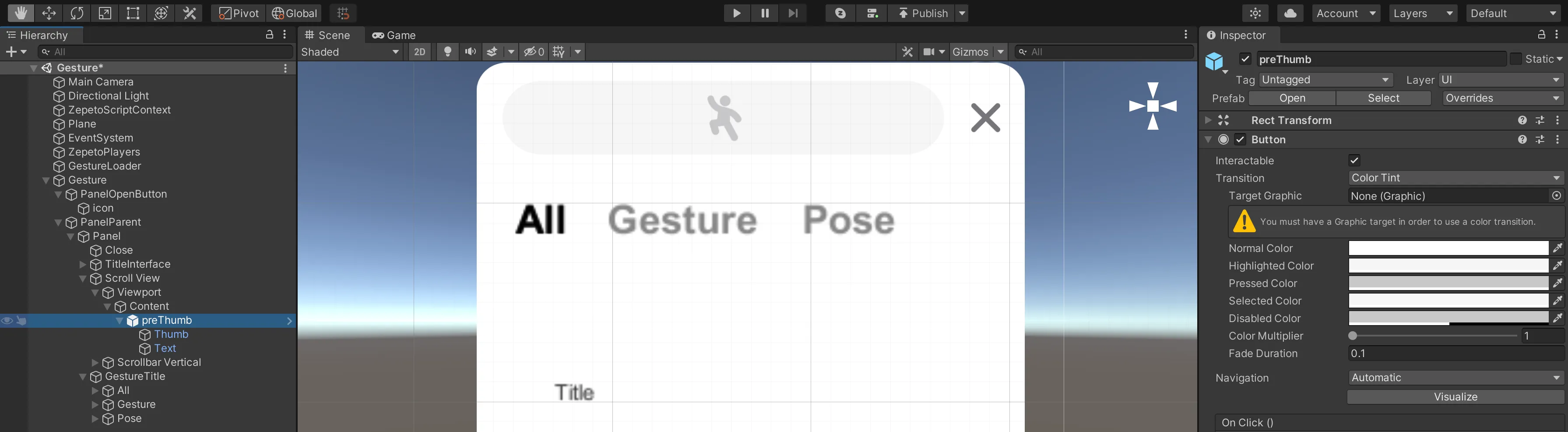
1-3단계 : 썸네일 프리팹 만들기
썸네일 버튼을 프리팹으로 생성한 다음, 스크립트에서 인스턴스로 생성하는 방법을 사용하세요.
1) UI > 버튼을 스크롤 뷰의 콘텐츠 자식으로 추가하고 이름을 preThumb로 변경하세요.
2) Raw Image를 추가한 후 이름을 Thumb으로 변경하세요.
- 이 이미지는 썸네일이 됩니다. 크기를 적절하게 조정하세요.
3) 텍스트를 추가하세요.
- 이미지의 하단을 중앙에 위치하도록 설정하세요.
- 글자의 크기와 두께를 조정하고, Content Size Fitter를 추가하세요.
- 수평 맞춤 : 선호 크기
- 수직 맞춤 : 선호 크기
4) 설정이 완료되면 프리팹으로 만들고 Resources 폴더에 넣어주세요.
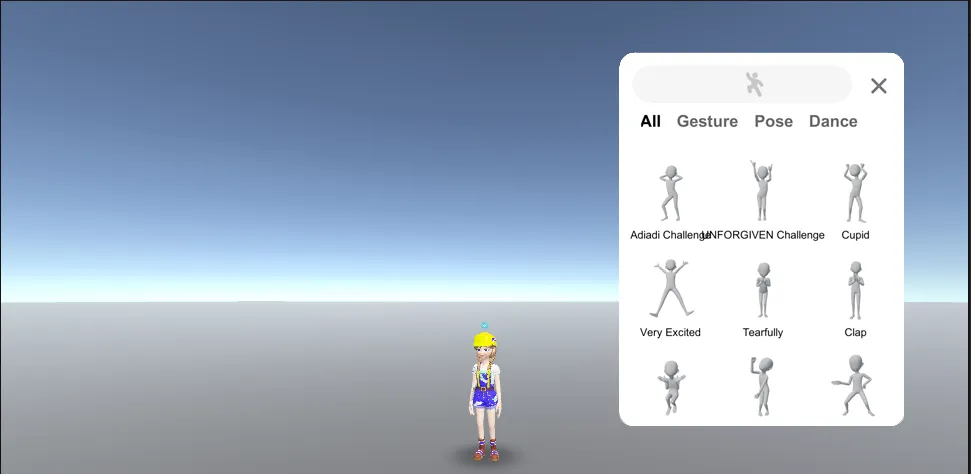
1-4단계 : UI 설정 가이드 비디오
👍 비디오에 표시된 UI 크기 및 위치 값은 권장 사항이지만, 원하는 값으로 수정할 수 있습니다!
UI 설정이 완료되면 스크립팅으로 진행하세요.
2단계 : 스크립트 작성하기
이 스크립트는 단일 플레이를 기반으로 합니다.
2-1단계 : 썸네일
- 프로젝트 > 생성 > ZEPETO > TypeScript로 이름을 썸네일로 변경합니다.
- 아래와 같은 샘플 스크립트를 작성합니다.
- 이 스크립트는 제스처 콘텐츠 정보를 UI로 정리합니다 (제목, 이미지).
import { ZepetoScriptBehaviour } from 'ZEPETO.Script';
import { Content } from 'ZEPETO.World';
import { RawImage, Text } from 'UnityEngine.UI';
import { Texture2D } from 'UnityEngine';

export default class Thumbnail extends ZepetoScriptBehaviour {

    @HideInInspector() public content: Content;

    Start() {
        this.GetComponentInChildren<Text>().text = this.content.Title;
        this.GetComponentInChildren<RawImage>().texture = this.content.Thumbnail as Texture2D;
    }

}- 스크립트를 생성한 후, preThumb 프리팹을 열고 스크립트를 추가합니다.
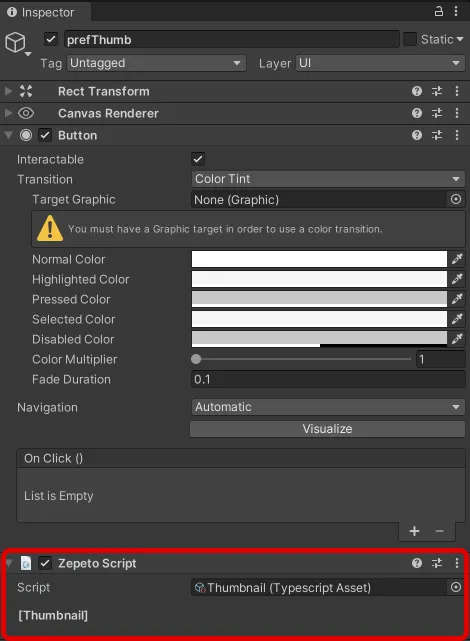
2단계-2 : GestureLoader
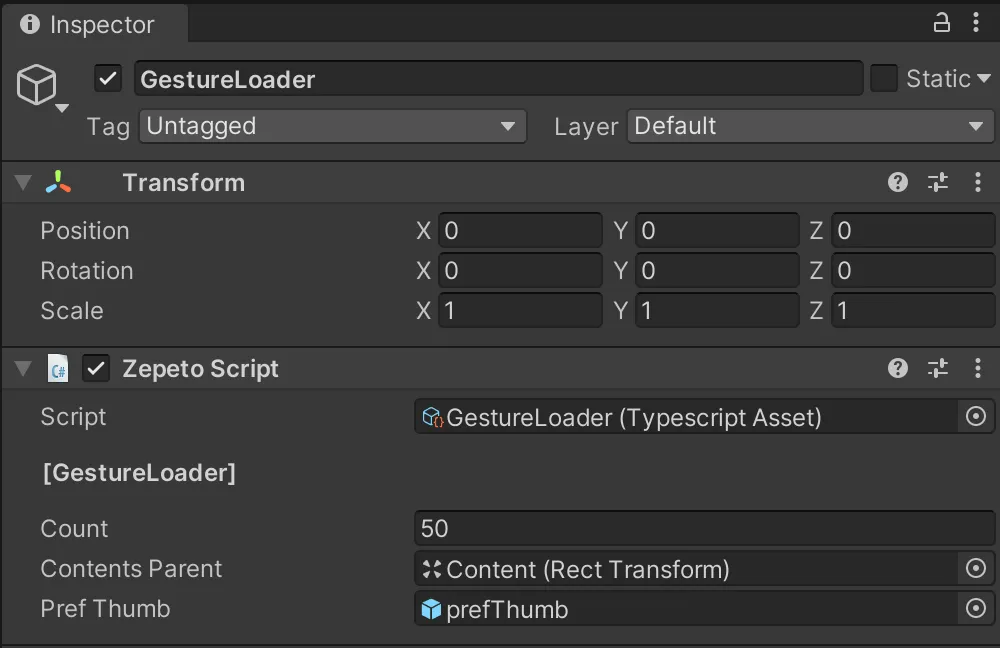
- 계층 구조 만들기 > 빈 객체 생성 후 GestureLoader로 이름 변경하기.
- 프로젝트 만들기 > 생성 > ZEPETO > TypeScript로 생성 후 GestureLoader로 이름 변경하기.
- 아래와 같은 샘플 스크립트 작성하기.
import { ZepetoScriptBehaviour } from 'ZEPETO.Script';
import { LocalPlayer, SpawnInfo, ZepetoCharacter, ZepetoPlayers } from 'ZEPETO.Character.Controller';
import { OfficialContentType, WorldService, ZepetoWorldContent, Content } from 'ZEPETO.World';
import { RawImage, Text, Button } from 'UnityEngine.UI';
import { GameObject, Texture2D, Transform, WaitUntil } from 'UnityEngine';
import Thumbnail from './Thumbnail';

export default class GestureLoader extends ZepetoScriptBehaviour {

    @HideInInspector() public contents: Content[] = [];
    @HideInInspector() public thumbnails: GameObject[] = [];

    @SerializeField() private _count: number = 50;
    @SerializeField() private _contentsParent: Transform;
    @SerializeField() private _prefThumb: GameObject;

    private _myCharacter: ZepetoCharacter;

    Start() {
        // Creating a Character
        ZepetoPlayers.instance.CreatePlayerWithUserId(WorldService.userId, new SpawnInfo(), true);

        ZepetoPlayers.instance.OnAddedLocalPlayer.AddListener(() => {
            this._myCharacter = ZepetoPlayers.instance.LocalPlayer.zepetoPlayer.character;

            // In order to take a thumbnail with my character, You need to request the content after the character is created.
            this.ContentRequest();
        });
    }


    // 1. Receive content from the server
    private ContentRequest() {

        // All Type Request
        ZepetoWorldContent.RequestOfficialContentList(OfficialContentType.All, contents => {
            this.contents = contents;

            for (let i = 0; i < this._count; i++) {
                if (!this.contents[i].IsDownloadedThumbnail) {
                    // Take a thumbnail photo using my character
                    this.contents[i].DownloadThumbnail(() =>{
                        this.CreateThumbnailObjcet(this.contents[i]);
                    });
                } else {
                    this.CreateThumbnailObjcet(this.contents[i]);
                }
            }
        });

    }

    // 2. Creating Thumbnail Objects
    private CreateThumbnailObjcet(content: Content) {
        const newThumb: GameObject = GameObject.Instantiate(this._prefThumb, this._contentsParent) as GameObject;
        newThumb.GetComponent<Thumbnail>().content = content;

        // Button Listener for each thumbnail
        newThumb.GetComponent<Button>().onClick.AddListener(() => {
            this.LoadAnimation(content);
        });

        this.thumbnails.push(newThumb);
    }

    // 3. Loading Animation
    private LoadAnimation(content: Content) {
        // Verify animation load
        if (!content.IsDownloadedAnimation) {
            // If the animation has not been downloaded, download it.
            content.DownloadAnimation(() => {
                // play animation clip
                this._myCharacter.SetGesture(content.AnimationClip);
            });
        } else {
            this._myCharacter.SetGesture(content.AnimationClip);
        }
    }
}- 카운트는 각 탭에서 다운로드할 최대 제스처 수입니다. 100보다 큰 숫자로 설정하면 썸네일 다운로드 과정에서 오류가 발생할 수 있으므로 필요한 만큼만 설정해 주세요.
스크립트는 다음과 같이 진행됩니다:
1) ZEPETO 캐릭터를 로드한 후 썸네일 생성을 위해 ContentsRequest() 사용자 정의 함수를 호출합니다.
- ContentsRequest() 함수는 제스처와 포즈를 각각 분리하여 콘텐츠 정보를 수신합니다.
- 기존 썸네일이 있으면 건너뛰고, 그렇지 않으면 썸네일을 가져옵니다.
- 가져온 썸네일 데이터는 각각의 리스트에 저장됩니다.
단계 2-3 : UIController
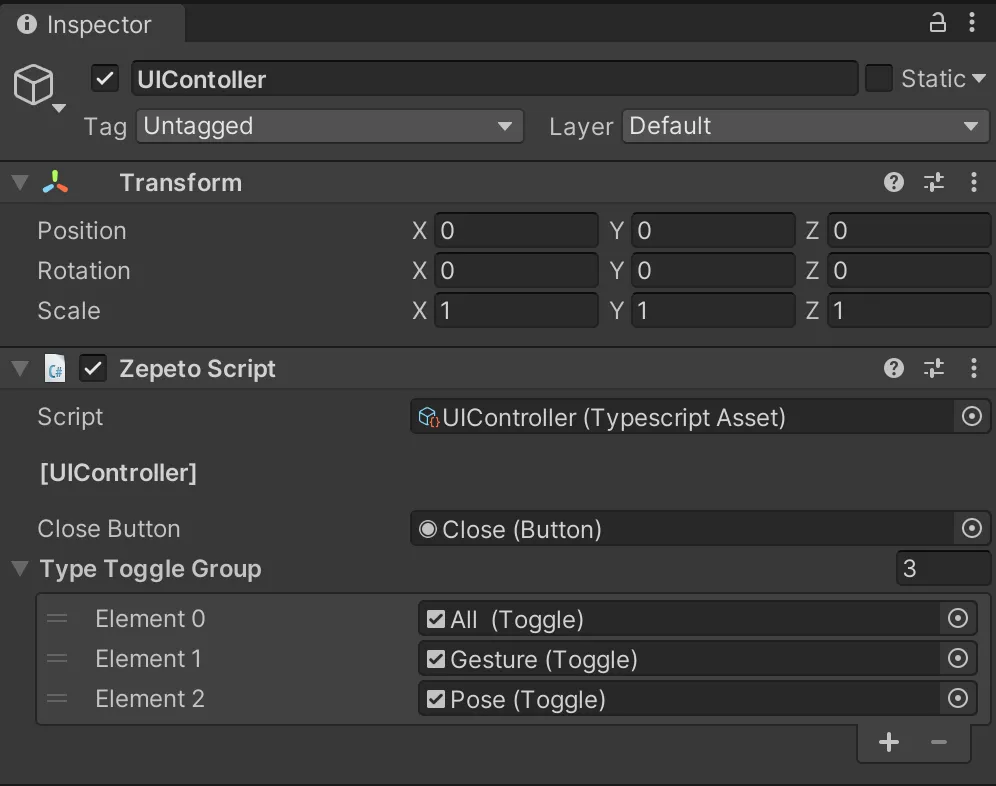
- 계층 구조 만들기 > 빈 객체 만들기 및 이름을 UIContoller로 변경합니다.
- 프로젝트 만들기 > 만들기 > ZEPETO > TypeScript로 이름을 UIContoller로 변경합니다.
- 아래와 같은 샘플 스크립트를 작성합니다.
import { ZepetoScriptBehaviour } from 'ZEPETO.Script';
import { Button, RawImage, Text, Toggle } from 'UnityEngine.UI';
import { LocalPlayer, ZepetoCharacter, ZepetoPlayers, ZepetoScreenTouchpad } from 'ZEPETO.Character.Controller';
import { OfficialContentType, Content } from 'ZEPETO.World';
import { Object, GameObject, Transform } from 'UnityEngine';
import GestureLoader from './GestureLoader';
import Thumbnail from './Thumbnail';

export default class UIController extends ZepetoScriptBehaviour {

    @SerializeField() private _closeButton : Button;
    @SerializeField() private _typeToggleGroup : Toggle[];

    private _gestureLodaer: GestureLoader;
    private _myCharacter: ZepetoCharacter;

    Start() {
        this._gestureLodaer = Object.FindObjectOfType<GestureLoader>();
        ZepetoPlayers.instance.OnAddedLocalPlayer.AddListener(() => {
            this._myCharacter = ZepetoPlayers.instance.LocalPlayer.zepetoPlayer.character;

            // If click the touchpad, cancel the gesture
            Object.FindObjectOfType<ZepetoScreenTouchpad>().OnPointerDownEvent.AddListener(() => {
                this.StopGesture();
            });

            // If click the close button, cancel the gesture
            this._closeButton.onClick.AddListener(() => {
                this.StopGesture();
            });
        });

        // UI Listener
        this._typeToggleGroup[0].onValueChanged.AddListener(() => {
            this.SetCategoryUI(OfficialContentType.All);
        });
        this._typeToggleGroup[1].onValueChanged.AddListener(() => {
            this.SetCategoryUI(OfficialContentType.Gesture);
        });
        this._typeToggleGroup[2].onValueChanged.AddListener(() => {
            this.SetCategoryUI(OfficialContentType.Pose);
        });

    }

    // Category Toggle UI Set
    private SetCategoryUI(category: OfficialContentType) {

        if (category == OfficialContentType.All) {
            this._gestureLodaer.thumbnails.forEach((Obj) => {
                Obj.SetActive(true);
            });
        }   else {
            for (let i = 0; i < this._gestureLodaer.thumbnails.length; i++) {
                const content = this._gestureLodaer.thumbnails[i].GetComponent<Thumbnail>().content;
                if (content.Keywords.includes(category)) {
                    this._gestureLodaer.thumbnails[i].SetActive(true);
                } else {
                    this._gestureLodaer.thumbnails[i].SetActive(false);
                }
            }
        }
    }

    private StopGesture() {
        this._myCharacter.CancelGesture();
    }
}
스크립트 흐름은 다음과 같습니다:
- 재생을 취소하려면 터치패드나 닫기 버튼을 터치하여 CancelGesture() 함수를 사용하세요.
- 탭(토글 버튼)을 탭하여 SetCategoryUI() 사용자 정의 함수를 호출하세요.
- SetCategoryUI() 함수는 각 썸네일의 제스처 콘텐츠 정보를 사용하여 해당 카테고리에 설정합니다.
- 적용 가능한 유형이면 활성화하고, 그렇지 않으면 비활성화하세요.
스크립트를 완료한 후, 인스펙터에 닫기 버튼과 타입 토글 그룹을 할당하세요.
- 타입 토글 그룹에 대한 항목은 제스처 패널의 토글 그룹의 자식인 토글입니다.
3단계 : 실행
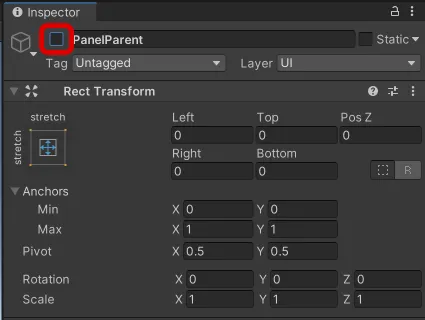
❗️ 주의 재생하기 전에 PanelParent를 비활성화하여 재생 중에 열기 버튼만 보이도록 하세요.
4단계 : 멀티 플레이 제스처 동기화
- 멀티 플레이의 경우 특정 플레이어가 가져온 제스처 정보 값을 수신하고 이를 방에 접근하는 모든 플레이어에게 적용하는 동기화 코드를 추가해야 합니다.
- 핵심은 어떤 플레이어가 어떤 제스처를 만들었는지에 대한 방 메시지를 서버와 클라이언트 간에 송수신하는 것입니다.
단계 4-1 : 클라이언트 코드
썸네일 - 멀티플레이
- 싱글 플레이 클라이언트 코드에 구현된 것과 동일한 스크립트를 작성하십시오.
import { ZepetoScriptBehaviour } from 'ZEPETO.Script';
import { Content } from 'ZEPETO.World';
import { RawImage, Text } from 'UnityEngine.UI';
import { Texture2D } from 'UnityEngine';

export default class Thumbnail extends ZepetoScriptBehaviour {

    @HideInInspector() public content: Content;

    Start() {
        this.GetComponentInChildren<Text>().text = this.content.Title;
        this.GetComponentInChildren<RawImage>().texture = this.content.Thumbnail as Texture2D;
    }

}
제스처 로더 - 멀티플레이
- 기본적으로 싱글 플레이 클라이언트 코드에 구현된 스크립트는 동일하게 작성됩니다.
- 추가로, 클라이언트는 PlayerGestureInfo를 포함하는 인터페이스를 선언합니다.
- 서버에 정보를 보낼 때: SendMyGesture() 사용자 정의 함수 참조
- 플레이어가 썸네일을 눌러 제스처를 만들 때, 제스처 ID를 room.Send()를 사용하여 서버에 전송합니다.
- 제스처를 취소할 때, 취소했다는 정보를 전송하도록 처리합니다.
- 서버에서 다른 클라이언트로부터 제스처 정보를 받을 때: "OnChangeGesture" 룸 메시지가 Start() 내의 this.room.AddMessageHandler()로 전송됩니다.
- 동기화는 "OnChangeGesture" 메시지에 세션 ID와 제스처 ID를 포함하여 적절한 플레이어가 제스처를 재생하도록 함으로써 이루어집니다.
import { ZepetoScriptBehaviour } from 'ZEPETO.Script';
import { LocalPlayer, SpawnInfo, ZepetoCharacter, ZepetoPlayers } from 'ZEPETO.Character.Controller';
import { OfficialContentType, WorldService, ZepetoWorldContent, Content, ZepetoWorldMultiplay } from 'ZEPETO.World';
import { RawImage, Text, Button } from 'UnityEngine.UI';
import { GameObject, Texture2D, Transform, WaitUntil } from 'UnityEngine';
import Thumbnail from './Thumbnail';
import { Room, RoomData } from 'ZEPETO.Multiplay';

interface PlayerGestureInfo {
    sessionId: string,
    gestureId: string
}

const CancelMotion = "" as const;

export default class GestureLoaderMultiPlay extends ZepetoScriptBehaviour {

    public multiplay: ZepetoWorldMultiplay;

    @HideInInspector() public contents: Content[] = [];
    @HideInInspector() public thumbnails: GameObject[] = [];

    @SerializeField() private _count: number = 50;
    @SerializeField() private _contentsParent: Transform;
    @SerializeField() private _prefThumb: GameObject;

    private _myCharacter: ZepetoCharacter;
    private _room: Room;
    private _contentsMap: Map<string, Content> = new Map<string, Content>();

    Start() {
        // 캐릭터 생성
        ZepetoPlayers.instance.OnAddedLocalPlayer.AddListener(() => {
            this._myCharacter = ZepetoPlayers.instance.LocalPlayer.zepetoPlayer.character;

            // 내 캐릭터로 썸네일을 찍으려면 캐릭터가 생성된 후 콘텐츠를 요청해야 합니다.
            this.ContentRequest();
        });

        // 멀티플레이를 위한
        this.multiplay.RoomCreated += (room: Room) => {
            this._room = room;
            // 서버에서 사용자 제스처 정보를 수신
            this._room.AddMessageHandler("OnChangeGesture", (message: PlayerGestureInfo) => {
                let playerGestureInfo: PlayerGestureInfo = {
                    sessionId: message.sessionId,
                    gestureId: message.gestureId
                };
                this.LoadAnimation(playerGestureInfo);
            });
        };
    }


    // 1. 서버에서 콘텐츠 수신
    private ContentRequest(){

        // 모든 유형 요청
        ZepetoWorldContent.RequestOfficialContentList(OfficialContentType.All, contents => {
            this.contents = contents;
            for (let i = 0; i < this._count; i++) {
                if (!this.contents[i].IsDownloadedThumbnail) {
                    // 내 캐릭터를 사용하여 썸네일 사진 찍기
                    this.contents[i].DownloadThumbnail(() =>{
                        this.CreateThumbnailObjcet(this.contents[i]);
                    });
                } else {
                    this.CreateThumbnailObjcet(this.contents[i]);
                }
            }
        });

    }

    // 2. 썸네일 객체 생성
    private CreateThumbnailObjcet(content: Content) {
        const newThumb: GameObject = GameObject.Instantiate(this._prefThumb, this._contentsParent) as GameObject;
        newThumb.GetComponent<Thumbnail>().content = content;

        // 콘텐츠 ID로 콘텐츠를 찾기 위한 사전 생성
        this._contentsMap.set(content.Id, content);

        // 각 썸네일에 대한 버튼 리스너
        newThumb.GetComponent<Button>().onClick.AddListener(() => {
            this.SendMyGesture(content.Id);
        });

        // 썸네일 목록
        this.thumbnails.push(newThumb);

    }

    // 멀티플레이를 위한
    // 클릭한 제스처 정보를 서버에 전송
    public SendMyGesture(gestureId) {
        const data = new RoomData();
        data.Add("gestureId", gestureId);
        this._room.Send("OnChangeGesture", data.GetObject());
    }

    // 3. 애니메이션 로딩
    private LoadAnimation(playerGestureInfo: PlayerGestureInfo){

        if (!ZepetoPlayers.instance.HasPlayer(playerGestureInfo.sessionId)) {
            console.log("플레이어가 존재하지 않습니다");
            return;
        }

        const zepetoPlayer = ZepetoPlayers.instance.GetPlayer(playerGestureInfo.sessionId).character;

        if (playerGestureInfo.gestureId == CancelMotion) {
            zepetoPlayer.CancelGesture();
            return;
        }
        else if(!this._contentsMap.has(playerGestureInfo.gestureId)) {
            console.log("리소스가 아직 로드되지 않았습니다");
            return;
        }

        const content = this._contentsMap.get(playerGestureInfo.gestureId);

        // 애니메이션 로드 확인
        if (!content.IsDownloadedAnimation) {
            // 애니메이션이 다운로드되지 않은 경우 다운로드합니다.
            content.DownloadAnimation(() => {
                // 애니메이션 클립 재생
                zepetoPlayer.SetGesture(content.AnimationClip);
            });
        } else {
            zepetoPlayer.SetGesture(content.AnimationClip);
        }
    }
}
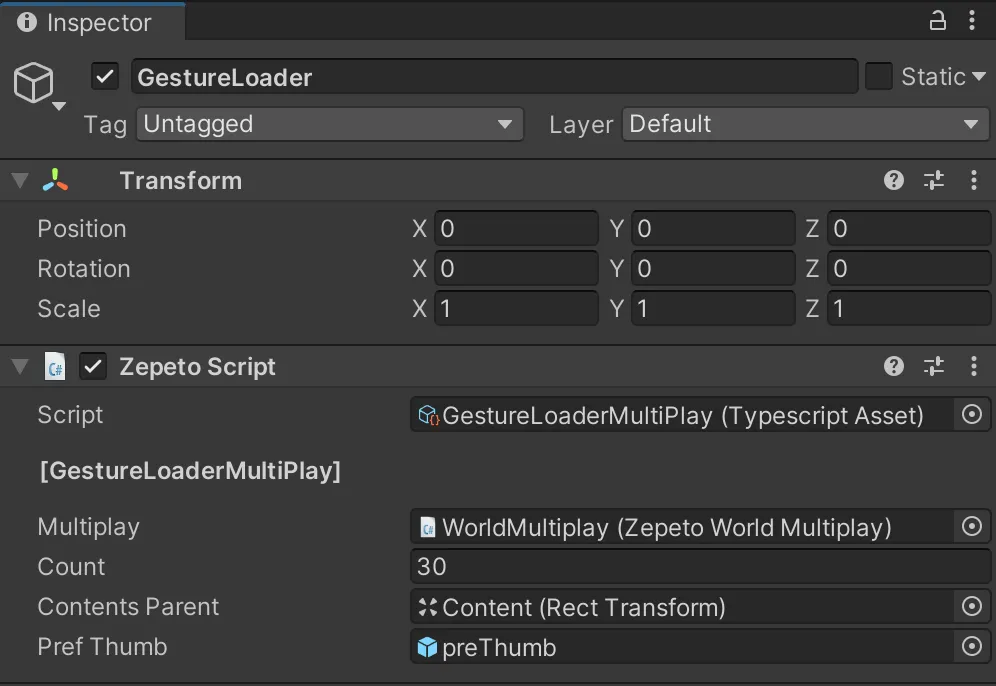
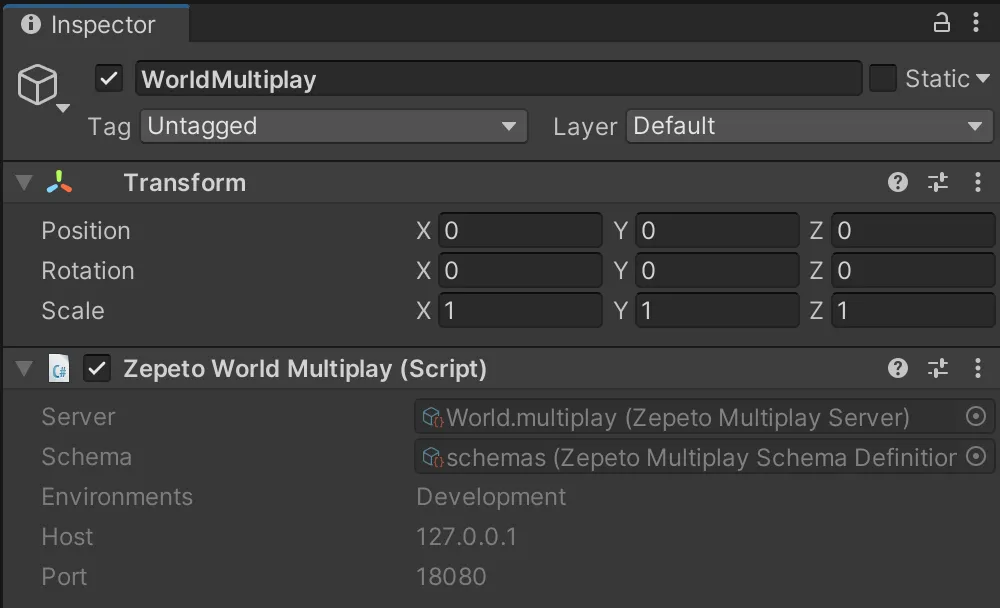
- 스크립트를 완료한 후, 검사자는 Zepeto World Multiplay 구성 요소와 함께 Multiplay에 추가 객체를 할당합니다.
UIController - 멀티플레이
- 기본적으로, 단일 플레이 클라이언트 코드에서 구현된 스크립트는 동일하게 작성됩니다.
- 단일 플레이 클라이언트 코드와의 차이점은 StopGesture() 사용자 정의 함수입니다.
- GestureLoaderMultiplay 내에서 SendMyGesture() 사용자 정의 함수를 호출합니다.
- 제스처가 취소되었다는 정보를 전송하는 프로세스입니다.
import { ZepetoScriptBehaviour } from 'ZEPETO.Script';
import { Button, RawImage, Text, Toggle } from 'UnityEngine.UI';
import { LocalPlayer, ZepetoCharacter, ZepetoPlayers, ZepetoScreenTouchpad } from 'ZEPETO.Character.Controller';
import { OfficialContentType, Content } from 'ZEPETO.World';
import { Object, GameObject, Transform } from 'UnityEngine';
import GestureLoaderMultiPlay from './GestureLoaderMultiPlay';
import Thumbnail from './Thumbnail';

const CancelMotion = "" as const;

export default class UIController extends ZepetoScriptBehaviour {

    @SerializeField() private _closeButton : Button;
    @SerializeField() private _typeToggleGroup : Toggle[];

    private _gestureLodaer: GestureLoaderMultiPlay;
    private _myCharacter: ZepetoCharacter;

    Start() {
        this._gestureLodaer = Object.FindObjectOfType<GestureLoaderMultiPlay>();
        ZepetoPlayers.instance.OnAddedLocalPlayer.AddListener(() => {
            this._myCharacter = ZepetoPlayers.instance.LocalPlayer.zepetoPlayer.character;

            // 터치패드를 클릭하면 제스처를 취소합니다.
            Object.FindObjectOfType<ZepetoScreenTouchpad>().OnPointerDownEvent.AddListener(() => {
                this.StopGesture();
            });

            // 닫기 버튼을 클릭하면 제스처를 취소합니다.
            this._closeButton.onClick.AddListener(() => {
                this.StopGesture();
            });
        });

        // UI 리스너
        this._typeToggleGroup[0].onValueChanged.AddListener(() => {
            this.SetCategoryUI(OfficialContentType.All);
        });
        this._typeToggleGroup[1].onValueChanged.AddListener(() => {
            this.SetCategoryUI(OfficialContentType.Gesture);
        });
        this._typeToggleGroup[2].onValueChanged.AddListener(() => {
            this.SetCategoryUI(OfficialContentType.Pose);
        });

    }

    // 카테고리 토글 UI 설정
    private SetCategoryUI(category: OfficialContentType) {

        if (category == OfficialContentType.All) {
            this._gestureLodaer.thumbnails.forEach((Obj) => {
                Obj.SetActive(true);
            });
        }  else {
            for (let i = 0; i < this._gestureLodaer.thumbnails.length; i++) {
                const content = this._gestureLodaer.thumbnails[i].GetComponent<Thumbnail>().content;
                if (content.Keywords.includes(category)) {
                    this._gestureLodaer.thumbnails[i].SetActive(true);
                } else {
                    this._gestureLodaer.thumbnails[i].SetActive(false);
                }
            }
        }
    }

    private StopGesture() {
        this._gestureLodaer.SendMyGesture(CancelMotion);
    }
}
단계 4-2 : 서버 코드
- 서버 코드는 PlayerGestureInfo를 포함하도록 인터페이스를 선언합니다.
- 서버 코드는 기본적으로 Multiplay Sample의 서버 코드를 기반으로 합니다.
- onCreate() 내에서 제스처가 변경될 때 다른 클라이언트에 제스처 정보를 전송하는 onMessage() 콜백을 생성합니다.
import { Sandbox, SandboxOptions, SandboxPlayer } from 'ZEPETO.Multiplay';
import { Player, Transform, Vector3 } from 'ZEPETO.Multiplay.Schema';

// 플레이어의 제스처 정보를 나타내기 위한 인터페이스 PlayerGestureInfo를 정의합니다.
interface PlayerGestureInfo {
    sessionId: string,
    gestureId: string
}

export default class extends Sandbox {

 	 // 스크립트에서 사용되는 메시지 유형을 저장하기 위한 상수 객체 `MESSAGE_TYPE`을 정의합니다.
    MESSAGE_TYPE = {
        OnChangeGesture: "OnChangeGesture"
    }

    onCreate(options: SandboxOptions) {

        // 방이 생성될 때 호출됩니다.
        // 방의 상태 또는 데이터 초기화를 처리합니다.

        this.onMessage("onChangedTransform", (client, message) => {
            const player = this.state.players.get(client.sessionId);

            const transform = new Transform();
            transform.position = new Vector3();
            transform.position.x = message.position.x;
            transform.position.y = message.position.y;
            transform.position.z = message.position.z;

            transform.rotation = new Vector3();
            transform.rotation.x = message.rotation.x;
            transform.rotation.y = message.rotation.y;
            transform.rotation.z = message.rotation.z;

            player.transform = transform;
        });

        this.onMessage("onChangedState", (client, message) => {
            const player = this.state.players.get(client.sessionId);
            player.state = message.state;
            player.subState = message.subState; // 캐릭터 컨트롤러 V2
        });

        // 제스처가 변경될 때,
        this.onMessage<PlayerGestureInfo>(this.MESSAGE_TYPE.OnChangeGesture, (client, message) => {
            let gestureInfo:PlayerGestureInfo = {
                sessionId: client.sessionId,
                gestureId: message.gestureId
            };
            // 클라이언트를 제외한 다른 플레이어에게 제스처를 전송합니다.
            this.broadcast(this.MESSAGE_TYPE.OnChangeGesture, gestureInfo);
        });

    }

    onJoin(client: SandboxPlayer) {

        // schemas.json에 정의된 플레이어 객체를 생성한 후 초기 값을 설정합니다.
        console.log(`[OnJoin] sessionId : ${client.sessionId}, userId : ${client.userId}`)

        const player = new Player();
        player.sessionId = client.sessionId;


        if (client.userId) {
            player.zepetoUserId = client.userId;
        }

        // 클라이언트 객체의 고유 키 값인 sessionId를 사용하여 Player 객체를 관리합니다.
        // 클라이언트는 players 객체에 add_OnAdd 이벤트를 추가하여 추가된 플레이어 객체에 대한 정보를 확인할 수 있습니다.
        this.state.players.set(client.sessionId, player);
    }

    onLeave(client: SandboxPlayer, consented?: boolean) {

        // allowReconnection을 설정하면 회로에 대한 연결을 유지할 수 있지만 기본 가이드에서 즉시 정리합니다.
        // 클라이언트는 players 객체에 add_OnRemove 이벤트를 추가하여 삭제된 플레이어 객체에 대한 정보를 확인할 수 있습니다.
        this.state.players.delete(client.sessionId);
    }
}