Multiplay Room Message
멀티플레이 룸 메시지
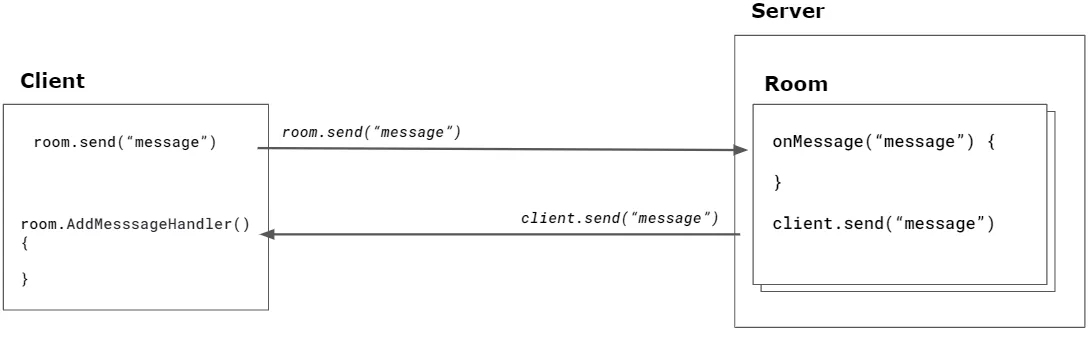
ZEPETO 멀티플레이는 클라이언트와 서버(룸) 간의 메시지를 송수신하는 인터페이스를 제공합니다. 서버는 개별 클라이언트에게 독점적으로 메시지를 전송하거나 모든 연결된 클라이언트에게 전송할 수 있습니다.
전송 메시지 유형은 원시, 스키마, 사용자 정의(객체) 유형을 지원합니다.
서버 API
서버 API는 다음 메서드를 제공합니다.
API | 설명 |
|---|---|
onMessage(Type, Callback) | ZEPETO 멀티플레이 서버는 클라이언트가 보낸 메시지를 처리하기 위해 유형별로 매핑된 콜백을 등록할 수 있습니다. 유형 매개변수는 문자열로 정의할 수 있습니다. |
client.send(Type, Message) | 특정 클라이언트에게 메시지를 보내는 기능입니다. |
broadcast(Type, Message) | 방에 연결된 모든 클라이언트에게 메시지를 보내는 기능입니다. 모든 연결된 클라이언트에게 보낼 수 있으며, 특정 클라이언트를 목록에서 제외할 수도 있습니다. |
ZEPETO.Multiplay 서버 API에 관심이 있으시면 문서를 참조하세요:
📘 다음 가이드를 참조하세요. [ZEPETO.Multiplay(Server) API]
메시지 받기
다음은 onMessage를 사용하는 예입니다.
onCreate() {
    this.onMessage("action", (client: SandboxPlayer, message: string) => {

        // 'action' 메시지가 전송될 때 트리거됩니다.
    });

    this.onMessage("*", (client: SandboxPlayer, type, message: string) => {

        // 'action'을 제외한 다른 모든 유형의 메시지가 전송될 때 트리거됩니다,
        // 'action'은 위에 정의된 특정 핸들러가 있습니다.
        console.log(`${client.sessionId}가 ${type} ${message}를 보냈습니다.`);
    });
}
메시지 보내기
다음은 client.send를 사용하는 예입니다.
onCreate() {
    this.onMessage("echo", (client: SandboxPlayer, message: string) => {

        // 발신자에게 메시지를 보냅니다.
        client.send("echo", `에코 메시지: ${message}`);
    });
}
다음은 broadcast를 사용하는 예입니다.
▼ 모든 클라이언트에게 메시지를 방송하는 예시
onCreate() {
    this.onMessage("action", (client: SandboxPlayer, message: string) => {

        // 모든 클라이언트에게 메시지를 방송합니다
        this.broadcast("action-taken", "행동이 수행되었습니다!");
    });
}
▼ 특정 클라이언트를 제외하고 메시지를 방송하는 예시
onCreate() {
    this.onMessage("fire", (client: SandboxPlayer, message: string) => {

        // 트리거한 클라이언트를 제외한 모든 클라이언트에게 "fire" 이벤트를 보냅니다.
        this.broadcast("fire", message, { except: client });
    });
}
클라이언트 API
클라이언트 API는 다음 메서드를 제공합니다.
room.AddMessageHandler(Type, Message) | 서버에서 수신된 메시지는 AddMessageHandler 콜백을 등록하여 수신할 수 있습니다. 메시지 콜백을 등록할 때 수신할 메시지 유형을 정의할 수 있습니다. |
|---|---|
room.Send(Type, message) | 서버로 메시지를 전달하는 데 사용되는 인터페이스입니다. 전달할 메시지 유형을 정의할 수 있습니다. |
메시지를 수신합니다. 다음은 room.AddMessageHandler를 사용하는 예시입니다.
this.multiplay.RoomJoined += (room: Room) => {

       // "fire" 유형의 서버 메시지 리스너 추가
       room.AddMessageHandler("fire", (message: string) => {

           // 서버 메시지 출력
           console.log(message);
       });
};
메시지 보내기 다음은 room.Send를 사용하는 예입니다.
room.Send("message", "hello");
다양한 유형의 Room 메시지 예제를 확인하세요.
서버
import { Sandbox, SandboxOptions, SandboxPlayer } from 'ZEPETO.Multiplay';

interface MessageModel {
    str: string,
    isTest: boolean
}

export default class extends Sandbox {

    onCreate(options: SandboxOptions) {
        this.onMessage("action", (client: SandboxPlayer, message: string) => {

            // 'action' 메시지가 전송될 때 트리거됩니다.
            // 모든 클라이언트에게 메시지를 방송합니다.
            this.broadcast("action-taken", "행동이 취해졌습니다!");
        });
        this.onMessage("*", (client: SandboxPlayer, type, message: string) => {

            // 다른 모든 유형의 메시지가 전송될 때 트리거됩니다,
            // 위에 정의된 "action"을 제외합니다.
            console.log(`${client.sessionId}가 ${type} ${message}를 보냈습니다.`);
        });
        this.onMessage("echo", (client: SandboxPlayer, message: number) => {

            // 발신자에게 메시지를 보냅니다.
            client.send("echo", `에코 메시지: ${message}`);
        });
        this.onMessage("fire", (client: SandboxPlayer, message: string) => {

            // "fire" 이벤트를 트리거한 클라이언트를 제외한 모든 클라이언트에게 보냅니다.
            this.broadcast("fire", message, { except: client });
        });
        this.onMessage("position", (client: SandboxPlayer, message) => {
            console.log(`[${client.sessionId}] 위치: (${message.x}, ${message.y}, ${message.z})`);
        });

        // 사용자 정의 객체 "MessageModel" 유형의 메시지가 전송될 때.
        this.onMessage<MessageModel>('channel_object', (client: SandboxPlayer, message: MessageModel) => {
            console.log(`[${client.sessionId}] 메시지 유형: ${typeof (message)}, 메시지: ${message.str}`);
        });
    }
}
클라이언트
import { Room, RoomData } from 'ZEPETO.Multiplay';
import { ZepetoScriptBehaviour } from 'ZEPETO.Script';
import { ZepetoWorldMultiplay } from 'ZEPETO.World';

interface MessageModel {
    str: string,
    isTest: boolean
}

export default class ClientLogic extends ZepetoScriptBehaviour {

    private multiplay: ZepetoWorldMultiplay;

    Start() {

        this.multiplay = this.gameObject.GetComponent<ZepetoWorldMultiplay>();
        this.multiplay.RoomJoined += (room: Room) => {

            // [room.Send]
            // 서버에 "action" 메시지 전송
            room.Send("action", "action message");

            // 서버에 "message" 메시지 전송
            room.Send("message", "안녕하세요");

            // 서버에 "echo" 메시지 전송
            room.Send("echo", 1234);

            // 서버에 RoomData "posData" 메시지 전송
            const posData = new RoomData();
            posData.Add("x", this.transform.position.x);
            posData.Add("y", this.transform.position.y);
            posData.Add("z", this.transform.position.z);
            room.Send("position", posData.GetObject());

            // 서버에 Custom object "MessageModel" 전송
            let message = {str:'test', isTest: true} as MessageModel;
            room.Send("channel_object", message);


            // [room.AddMessageHandler]
            // "echo"에 의해 서버 메시지 리스너 추가
            room.AddMessageHandler("echo", (message: string) => {

                // 서버 메시지 출력
                console.log(message);
            });

            // "action-taken"에 의해 서버 메시지 리스너 추가
            room.AddMessageHandler("action-taken", (message: string) => {
                // 서버 메시지 출력
                console.log(message);
            });

            // "fire"에 의해 서버 메시지 리스너 추가
            room.AddMessageHandler("fire", (message: string) => {
                // 서버 메시지 출력
                console.log(message);
            });
        };
    }
}