ข้อความในห้องเล่นหลายคน
ข้อความห้องหลายผู้เล่น
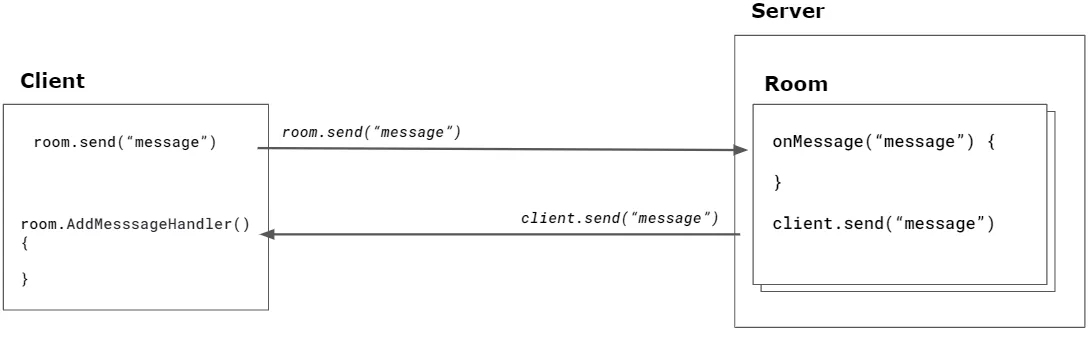
ZEPETO Multiplay ให้ส่วนติดต่อสำหรับการส่ง/รับข้อความระหว่างลูกค้าและเซิร์ฟเวอร์ (ห้อง). เซิร์ฟเวอร์สามารถส่งข้อความเฉพาะไปยังลูกค้าแต่ละรายหรือทั่วถึงลูกค้าทั้งหมดที่เชื่อมต่ออยู่.
ประเภทข้อความที่ส่งสนับสนุนประเภท Primitive, Schema, Custom(Object).
API เซิร์ฟเวอร์
API ของเซิร์ฟเวอร์มีวิธีการดังต่อไปนี้.
API | คำอธิบาย |
|---|---|
onMessage(Type, Callback) | เซิร์ฟเวอร์ ZEPETO Multiplay สามารถลงทะเบียน callback ที่แมพตามประเภทเพื่อจัดการข้อความที่ส่งโดยลูกค้า พารามิเตอร์ประเภทสามารถกำหนดเป็นสตริงได้. |
client.send(Type, Message) | ฟังก์ชันสำหรับส่งข้อความไปยังลูกค้าเฉพาะ. |
broadcast(Type, Message) | ฟังก์ชันสำหรับส่งข้อความไปยังลูกค้าทั้งหมดที่เชื่อมต่อกับห้อง. คุณสามารถส่งไปยังลูกค้าทั้งหมดที่เชื่อมต่อ หรือคุณสามารถยกเว้นลูกค้าเฉพาะจากรายการได้. |
หากคุณสนใจใน API ของ ZEPETO.Multiplay Server โปรดดูเอกสารประกอบ:
📘 โปรดดูคู่มือดังต่อไปนี้. [ZEPETO.Multiplay(Server) API]
รับข้อความ
ต่อไปนี้คือตัวอย่างการใช้ onMessage.
onCreate() {
    this.onMessage("action", (client: SandboxPlayer, message: string) => {

        // จะถูกเรียกเมื่อส่งข้อความ 'action'.
    });

    this.onMessage("*", (client: SandboxPlayer, type, message: string) => {

        // จะถูกเรียกเมื่อส่งข้อความประเภทอื่น,
        // ยกเว้น "action" ซึ่งมีตัวจัดการเฉพาะที่กำหนดไว้ข้างต้น.
        console.log(`${client.sessionId} ส่ง ${type} ${message}`);
    });
}
ส่งข้อความ
ต่อไปนี้คือตัวอย่างการใช้ client.send.
onCreate() {
    this.onMessage("echo", (client: SandboxPlayer, message: string) => {

        // ส่งข้อความไปยังผู้ส่ง
        client.send("echo", `echo message: ${message}`);
    });
}
ต่อไปนี้คือตัวอย่างการใช้ broadcast.
▼ ตัวอย่างการส่งข้อความไปยังลูกค้าทั้งหมด
onCreate() {
    this.onMessage("action", (client: SandboxPlayer, message: string) => {

        // ส่งข้อความไปยังลูกค้าทั้งหมด
        this.broadcast("action-taken", "มีการดำเนินการแล้ว!");
    });
}
▼ ตัวอย่างการส่งข้อความโดยไม่รวมลูกค้าบางราย
onCreate() {
    this.onMessage("fire", (client: SandboxPlayer, message: string) => {

        // ส่งเหตุการณ์ "fire" ไปยังลูกค้าทุกคน ยกเว้นคนที่กระตุ้นมัน
        this.broadcast("fire", message, { except: client });
    });
}
API ของลูกค้า
API ของลูกค้าให้วิธีการดังต่อไปนี้
room.AddMessageHandler(Type, Message) | ข้อความที่ได้รับจากเซิร์ฟเวอร์สามารถรับได้โดยการลงทะเบียน callback ของ AddMessageHandler คุณสามารถกำหนดประเภทข้อความที่คุณต้องการรับเมื่อทำการลงทะเบียน callback ข้อความ |
|---|---|
room.Send(Type, message) | อินเตอร์เฟซที่ใช้ในการส่งต่อข้อความไปยังเซิร์ฟเวอร์ คุณสามารถกำหนดประเภทข้อความที่จะส่งต่อได้ |
รับข้อความ ตัวอย่างต่อไปนี้คือการใช้ room.AddMessageHandler
this.multiplay.RoomJoined += (room: Room) => {

       // เพิ่มตัวฟังข้อความจากเซิร์ฟเวอร์ประเภท "fire"
       room.AddMessageHandler("fire", (message: string) => {

           // พิมพ์ข้อความจากเซิร์ฟเวอร์
           console.log(message);
       });
};
ส่งข้อความ ตัวอย่างต่อไปนี้คือการใช้ room.Send.
room.Send("message", "hello");
ดูตัวอย่างของประเภทต่างๆ ของข้อความในห้อง.
เซิร์ฟเวอร์
import { Sandbox, SandboxOptions, SandboxPlayer } from 'ZEPETO.Multiplay';

interface MessageModel {
    str: string,
    isTest: boolean
}

export default class extends Sandbox {

    onCreate(options: SandboxOptions) {
        this.onMessage("action", (client: SandboxPlayer, message: string) => {

            // Triggers when 'action' message is sent.
            // Broadcast a message to all clients
            this.broadcast("action-taken", "มีการดำเนินการแล้ว!");
        });
        this.onMessage("*", (client: SandboxPlayer, type, message: string) => {

            // Triggers when any other type of message is sent,
            // excluding "action", which has its own specific handler defined above.
            console.log(`${client.sessionId} ส่ง ${type} ${message}`);
        });
        this.onMessage("echo", (client: SandboxPlayer, message: number) => {

            // Send message to sender
            client.send("echo", `ข้อความ echo: ${message}`);
        });
        this.onMessage("fire", (client: SandboxPlayer, message: string) => {

            // Sends "fire" event to every client, except the one who triggered it.
            this.broadcast("fire", message, { except: client });
        });
        this.onMessage("position", (client: SandboxPlayer, message) => {
            console.log(`[${client.sessionId}] ตำแหน่ง: (${message.x}, ${message.y}, ${message.z})`);
        });

        // When Custom object "MessageModel" type of message is sent.
        this.onMessage<MessageModel>('channel_object', (client: SandboxPlayer, message: MessageModel) => {
            console.log(`[${client.sessionId}] ประเภทข้อความ: ${typeof (message)}, ข้อความ: ${message.str}`);
        });
    }
}
ไคลเอนต์
import { Room, RoomData } from 'ZEPETO.Multiplay';
import { ZepetoScriptBehaviour } from 'ZEPETO.Script';
import { ZepetoWorldMultiplay } from 'ZEPETO.World';

interface MessageModel {
    str: string,
    isTest: boolean
}

export default class ClientLogic extends ZepetoScriptBehaviour {

    private multiplay: ZepetoWorldMultiplay;

    Start() {

        this.multiplay = this.gameObject.GetComponent<ZepetoWorldMultiplay>();
        this.multiplay.RoomJoined += (room: Room) => {

            // [room.Send]
            // ส่งข้อความ "action" ไปยังเซิร์ฟเวอร์
            room.Send("action", "ข้อความการกระทำ");

            // ส่งข้อความ "message" ไปยังเซิร์ฟเวอร์
            room.Send("message", "สวัสดี");

            // ส่งข้อความ "echo" ไปยังเซิร์ฟเวอร์
            room.Send("echo", 1234);

            // ส่งข้อมูล RoomData "posData" ไปยังเซิร์ฟเวอร์
            const posData = new RoomData();
            posData.Add("x", this.transform.position.x);
            posData.Add("y", this.transform.position.y);
            posData.Add("z", this.transform.position.z);
            room.Send("position", posData.GetObject());

            // ส่งวัตถุ Custom "MessageModel" ไปยังเซิร์ฟเวอร์
            let message = {str:'ทดสอบ', isTest: true} as MessageModel;
            room.Send("channel_object", message);


            // [room.AddMessageHandler]
            // เพิ่มตัวฟังข้อความจากเซิร์ฟเวอร์ประเภท "echo"
            room.AddMessageHandler("echo", (message: string) => {

                // พิมพ์ข้อความจากเซิร์ฟเวอร์
                console.log(message);
            });

            // เพิ่มตัวฟังข้อความจากเซิร์ฟเวอร์ประเภท "action-taken"
            room.AddMessageHandler("action-taken", (message: string) => {
                // พิมพ์ข้อความจากเซิร์ฟเวอร์
                console.log(message);
            });

            // เพิ่มตัวฟังข้อความจากเซิร์ฟเวอร์ประเภท "fire"
            room.AddMessageHandler("fire", (message: string) => {
                // พิมพ์ข้อความจากเซิร์ฟเวอร์
                console.log(message);
            });
        };
    }
}