ตัวอย่างการใช้งาน Product API
18 นาที
ต่อไปนี้คือตัวอย่างการใช้ Product API เพื่อจัดการสกุลเงินโลกและผลิตภัณฑ์โลก
ตัวอย่างนี้ช่วยให้คุณเข้าใจพื้นฐานของ Product API และดำเนินการส่งและรับข้อความระหว่างเซิร์ฟเวอร์และไคลเอนต์ เพื่อให้คุณสามารถทดสอบการให้และหักสกุลเงินโลกและผลิตภัณฑ์ได้อย่างง่ายดาย
ตัวอย่างนี้รวมคำอธิบายของสคริปต์ไคลเอนต์สกุลเงินโลกและผลิตภัณฑ์โลก พร้อมด้วยสคริปต์เซิร์ฟเวอร์ที่รวมซึ่งจัดการการประมวลผลด้านเซิร์ฟเวอร์ทั้งหมด และรวมฟังก์ชันต่อไปนี้:
- การให้สกุลเงินโลก
- การหักสกุลเงินโลก
- การให้ผลิตภัณฑ์โลกโดยไม่หักสกุลเงิน
- การหักผลิตภัณฑ์โลก
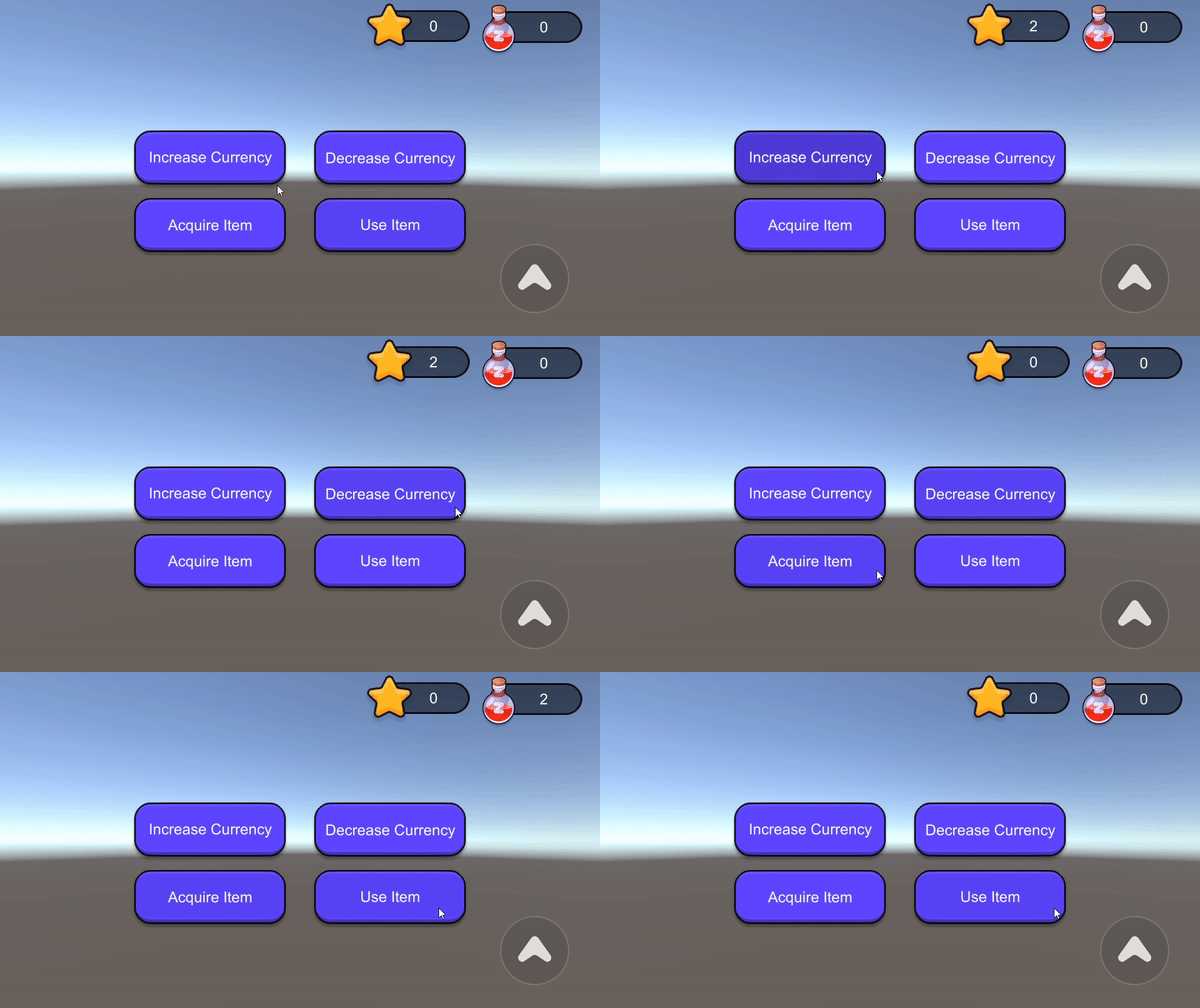
การให้และหักสกุลเงินโลก
ด้านล่างนี้คือรหัสลูกค้าแบบเต็มสำหรับการจัดการการมอบและหักเงินสกุลเงินโลก และวิธีการดำเนินการ
สคริปต์ลูกค้าสกุลเงิน
import { Button, Text } from 'UnityEngine.UI';
import { ZepetoScriptBehaviour } from 'ZEPETO.Script'
import { LocalPlayer, ZepetoPlayers } from 'ZEPETO.Character.Controller';
import { Room, RoomData } from 'ZEPETO.Multiplay';
import { ZepetoWorldMultiplay } from 'ZEPETO.World';

export default class CurrencyManagerSample extends ZepetoScriptBehaviour {

    public currencyId: string;
    public increaseQuantity: number;
    public decreaseQuantity: number;
    public increaseCurrencyBtn: Button;
    public decreaseCurrencyBtn: Button;
    public balanceText: Text;
    public multiplay: ZepetoWorldMultiplay;

    private _localPlayer: LocalPlayer;

    Start() {

        ZepetoPlayers.instance.OnAddedLocalPlayer.AddListener(() => {
            this._localPlayer = ZepetoPlayers.instance.LocalPlayer;
            this.loadCurrencyBalance(this.currencyId);
        });

        // Handles room joined events for currency UI updates
        this.multiplay.RoomJoined += (room: Room) => {
            room.AddMessageHandler("SyncCurrencyInfo", (message: CurrencyMessage) => {
                const currentCurrencyId = message.currencyId;
                const currentQuantity = message.quantity;
                this.balanceUIUpdate(currentCurrencyId, currentQuantity);
            });
        };

        // Button event listener for increasing currency : Request Credit
        this.increaseCurrencyBtn.onClick.AddListener(() => {
            const data = new RoomData();
            data.Add("currencyId", this.currencyId);
            data.Add("quantity", this.increaseQuantity);
            this.multiplay.Room?.Send("CreditCurrency", data.GetObject());
        })

        // Button event listener for decreasing currency : Request Debit
        this.decreaseCurrencyBtn.onClick.AddListener(() => {
            const data = new RoomData();
            data.Add("currencyId", this.currencyId);
            data.Add("quantity", this.decreaseQuantity);
            this.multiplay.Room?.Send("DebitCurrency", data.GetObject());
        })

    }

    // Requests the current amount of specified currency
    private loadCurrencyBalance(currentCurrencyId: string) {
        this.multiplay.Room?.Send("LoadBalance", currentCurrencyId);
    }

    // Updates the UI to reflect the current quantity of the currency
    private balanceUIUpdate(currentCurrencyId: string, currentQuantity: number) {
        this.balanceText.text = currentQuantity.toString();
    }

}

// Interface for currency sync messages
interface CurrencyMessage {
    currencyId: string,
    quantity: number,
}
คำอธิบายสคริปต์ลูกค้าสกุลเงิน
- เมื่อมีการโหลดตัวละคร ข้อความห้องจะถูกส่งไปยังเซิร์ฟเวอร์เพื่อโหลดยอดเงินสกุลเงินที่มีอยู่ จากนั้น UI จะถูกอัปเดตตามข้อมูลยอดเงินที่ได้รับจากเซิร์ฟเวอร์
this.multiplay.Room?.Send("LoadBalance", currentCurrencyId);- เพื่ออำนวยความสะดวกในการแลกเปลี่ยนข้อความ, CurrencyMessage อินเตอร์เฟซถูกกำหนดขึ้น.
interface CurrencyMessage {
    currencyId: string,
    quantity: number,
}- เมื่อผู้ใช้เพิ่มหรือลดสกุลเงินของตน, พวกเขาจะส่งคำขอไปยังเซิร์ฟเวอร์ในฐานะข้อความห้อง. มันรวมข้อมูลเกี่ยวกับว่าสกุลเงินใดที่จะเพิ่มหรือลดและโดยเท่าไหร่.
this.multiplay.Room?.Send("CreditCurrency", data.GetObject());
this.multiplay.Room?.Send("DebitCurrency", data.GetObject());- เซิร์ฟเวอร์จะประมวลผลการเพิ่มหรือลดสกุลเงินและส่งข้อมูลยอดเงินสุดท้ายไปยังลูกค้า ลูกค้าจะได้รับข้อมูลนี้และอัปเดต UI.
this.multiplay.RoomJoined += (room: Room) => {
    room.AddMessageHandler("SyncCurrencyInfo", (message: CurrencyMessage) => {
        const currentCurrencyId = message.currencyId;
        const currentQuantity = message.quantity;
        this.updateBalanceUI(currentCurrencyId, currentQuantity);
    });
};
การมอบและหักผลิตภัณฑ์ในโลก
ด้านล่างนี้คือรหัสลูกค้าแบบเต็มสำหรับการจัดการการมอบและหักผลิตภัณฑ์ทั่วโลก และวิธีการดำเนินการ
สคริปต์ลูกค้าผลิตภัณฑ์
import { Button, Text } from 'UnityEngine.UI';
import { ZepetoScriptBehaviour } from 'ZEPETO.Script'
import { LocalPlayer, ZepetoPlayers } from 'ZEPETO.Character.Controller';
import { Room, RoomData } from 'ZEPETO.Multiplay';
import { ZepetoWorldMultiplay } from 'ZEPETO.World';
import { InventoryRecord, InventoryService } from 'ZEPETO.Inventory';
import { WaitUntil } from 'UnityEngine';

export default class ProductManagerSample extends ZepetoScriptBehaviour {

    public productId: string;
    public productAddQuantity: number;
    public acquireItemBtn: Button;
    public useItemBtn: Button;
    public itemCountText: Text;
    public multiplay: ZepetoWorldMultiplay;

    private _localPlayer: LocalPlayer;

    Start() {

        ZepetoPlayers.instance.OnAddedLocalPlayer.AddListener(() => {
            this._localPlayer = ZepetoPlayers.instance.LocalPlayer;
            this.StartCoroutine(this.refreshProductUI());
        });

        // จัดการเหตุการณ์เข้าห้องสำหรับการอัปเดต UI ผลิตภัณฑ์
        this.multiplay.RoomJoined += (room: Room) => {
            room.AddMessageHandler("SyncProductInfo", (message: ProductMessage) => {
                this.StartCoroutine(this.refreshProductUI());
            });
        };

        // ตัวฟังเหตุการณ์ปุ่มสำหรับการรับสินค้า: เพิ่มผลิตภัณฑ์
        this.acquireItemBtn.onClick.AddListener(() => {
            const data = new RoomData();
            data.Add("productId", this.productId);
            data.Add("quantity", this.productAddQuantity);
            this.multiplay.Room?.Send("AddProduct", data.GetObject());
        })

        // ตัวฟังเหตุการณ์ปุ่มสำหรับการใช้สินค้า: ใช้ผลิตภัณฑ์
        this.useItemBtn.onClick.AddListener(() => {
            const data = new RoomData();
            data.Add("productId", this.productId);
            data.Add("quantity", 1);
            this.multiplay.Room?.Send("UseProduct", data.GetObject());
        })

    }

    private * refreshProductUI() {
        const request = InventoryService.GetAsync(this.productId);
        yield new WaitUntil(() => request.keepWaiting == false);
        // หากคำขอสำเร็จ จะอัปเดต UI ผลิตภัณฑ์
        if (request.responseData.isSuccess) {
            this.updateItemCountText(request.responseData.product);
        }
        else {
            console.log("ไม่สามารถโหลดผลิตภัณฑ์ได้.");
        }
    }

    private updateItemCountText(item: InventoryRecord) {
        if (item != null) {
            this.itemCountText.text = item.quantity.toString();
        }
        else {
            this.itemCountText.text = "0";
        }
    }

}

// อินเตอร์เฟซสำหรับข้อความผลิตภัณฑ์.
interface ProductMessage {
    productId: string,
    productAction: ProductAction,
}

// Enum สำหรับการกำหนดประเภทการกระทำผลิตภัณฑ์.
export enum ProductAction {
    ใช้,
    เพิ่ม,
}
คำอธิบายสคริปต์ลูกค้าผลิตภัณฑ์
- เมื่อมีการโหลดตัวละคร ให้ใช้ InventoryService จาก ZEPETO.Inventory เพื่อโหลดสินค้าคงคลังเริ่มต้นของผลิตภัณฑ์ จากนั้นอัปเดต UI.
private * refreshProductUI() {
        const request = InventoryService.GetAsync(this.productId);
        yield new WaitUntil(() => request.keepWaiting == false);
        if (request.responseData.isSuccess) {
            this.updateItemCountText(request.responseData.product);
        }
        else {
            console.log("ไม่สามารถโหลดผลิตภัณฑ์ได้.");
        }
}- ในการส่งและรับข้อความ ให้กำหนด ProductMessage อินเตอร์เฟซ กำหนด ProductAction Enum สำหรับการใช้งานตัวอย่าง.
interface ProductMessage {
    productId: string,
    productAction: ProductAction,
}

export enum ProductAction {
    ใช้,
    เพิ่ม,
}- เมื่อคุณเพิ่มหรือลดผลิตภัณฑ์ คุณจะส่งข้อมูลนั้นไปยังเซิร์ฟเวอร์ในฐานะข้อความห้อง มันรวมข้อมูลเกี่ยวกับผลิตภัณฑ์ที่ต้องการเพิ่มหรือลดและจำนวนที่ต้องการเพิ่มหรือลดด้วย.
this.multiplay.Room?.Send("AddProduct", data.GetObject());
this.multiplay.Room?.Send("UseProduct", data.GetObject());- หลังจากประมวลผลการเปลี่ยนแปลงผลิตภัณฑ์ เซิร์ฟเวอร์จะส่งข้อมูลสินค้าคงคลังสุดท้ายไปยังไคลเอนต์ ซึ่งจะอัปเดต UI ตามนั้น
this.multiplay.RoomJoined += (room: Room) => {
    room.AddMessageHandler("SyncProductInfo", (message: ProductMessage) => {
        this.StartCoroutine(this.refreshProductUI());
    });
};- โดยทั่วไป ผลิตภัณฑ์ในโลกควรมีค่าใช้จ่ายในการซื้อ
- ในกรณีนี้ คุณสามารถขายได้ง่ายๆ ด้วย ปุ่มซื้อผลิตภัณฑ์ โดยอ้างอิงจากคู่มือ สร้างรายได้จากโลกของคุณ! การตั้งค่าสินค้าและสกุลเงิน
สคริปต์เซิร์ฟเวอร์
ด้านล่างนี้คือรหัสเซิร์ฟเวอร์ทั้งหมดที่จัดการสกุลเงินโลกและผลิตภัณฑ์ และวิธีการนำไปใช้
สคริปต์เซิร์ฟเวอร์ทั้งหมด
import { Sandbox, SandboxOptions, SandboxPlayer } from "ZEPETO.Multiplay";
import { loadCurrency } from "ZEPETO.Multiplay.Currency";
import { loadInventory } from "ZEPETO.Multiplay.Inventory";

export default class extends Sandbox {

    async onCreate(options: SandboxOptions) {

        // สกุลเงิน
        //ขอโหลดสกุลเงิน
        this.onMessage("LoadBalance", (client, message: string) => {
            this.loadBalance(client, message);
        });
        //ขอเพิ่มเครดิต
        this.onMessage("CreditCurrency", (client, message: CurrencyMessage ) => {
            const currencyId = message.currencyId;
            const quantity = message.quantity;
            this.addCredit(client, currencyId, quantity);
        });
        //ขอหักเครดิต
        this.onMessage("DebitCurrency", (client, message: CurrencyMessage ) => {
            const currencyId = message.currencyId;
            const quantity = message.quantity;
            this.onDebit(client, currencyId, quantity);
        });

        // ผลิตภัณฑ์
        //ขอเพิ่มรายการ
        this.onMessage("AddProduct", (client, message: any) => {
            const productId = message.productId;
            const quantity = message.quantity;
            this.addProduct(client, productId, quantity);
        });
        //ขอใช้รายการ
        this.onMessage("UseProduct", (client, message: any) => {
            const productId = message.productId;
            const quantity = message.quantity;
            this.useProduct(client, productId, quantity);
        });

    }

    async addCredit(client: SandboxPlayer, currencyId: string, quantity: number) {
        try {
            const currency = await loadCurrency(client.userId);
            await currency.credit(currencyId, quantity);
            this.loadBalance(client, currencyId);
        } catch (e) {
            console.error(`AddCredit Error: ${e}`);
        }
    }

    async onDebit(client: SandboxPlayer, currencyId: string, quantity: number) {
        try {
            const currency = await loadCurrency(client.userId);
            if (await currency.debit(currencyId, quantity) === true) {
                this.loadBalance(client, currencyId);
            } else {
                console.error("DebitCredit Error: สกุลเงินไม่เพียงพอ");
            }
        } catch (e) {
            console.error(`DebitCredit Error: ${e}`);
        }
    }

    async loadBalance(client: SandboxPlayer, currencyId: string) {
        try {
            const currency = await loadCurrency(client.userId);
            let balancesObject = await currency.getBalances();
            let balancesMap: Map<string, number> = new Map(Object.entries(balancesObject));
            const specificCurrencyID = currencyId;
            const specificBalance = balancesMap.get(specificCurrencyID) ?? 0;
            const currencySync: CurrencyMessage = {
                currencyId: specificCurrencyID,
                quantity: specificBalance
            }
            client.send("SyncCurrencyInfo", currencySync);
        } catch (e) {
            console.error(`loadBalance Error: ${e}`);
        }
    }

    async addProduct(client: SandboxPlayer, productId: string, quantity: number) {
        try {
            const inventory = await loadInventory(client.userId);
            await inventory.add(productId, quantity);
            const productMessage: ProductMessage = {
                productId: productId,
                productAction: ProductAction.Add
            }
            client.send("SyncProductInfo", productMessage);
        } catch (e) {
            console.error(`addProduct Error: ${e}`);
        }
    }

    async useProduct(client: SandboxPlayer, productId: string, quantity: number) {
        try {
            const inventory = await loadInventory(client.userId);
            await inventory.use(productId, quantity);
            const productMessage: ProductMessage = {
                productId: productId,
                productAction: ProductAction.Use
            }
            client.send("SyncProductInfo", productMessage);
        } catch (e) {
            console.error(`useProduct Error: ${e}`);
        }
    }

    onJoin(client: SandboxPlayer) {
        // ลอจิกเมื่อเข้าร่วมที่นี่
    }

    onTick(deltaTime: number): void {
        // ลอจิกการนับที่นี่
    }

    onLeave(client: SandboxPlayer, consented?: boolean) {
        // จัดการลอจิกการออกที่นี่
    }

}

// อินเตอร์เฟซสำหรับข้อความสกุลเงิน
interface CurrencyMessage {
    currencyId: string,
    quantity: number,
}

// อินเตอร์เฟซสำหรับข้อความผลิตภัณฑ์.
interface ProductMessage {
    productId: string,
    productAction: ProductAction,
}

// อีนัมสำหรับการกำหนดประเภทการกระทำผลิตภัณฑ์.
export enum ProductAction {
    Use,
    Add,
}
คำอธิบายสคริปต์เซิร์ฟเวอร์
- ใช้ currency.credit() และ currency.debit() เพื่อเพิ่มหรือลดยอดคงเหลือของสกุลเงินที่ต้องการ หลังจากนั้นให้เรียก currency.getBalances() เพื่อดูยอดคงเหลือปัจจุบันสำหรับแต่ละสกุลเงิน.
currency.credit(currencyId, quantity);
currency.debit(currencyId, quantity);
currency.getBalances();- ใช้ inventory.add() และ inventory.use() เพื่อเพิ่มหรือลดยอดคงเหลือของสกุลเงินที่ต้องการ.
inventory.add(productId, quantity);
inventory.use(productId, quantity);- จัดการคำขอจากลูกค้าเพื่อเพิ่มหรือลดสกุลเงินและผลิตภัณฑ์.
- ใช้ loadBalance() เพื่อดึงข้อมูลสกุลเงินที่ลงทะเบียนใน ZEPETO Studio.
- หากมีสกุลเงินหลายสกุล คุณสามารถกำหนดเงื่อนไขตามค่า ID สกุลเงินเฉพาะเพื่อดึงยอดคงเหลือของสกุลเงินนั้นเท่านั้น.
- ส่งค่าบัญชีสุดท้ายไปยังลูกค้าเป็นข้อความในห้อง.