캐릭터의 키 측정하기
3 분
이 가이드에서는 로컬 플레이어의 ZEPETO 캐릭터의 신장을 몸 유형에 따라 측정하는 방법을 보여줍니다.
1단계 : 캐릭터의 신장 값을 가져오는 스크립트 작성하기
씬에 GameObject를 추가하고 아래의 CharacterHeight 예제 스크립트를 추가하세요.
import { Debug, HumanBodyBones, Vector3, WaitForEndOfFrame } from 'UnityEngine';
import { LocalPlayer, ZepetoPlayers, ZepetoPlayer, KnowSockets } from 'ZEPETO.Character.Controller';
import { ZepetoScriptBehaviour } from 'ZEPETO.Script';

export default class CharacterHeight extends ZepetoScriptBehaviour {

    Start() {
        ZepetoPlayers.instance.OnAddedLocalPlayer.AddListener(() => {
            let _player: LocalPlayer = ZepetoPlayers.instance.LocalPlayer;
            this.StartCoroutine(this.CoGetZepetoHeight(_player.zepetoPlayer));
        });
    }

    *CoGetZepetoHeight(zepeto: ZepetoPlayer) {
        // Use WaitForEndOfFrame to accurately obtain the joint positions of the character.
        yield new WaitForEndOfFrame();

        // Get the position of the head.
        const headPosition = zepeto.character.GetSocket(KnowSockets.HEAD_UPPER).position;

        // Get the position of the left foot.
        const leftFootPosition = zepeto.character.ZepetoAnimator.GetBoneTransform(HumanBodyBones.LeftFoot).position;

        // Get the position of the right foot.
        const rightFootPosition = zepeto.character.ZepetoAnimator.GetBoneTransform(HumanBodyBones.RightFoot).position;

        // Calculate the midpoint between the two feet.
        const characterCenter = Vector3.Lerp(leftFootPosition, rightFootPosition, 0.5);

        // Calculate the distance between the head and the character center.
        const characterHeight = Vector3.Distance(headPosition, characterCenter);
        console.log(`Character Height From Ground: ${characterHeight}`);
    }
}
스크립트 설명
- *CoGetZepetoHeight(zepeto: ZepetoPlayer)
- 사용 GetSocket 캐릭터의 머리 소켓 위치 값을 얻기 위해.
- 캐릭터의 하단 중앙 위치 값을 얻으려면 GetBoneTransform 캐릭터의 두 발 위치 값을 얻기 위해 사용하세요.
- 사용 Vector3.Lerp 캐릭터의 하단 중앙 위치 값을 얻기 위해.
- 캐릭터의 머리 소켓과 중앙 하단 위치 값을 사용하여 캐릭터의 높이 값을 얻으세요.
단계 2 : 실행
재생 버튼을 클릭하여 실행하면 콘솔 로그에서 캐릭터의 높이 값을 볼 수 있습니다.
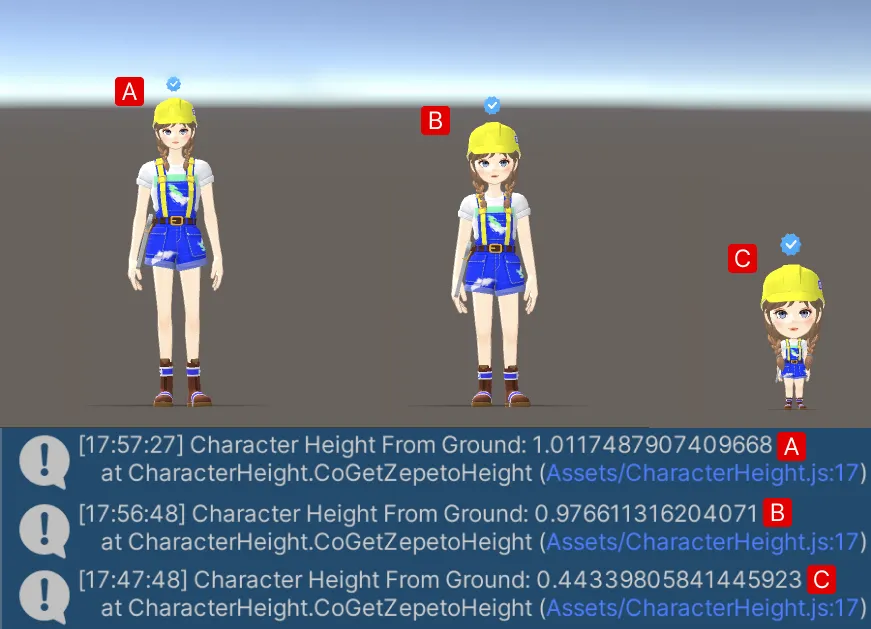
👍 팁
- 예제에서 높이를 측정하는 방법은 HeadSocket의 높이 값을 사용하여 캐릭터의 높이를 측정하는 것입니다.
- 캐릭터의 머리, 모자 및 액세서리를 모델링하여 상단 위치를 측정하려면 다음 링크를 참조하십시오 :