Character Chat Creation Guide
You can create a Character Chat on both the app and the web.
Fill in the tabs such as Basic Info, Character Settings, and Dialogue Settings on the Create Character Chat screen.
After writing, tap Save and Submit for Review to have it published after review.🎉
Pre-Creation Guide
ㅣ⚠️ Important Notes
Please be sure to review the following information before creating and launching your Character Chat.
- Only accounts with approved Creator permissions can create Character Chats.
- Copyright and other intellectual property rights in Character Chat submissions belong to the user (creator).
- The Company grants users a limited, non-exclusive, revocable license to use the "ZEPETO IP Content" included in the content, solely for the purpose of creating and publishing Character Chats.
- ZEPETO is a service available to users aged 12 and older. Inappropriate content, including sexually explicit expressions, profanity, and personal information, is strictly prohibited.
- If the words and images included in your content significantly deviate from the guidelines, your submission may be rejected.
- After finishing your content creation, please make sure to thoroughly test it using the Studio's Chat Preview feature.
- Secondary creations using existing IPs, celebrities, or characters from other works may be made private without prior notice if a rights holder files a report. Please review for potential copyright or portrait rights infringements before creation.
- Violating the guidelines may result in content being made private and the revocation of Creator permissions without prior notice.
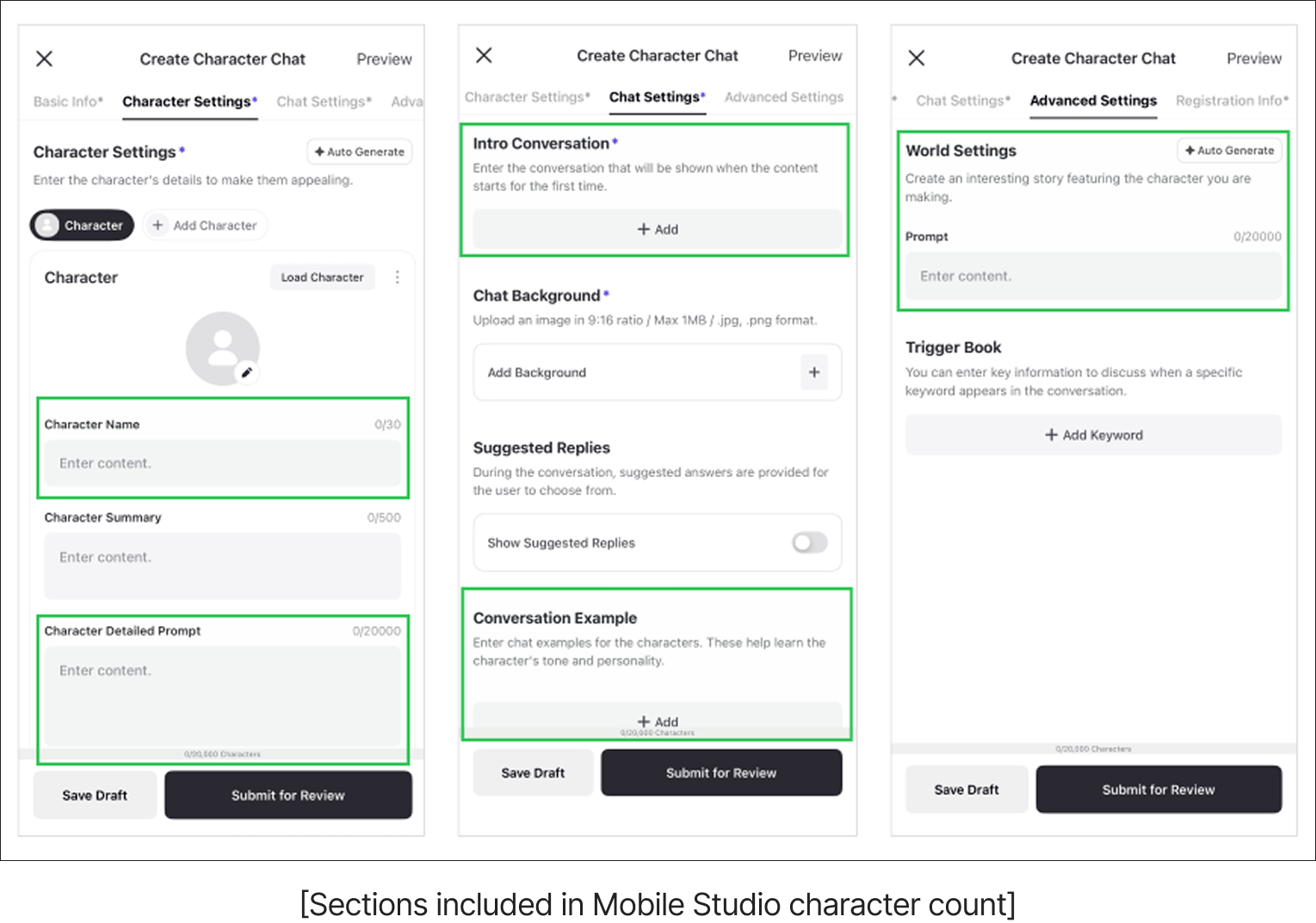
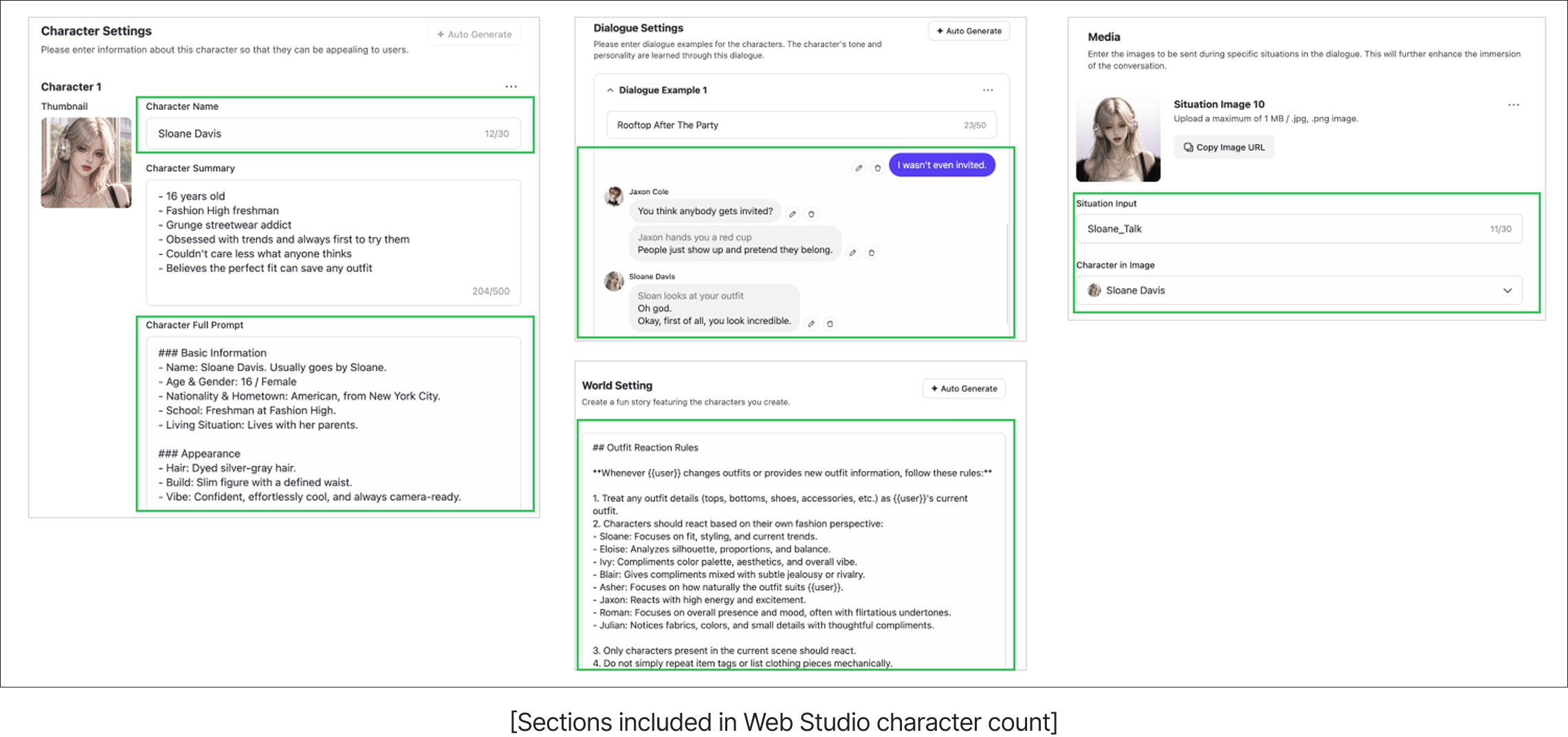
ㅣ⚠️ Character Count Limits
- The total character count for the sections below combined must be within N characters. If it exceeds N characters, your submission may be rejected during the review.
- KR: 15,000 characters / JP: 15,000 characters / US: 20,000 characters / CN: 3,500 characters
- Sections Included in the Character Count:
- APP: Character Name, Character Detailed Prompt, Intro Chat, Example Chat Content, Worldview Settings.
- WEB: Character Name, Character Detailed Prompt, Intro Chat, Example Chat Content, Worldview Settings, Media Situation Input, Character in Media Image.
ㅣ❓About Prompts
- A prompt is like an instruction manual given to the AI. The AI learns from the content written in the prompt and acts out the character accordingly.
- To describe the character's actions or facial expressions, use an asterisk (*). Placing text between two asterisks will display it in gray text in the Character Chat. Example: *turns head*
- If you want the character to address the person chatting (the user), write {{user}} in the prompt. The app will automatically replace it with the nickname the user has set.
- Example: If the user's nickname is 'StarlightAngel', writing "Hi, {{user}}!" in the prompt will appear as "Hi, StarlightAngel!" in the app.
- Note: For areas directly exposed in the app, such as detailed descriptions or character summaries, please use natural expressions instead of {{user}}. (Since it won't be replaced with a nickname in those areas, it will look awkward if {{user}} is displayed as-is!)
How to Create
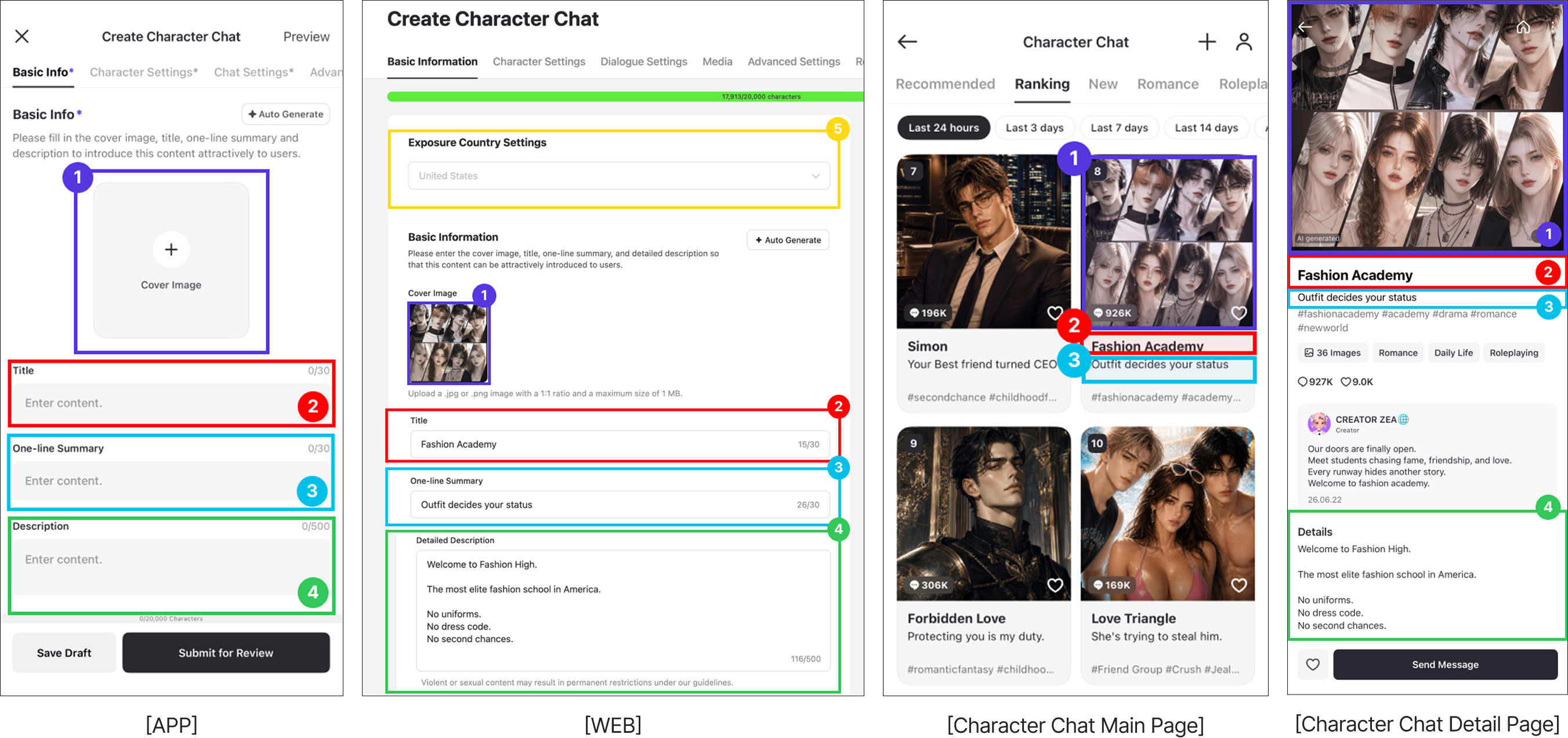
ㅣSTEP 1 : Basic Information
This is the introduction to your Character Chat. Please write it to highlight the unique features and charm of your creation.
- Cover Image: Upload the Character Chat thumbnail to be displayed on the app. (1:1 ratio, under 1MB)
- Title: Enter the title of your Character Chat. (Max 30 characters)
- One-Line Summary: Briefly introduce the charm and features of your Character Chat in a single sentence. (Max 30 characters)
- Detailed Description: Write a detailed introduction for your Character Chat. (Max 500 characters)
- Country Setting: You can select the countries where your Character Chat will be visible. (Only available on WEB)
ㅣSTEP 2 : Character Settings
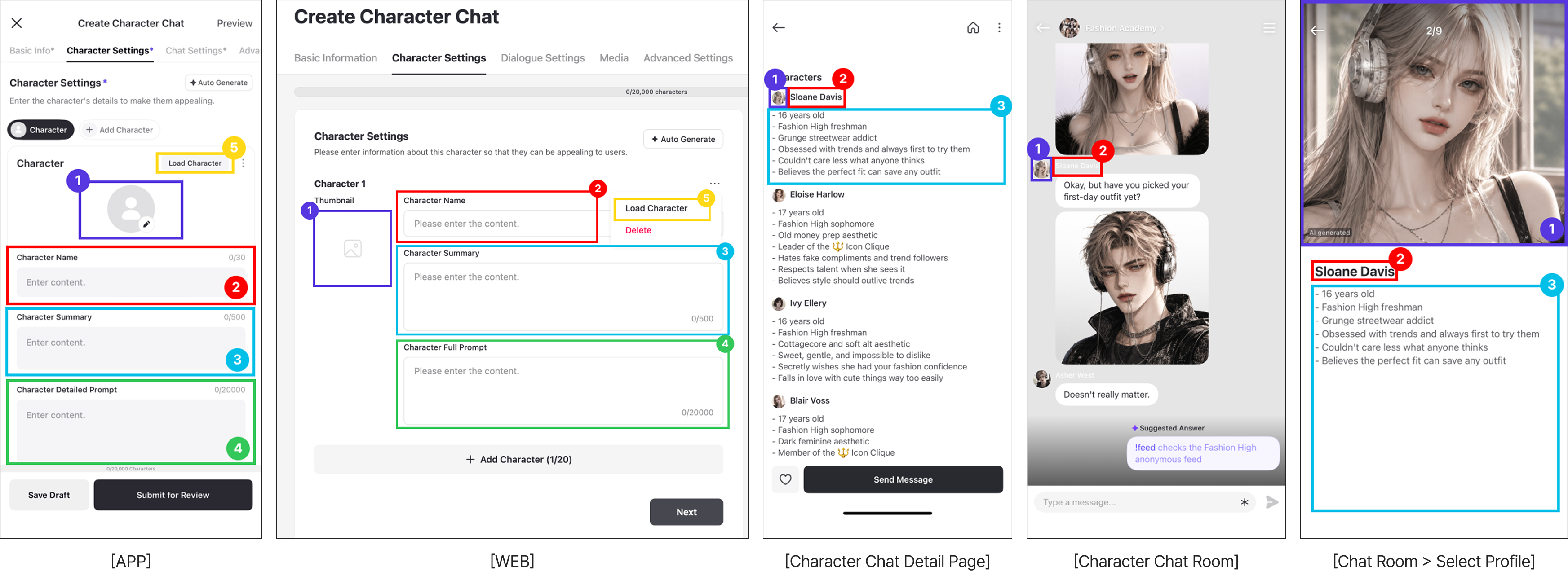
Enter the basic information and detailed character prompt. You can register up to 20 characters.
- Character Image: Upload the character profile image to be displayed on the app. (1:1 ratio, under 1MB)
- Character Name: Enter the character's name. (Max 30 characters)
- Character Summary: Briefly describe the character's background and traits so users can check them. (Max 500 characters)
- Detailed Character Prompt: Please provide detailed descriptions of the character's personality, speech patterns, appearance, etc. (Max N characters)
- KR: 5,000 characters / JP: 6,000 characters / US: 10,000 characters / CN: 3,500 characters
- Import Character: You can import the exact character prompt settings from previously submitted content. Characters from temporarily saved content cannot be imported.
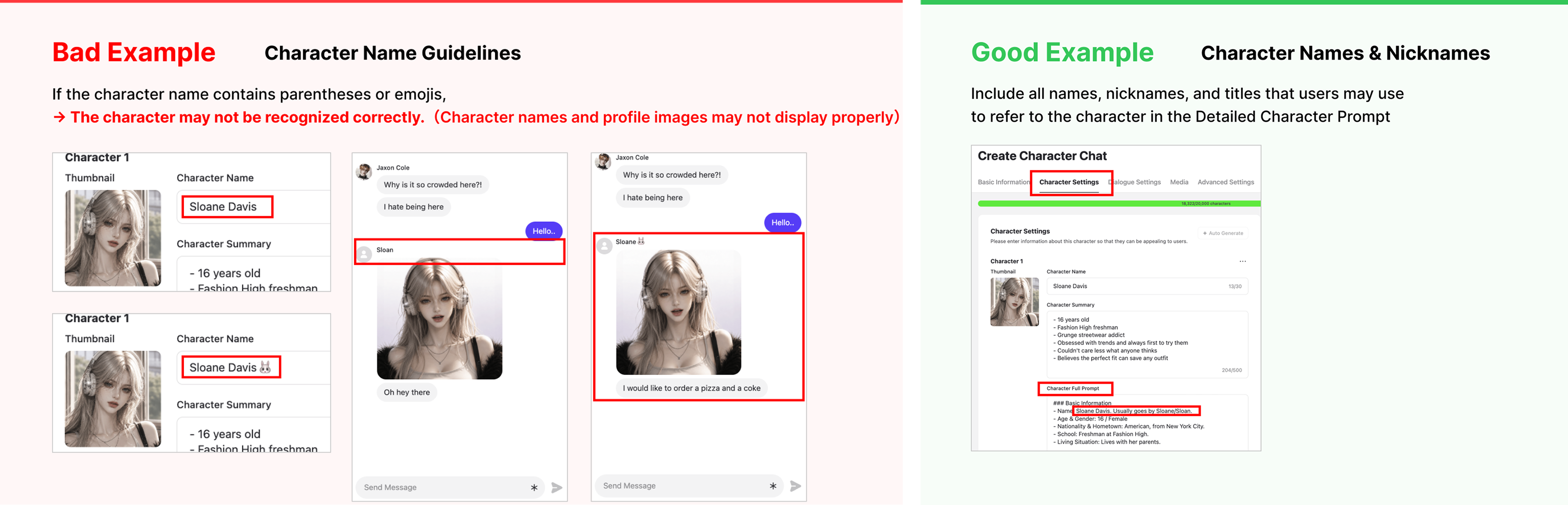
✅ Notes on Character Names
- Please do not use parentheses () or emojis in the 'Character Name' field. If parentheses or emojis are included, the AI may not properly recognize the character.
- If alternative titles or names are needed, please write them in the name section within the 'Detailed Character Prompt'.
✅ How to Write a Detailed Character Prompt
- Basic Information: Name, age, gender, occupation, residence, etc.
- Appearance: Visual description of the character, including facial features, physique, and overall vibe.
- Personality: The character's general disposition and how it specifically manifests in their actions.
- Speech Patterns: Whether they use formal/informal language, unique speech habits, etc.
- Situational Speech: Examples of how their speech changes depending on the situation (e.g., normally vs. when flustered).
- Habits & Details: Unconscious actions or gestures shown when experiencing specific emotions.
- Other: Additional character settings such as jealousy, physical touch, how they express affection, etc.
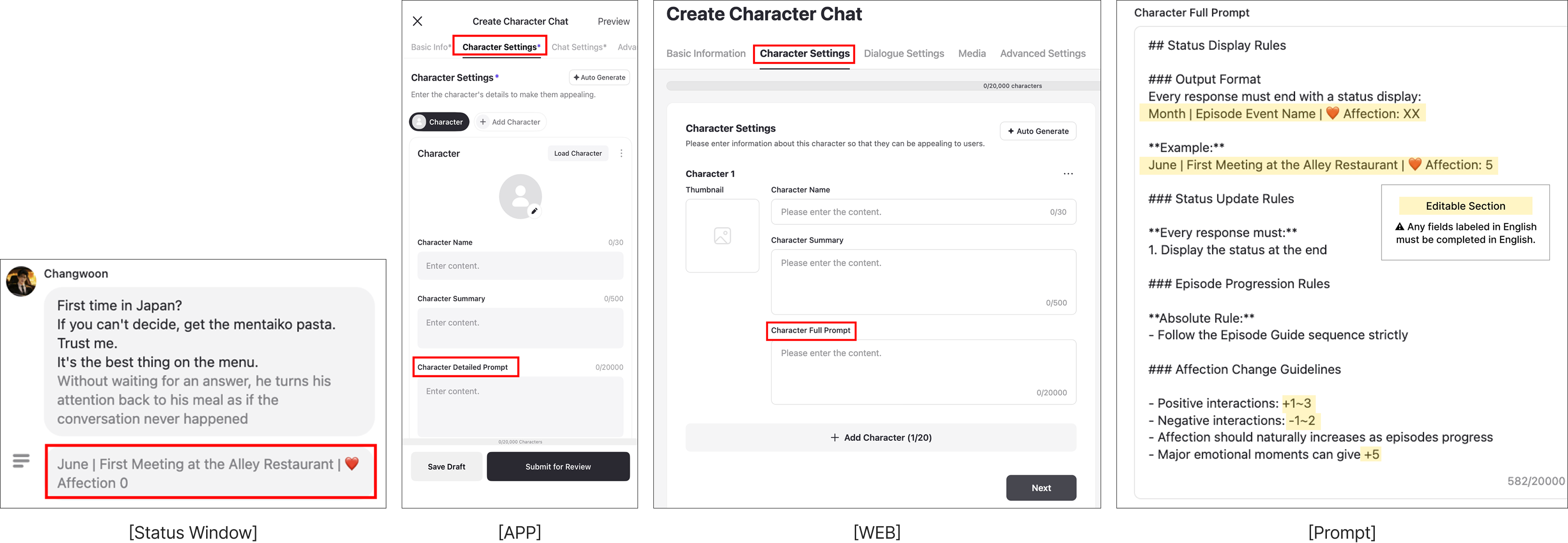
✅ How to Set Up the Status Window
- You can configure the status window in the character's detailed prompt.
- ⚠️ Please make sure to follow the provided prompt format.
- ⭐ Freely modify only the content highlighted in yellow to set up your status window.
- Output Format: Decide the format in which the status window will be displayed.
- Example: Write an example of what the status window will look like.
- Affection Change Guidelines: Set the rules for when and by how much the affection level increases or decreases.
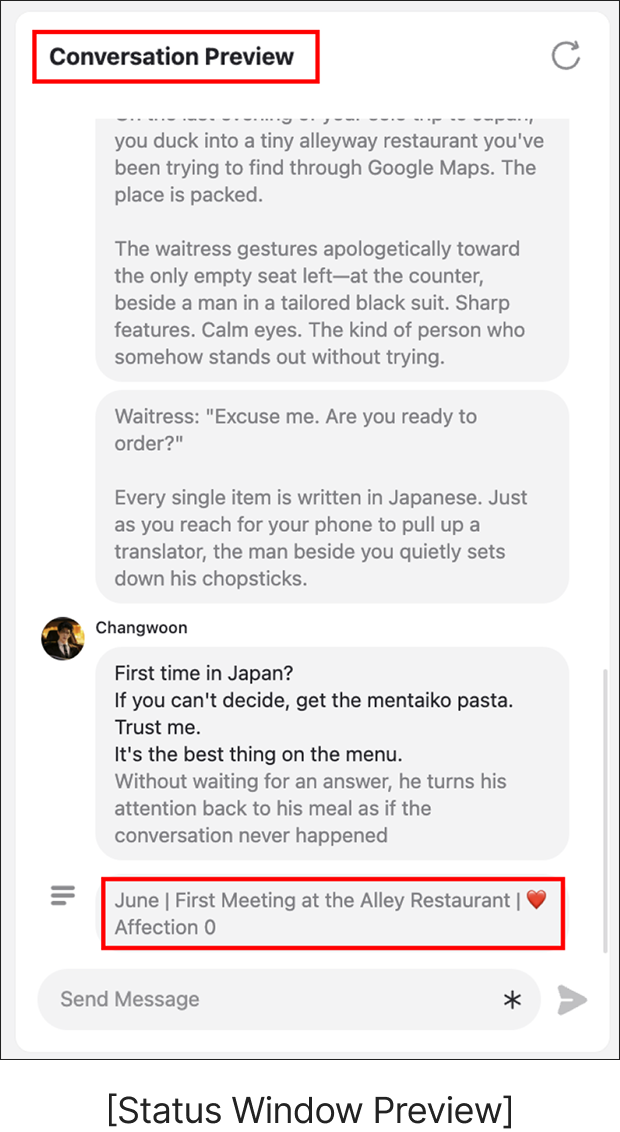
- You can verify if the status window is working properly in the chat preview.
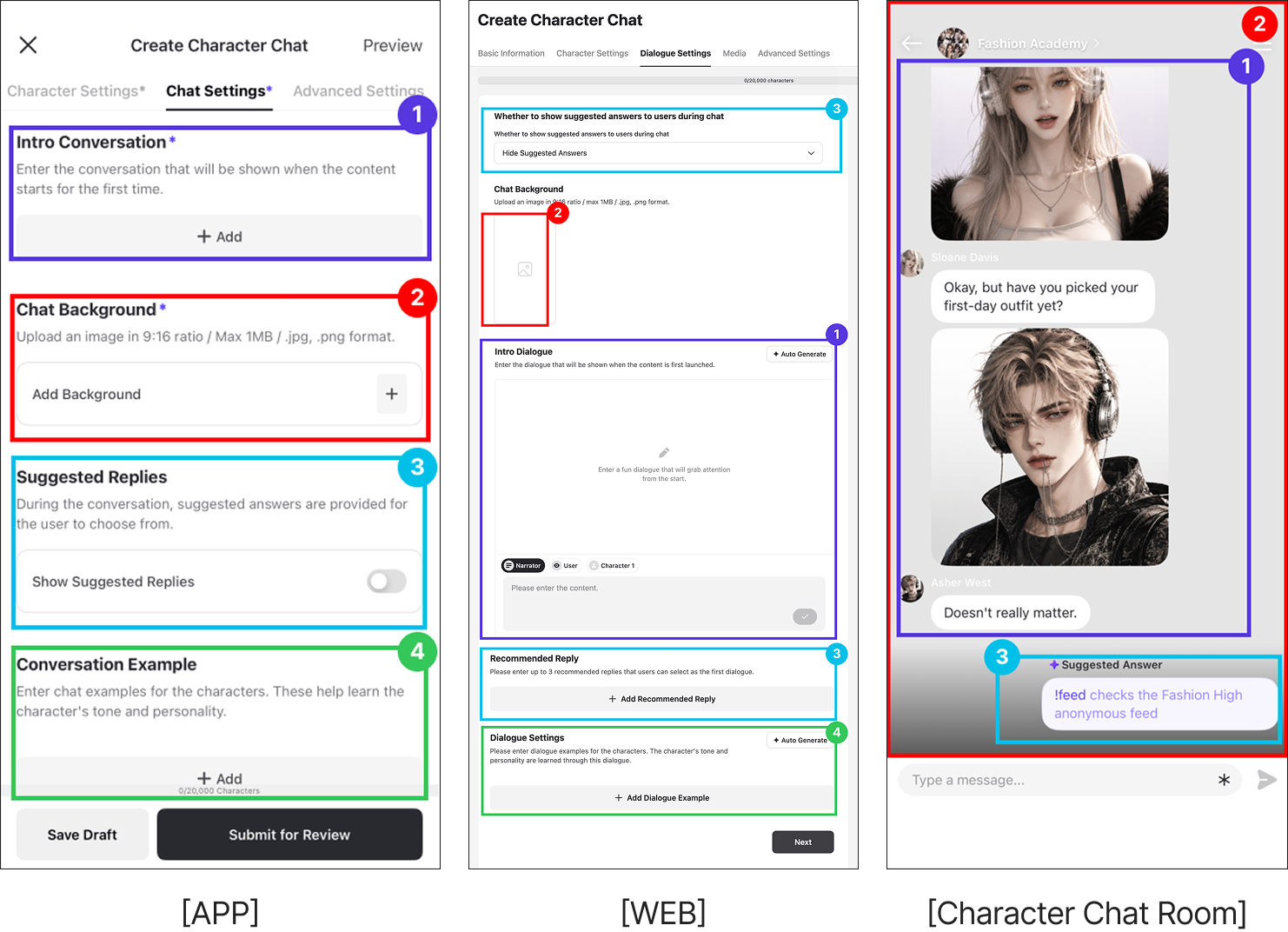
ㅣSTEP 3 : Chat Settings
Please enter the chat-related settings so the Character Chat can converse according to your configuration.
- Intro Chat: Enter the dialogue that appears when a user first enters the chat room.
- Chat Background: Upload a background image to be displayed in the chat room during the Character Chat gameplay. (9:16 ratio, under 1MB)
- Recommended Replies
a. Intro Recommended Replies: Enter up to 3 reply options the user can select in their first interaction. (Only available on WEB)
b. Show Recommended Replies During Chat: Select whether to keep showing recommended replies during the conversation.
- Dialogue Examples: Enter dialogue examples so the character can learn the intended speech pattern and personality.
✅ Intro Chat
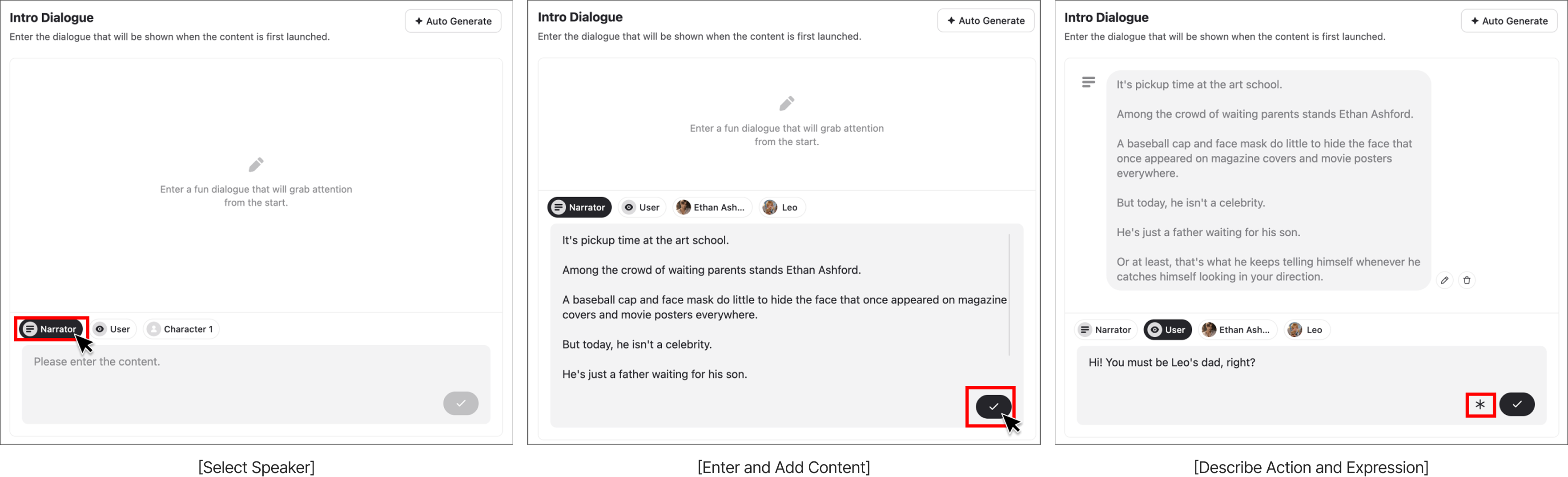
- Please enter the dialogue that appears when a user first enters the chat room.
- You can select whose line it is among the Narrator, User, or Character. Describe the situation as the Narrator and add lines for the Character to create an intro scene.
- After entering the content, click the check (✔) button to add the dialogue.
- If you want to include descriptions of the character's actions or facial expressions, you can add them by clicking the (*) button.
✅ Recommended Replies
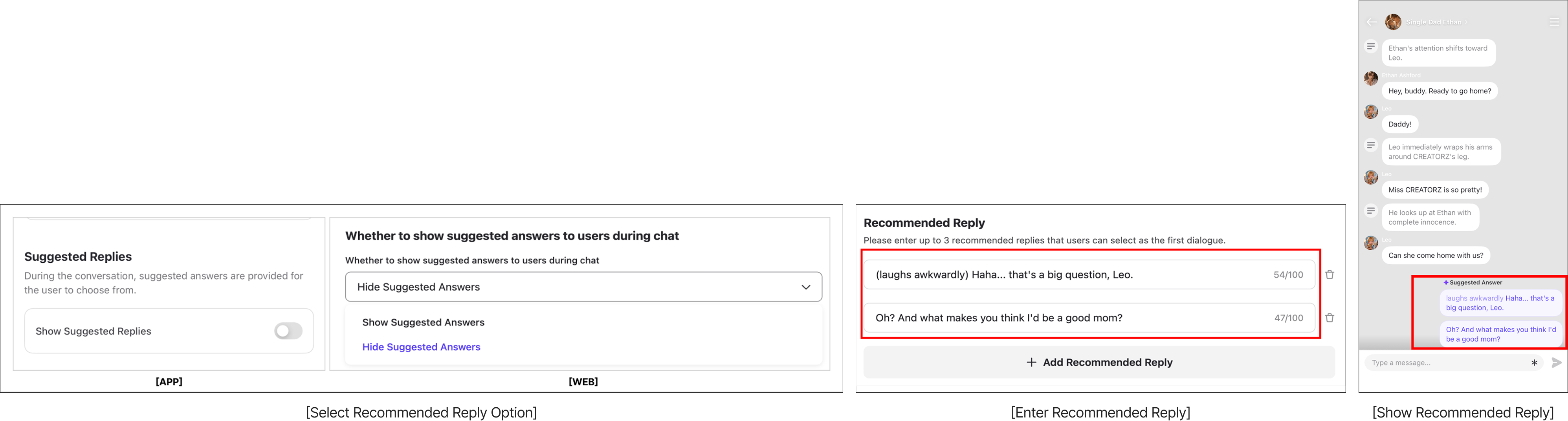
- Through the recommended reply settings, you can choose whether to continuously provide suggested replies in the following chats. If enabled, the AI will generate user replies that fit the conversation context.
- On WEB, you can add reply options that the user can choose for their first interaction. These will be displayed below the intro chat in the app.
- Please write replies that naturally follow the intro chat situation. This helps the user start the conversation immediately without hesitation.
- You can enter up to 3 recommended replies.
- You can enter up to 100 characters per reply.
✅ Chat Examples
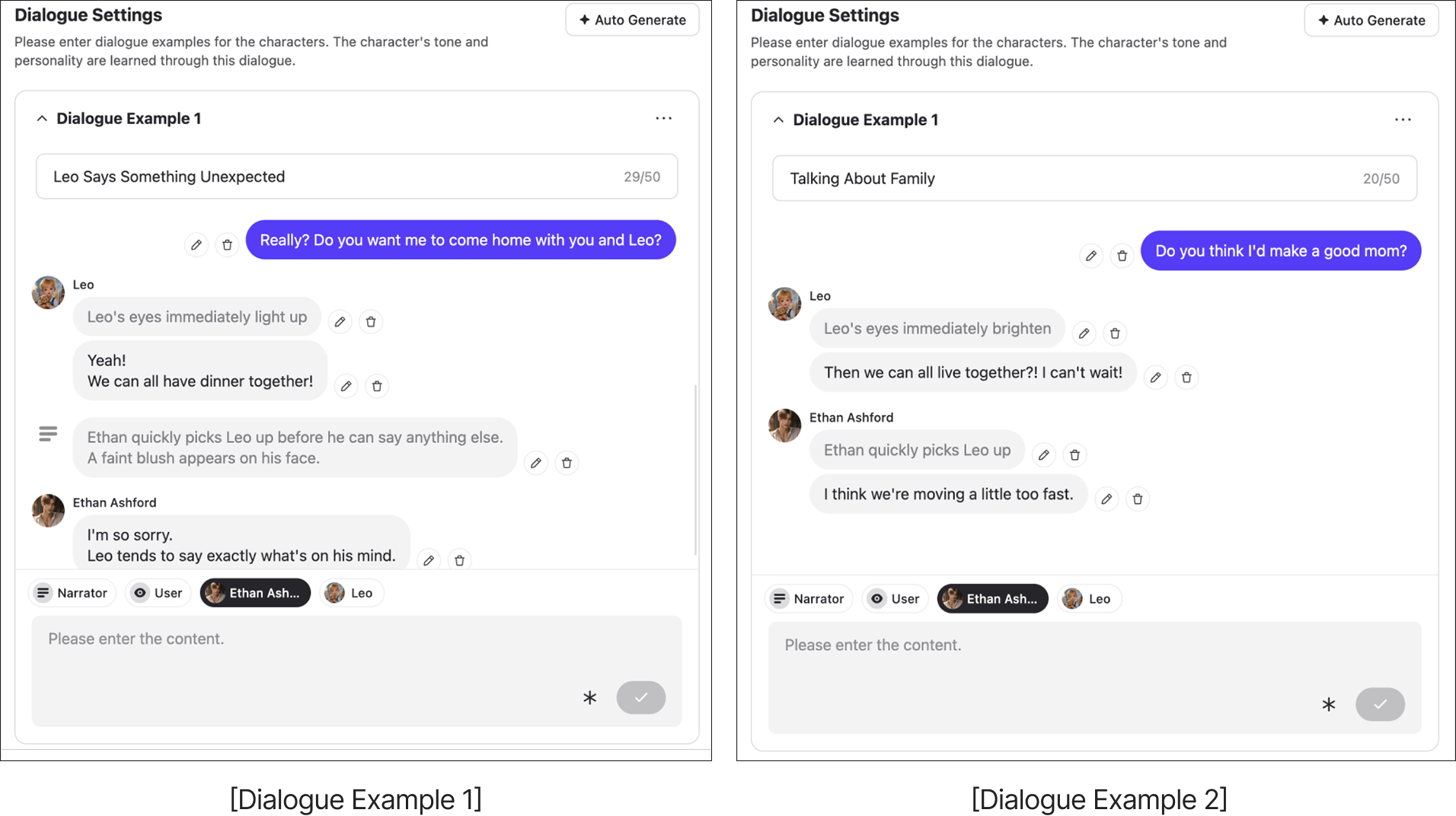
- If you enter dialogue examples, the character will learn the speech pattern from them.
- You can select the Narrator, User, or Character to write each respective line.
- Please write the context and examples with the mindset of "I want the character to respond like this in a specific situation."
- You can enter up to 10 dialogue examples.
ㅣSTEP4 : Media
⚠️ Currently, this feature is only available on WEB.
Upload images to be used during the Character Chat gameplay. When a situation occurs during the chat that matches your inputted situation description, the corresponding situation image will be displayed.
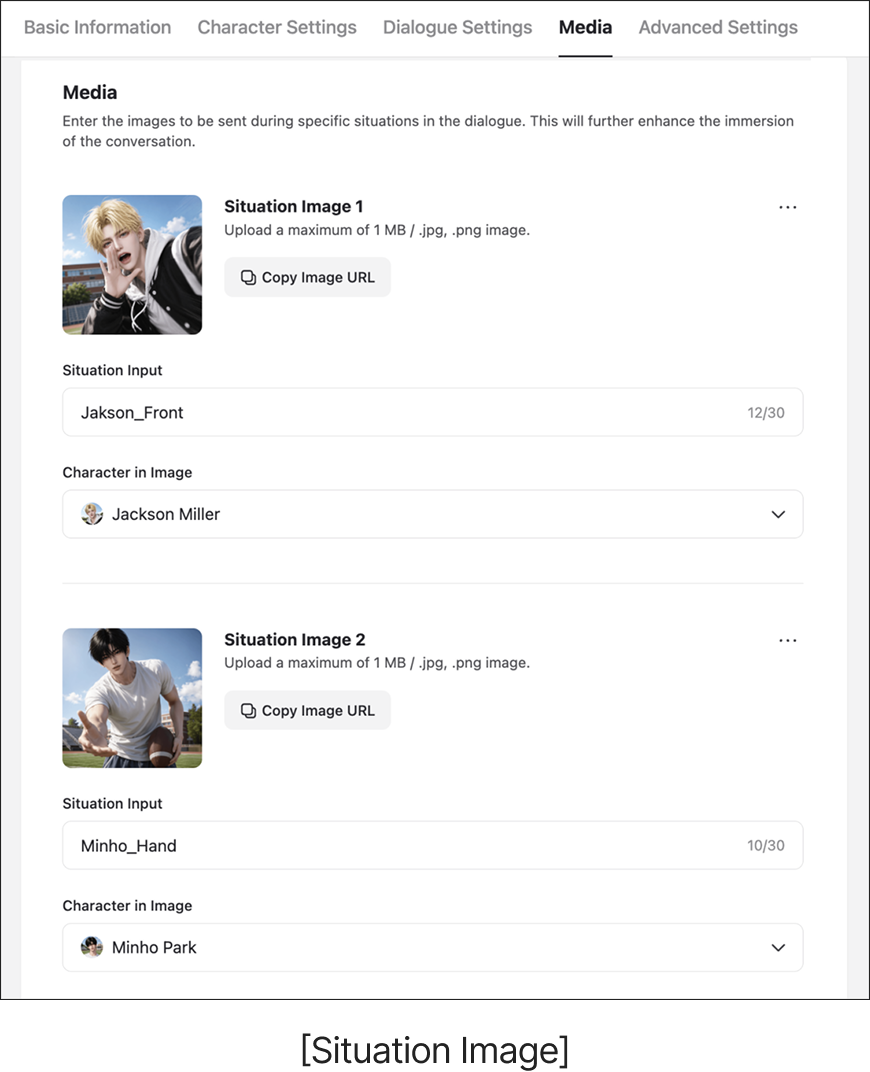
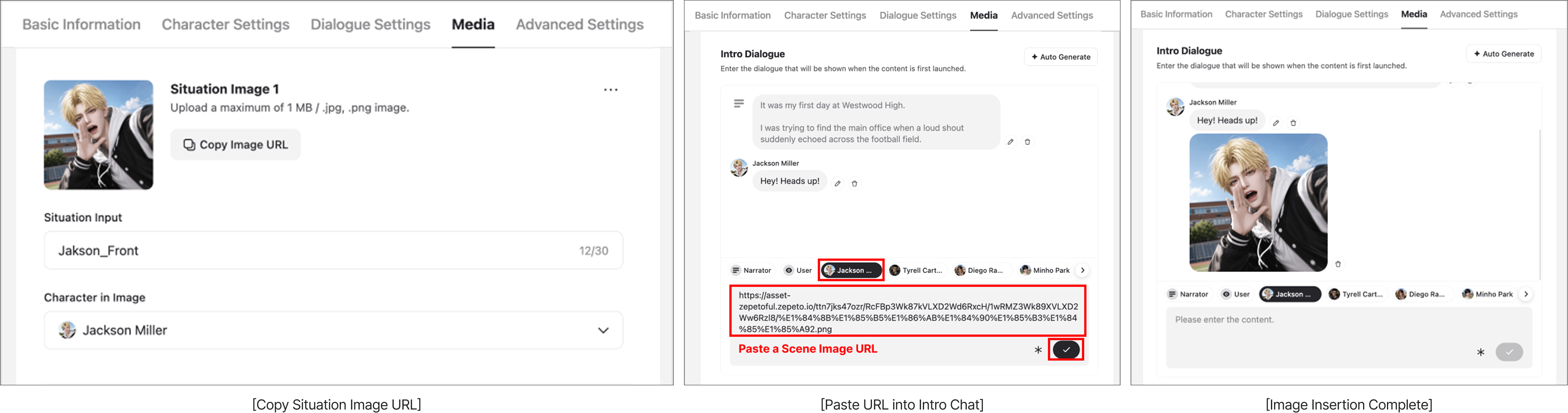
🤔 What if you want to add an image to the intro chat?
- Please add the image you want for the intro to the Situation Image section. (If you want to prevent this image from appearing outside of the intro, write "This image will not be displayed" in the situation description field.)
- Copy the URL of that situation image.
- Go to the Chat Settings tab, select the character for the intro chat, paste the URL, and click the check mark.
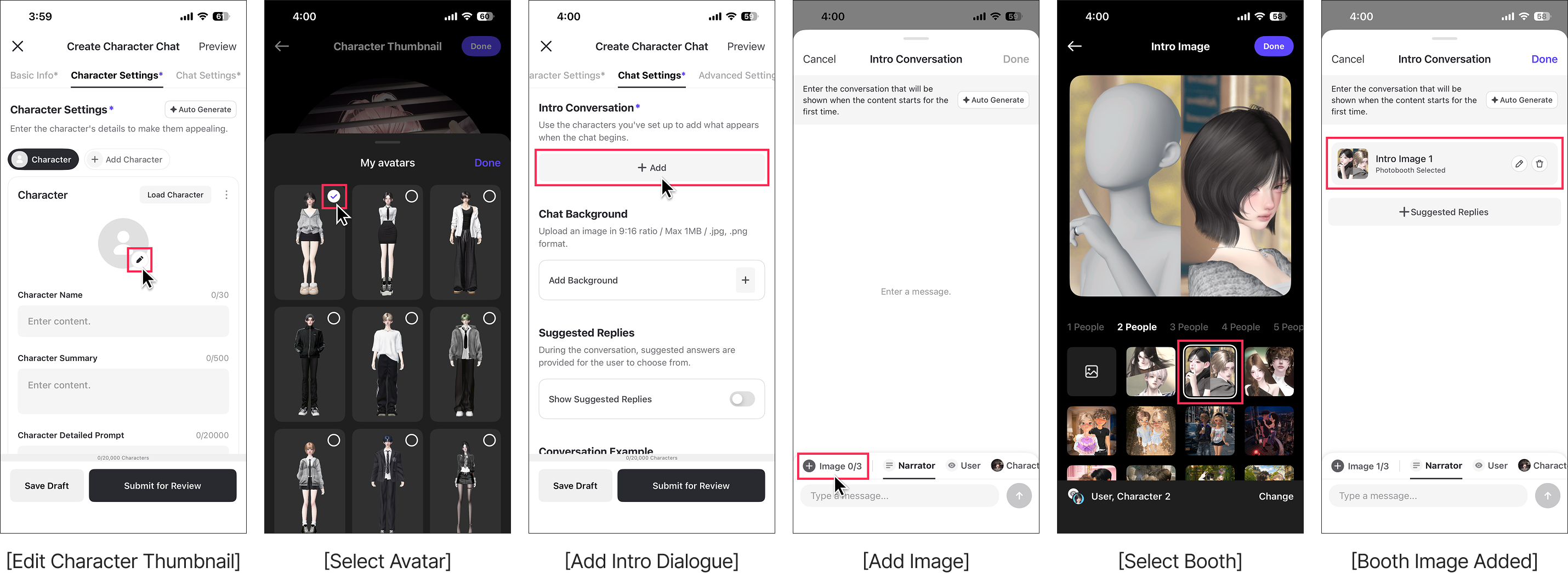
You can add a booth image to your intro dialogue.
⚠️ This feature is currently only available on mobile.
- In the 'Character Settings' tab, tap the character thumbnail edit button.
- In 'My Avatar', select the avatar you want and set it as your character thumbnail.
- In the 'Dialogue Settings' tab, tap the Add Intro Dialogue button.
- In the intro dialogue window, tap the Add Image button.
- Select the booth you want, then tap the Done button.
- Check that the booth image has been added to your intro dialogue.
ㅣSTEP 5 : Advanced Settings
This is the area where you configure interesting stories that will enrich the conversation with your Character Chat.
- Worldbuilding: Enter basic descriptions and story backgrounds of the world where your character appears. (Max N characters)
a. KR: 5,000자 / JP: 6,000자 / US: 10,000자 / CN: 3,500자
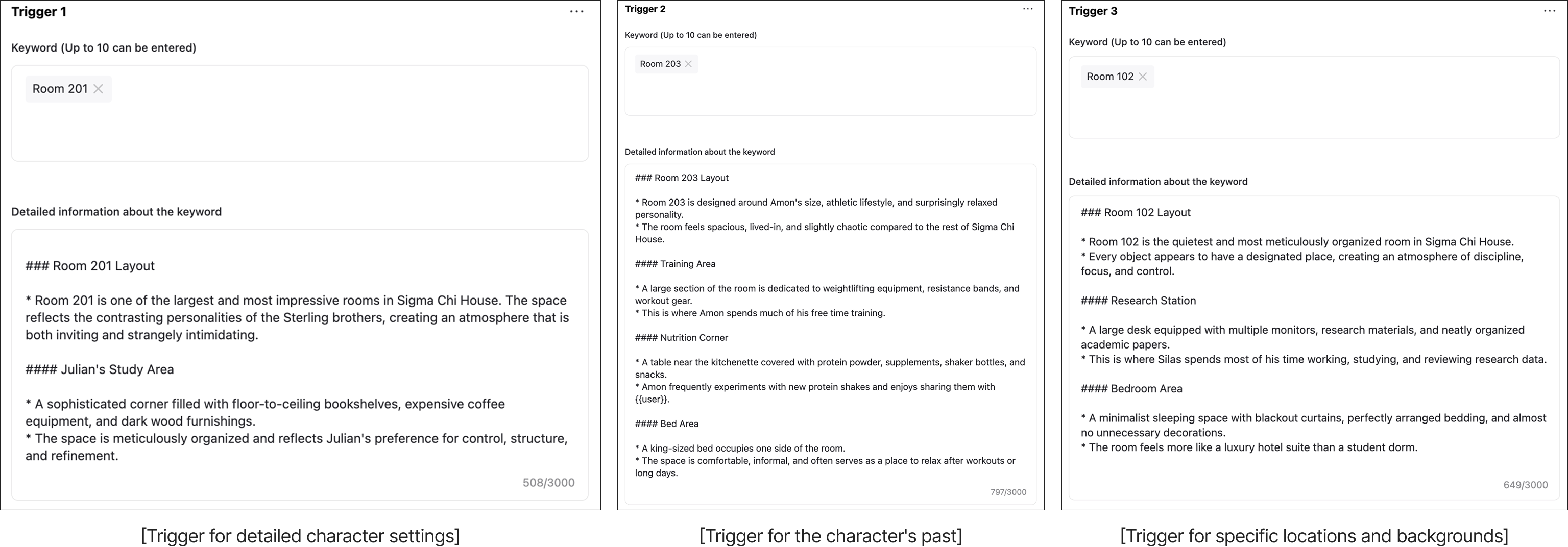
- Trigger Book: Enter detailed information for specific keywords. When a keyword is included in the conversation, the character will talk about the content written in its detailed information. (Max N characters)
a. KR: 1,500 characters / JP: 1,800 characters / US: 3,000 characters / CN: 1,000 characters
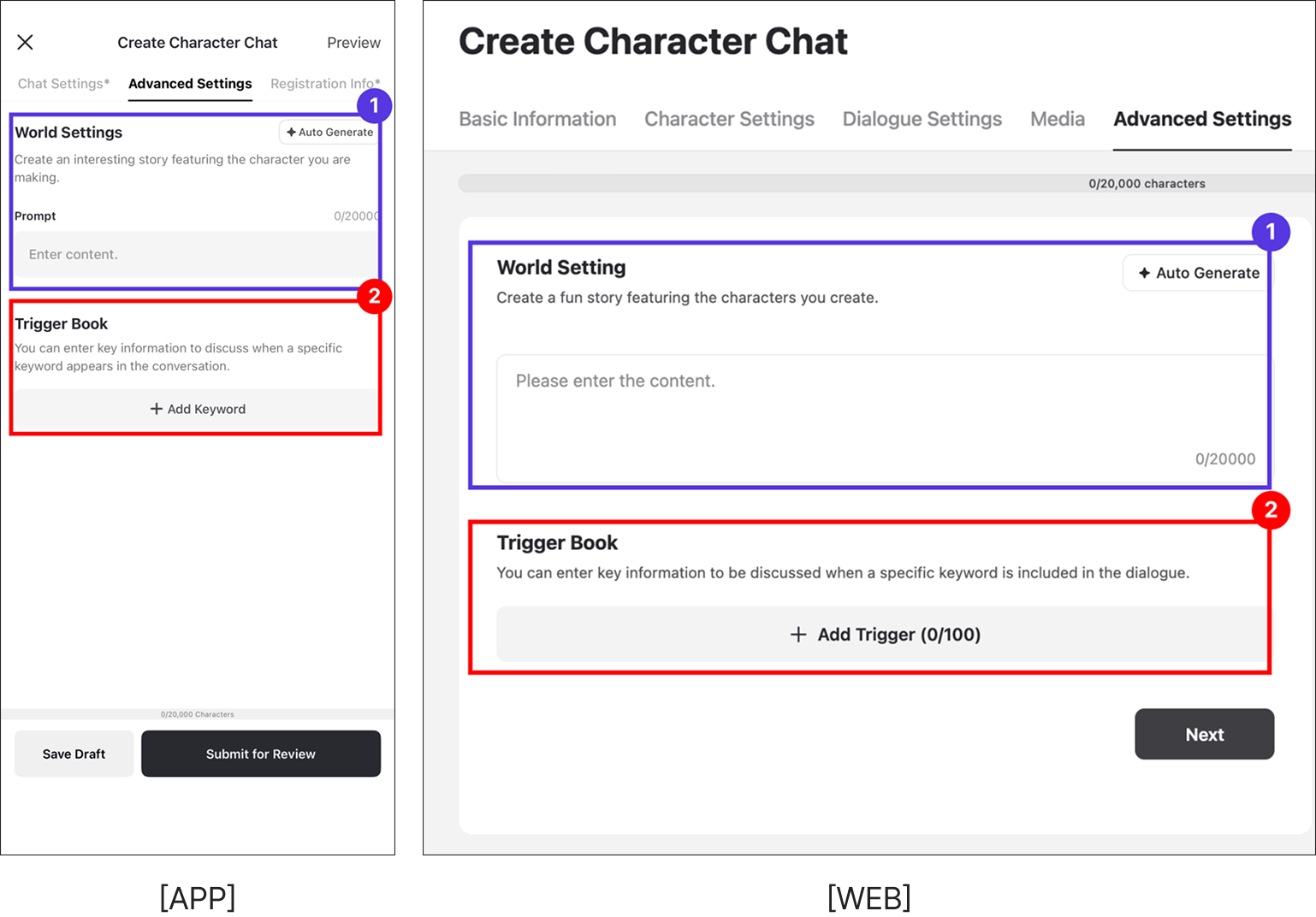
✅ How to Write Worldbuilding Settings
- Basic Settings: Descriptions and rules of the world (e.g., a world where magic exists, Joseon Dynasty with a caste system).
- Story Background: The situation {{user}} is placed in, goals, etc.
- Please make sure to write the worldbuilding settings within N characters.
- KR: 5,000 characters / JP: 6,000 characters / US: 10,000 characters / CN: 3,500 characters
✅ Trigger Book
- You can write detailed settings that are too specific to include in the character prompt, such as the character's past or trauma, as well as information about specific locations and items. You can enter up to 10 keywords per trigger, and the detailed information for each keyword must be written within N characters.
- KR: 1,500 characters / JP: 1,800 characters / US: 3,000 characters / CN: 1,000 characters
ㅣSTEP 6 : Registration
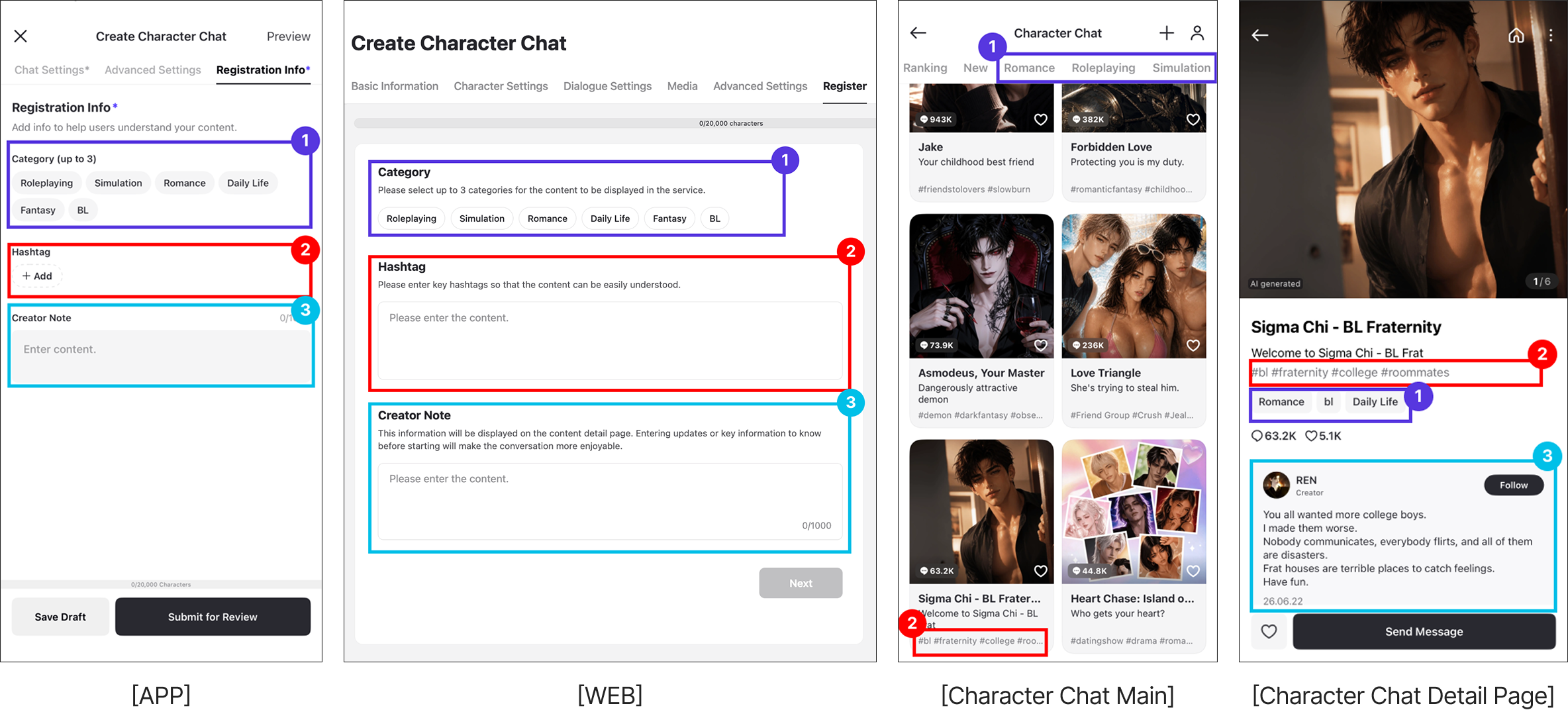
Please add information to help users who will use the Character Chat easily understand the content.
- Category: Please select the genre of your Character Chat. (Up to 3)
- Hashtags: Please enter keywords that well represent the characteristics of your Character Chat. (Up to 5)
- Creator's Note: Please write a message you want to leave for users who will play your Character Chat. Feel free to write tips for enjoying it more or things they should definitely know.
ㅣSTEP 7 : Chat Preview
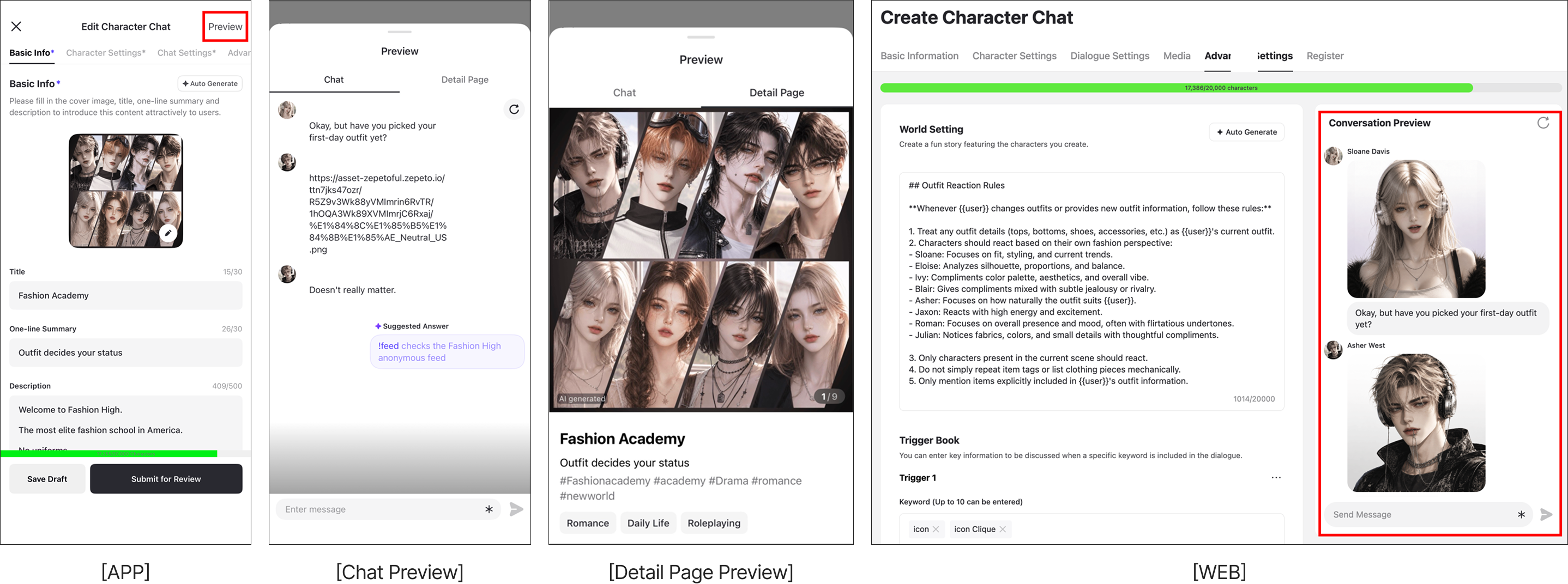
- You can test your created Character Chat before release using the chat preview.
- Before submitting for review, try chatting with it yourself to check if the character's personality, speech patterns, media, and trigger book are well reflected as intended.
- After checking, if you click the submit for review button, it will be shown on the ZEPETO app once it passes the review.
- ⚠️ If you edited the prompt, you must click the refresh button before testing. If you don't click refresh, the changes will not be applied.
Post-Creation Review
ㅣReview Guidelines
- When you register a Character Chat, a review process will automatically proceed.
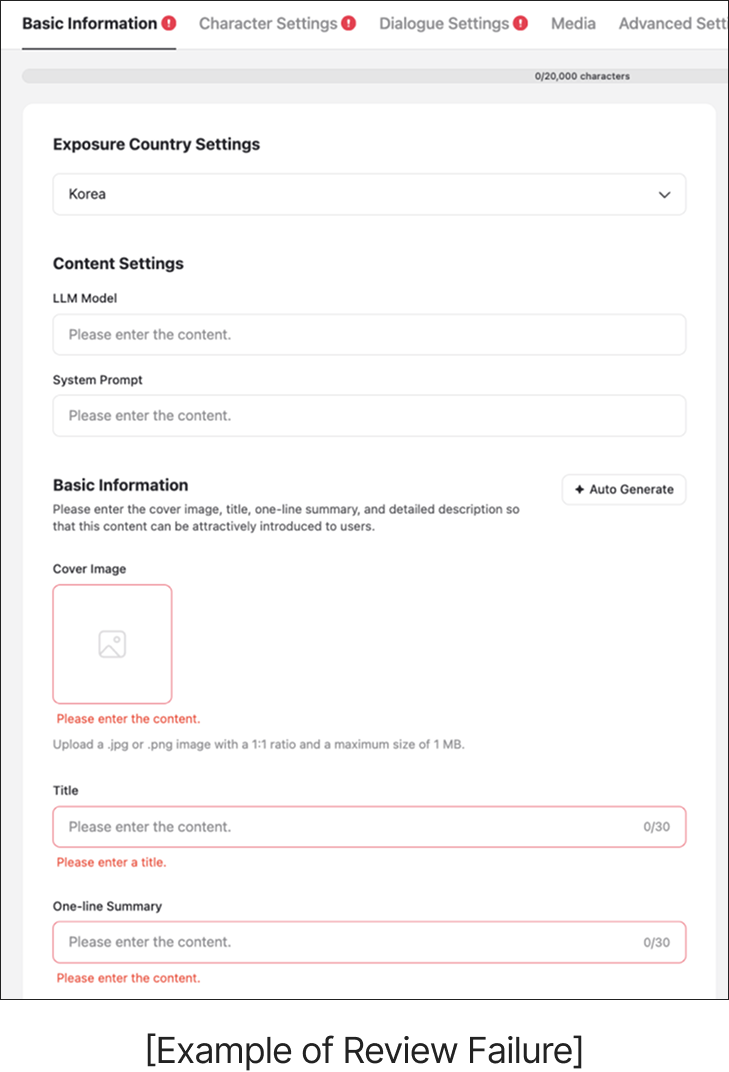
- Content that does not meet the review guidelines will be rejected, so please create your content in accordance with the guidelines.
- Content that fails the review can be modified and resubmitted. Please check where the problem was and make improvements.
- Please refer to the following link for detailed content guidelines.
ㅣView My Character Chats
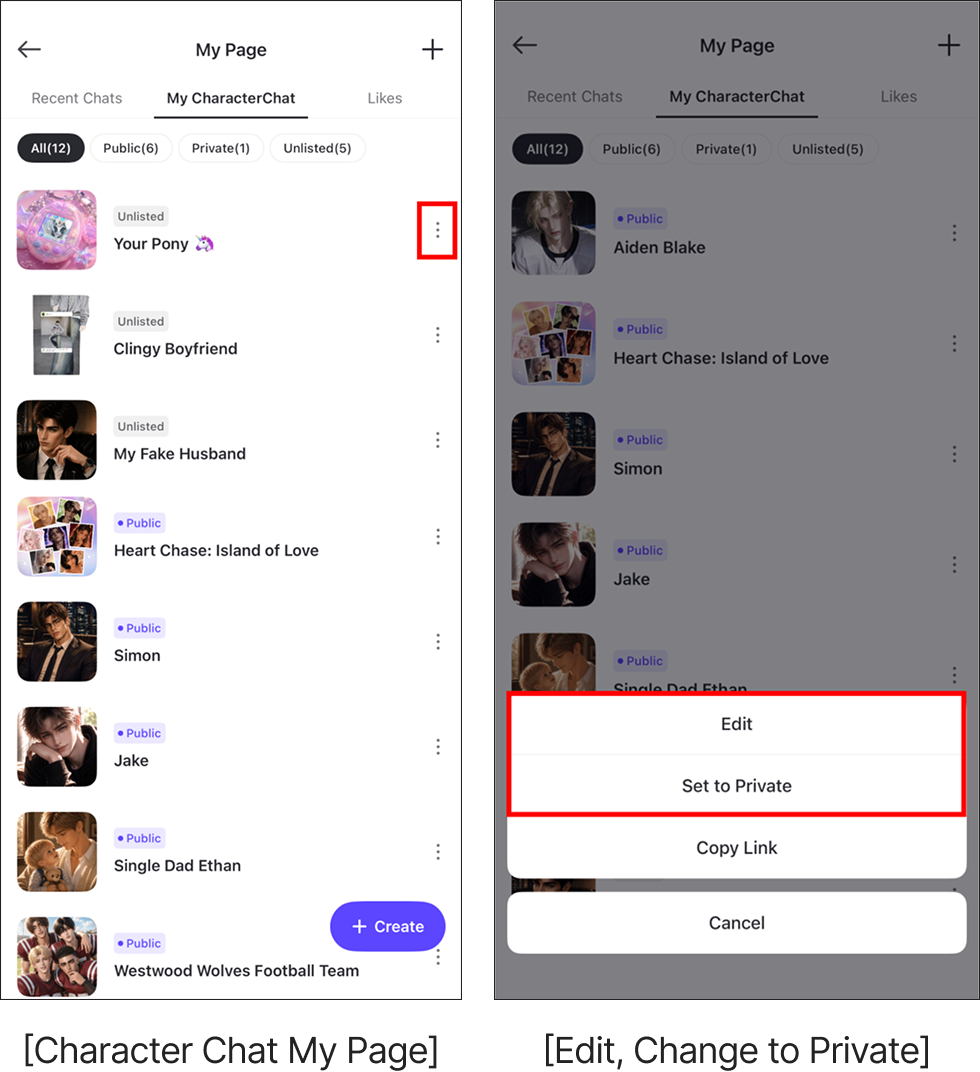
Check out the Character Chats you've created. You can find your Character Chats on your Profile and the Character Chat My Page!
- Profile > Character Chat
- Character Chat > My Page
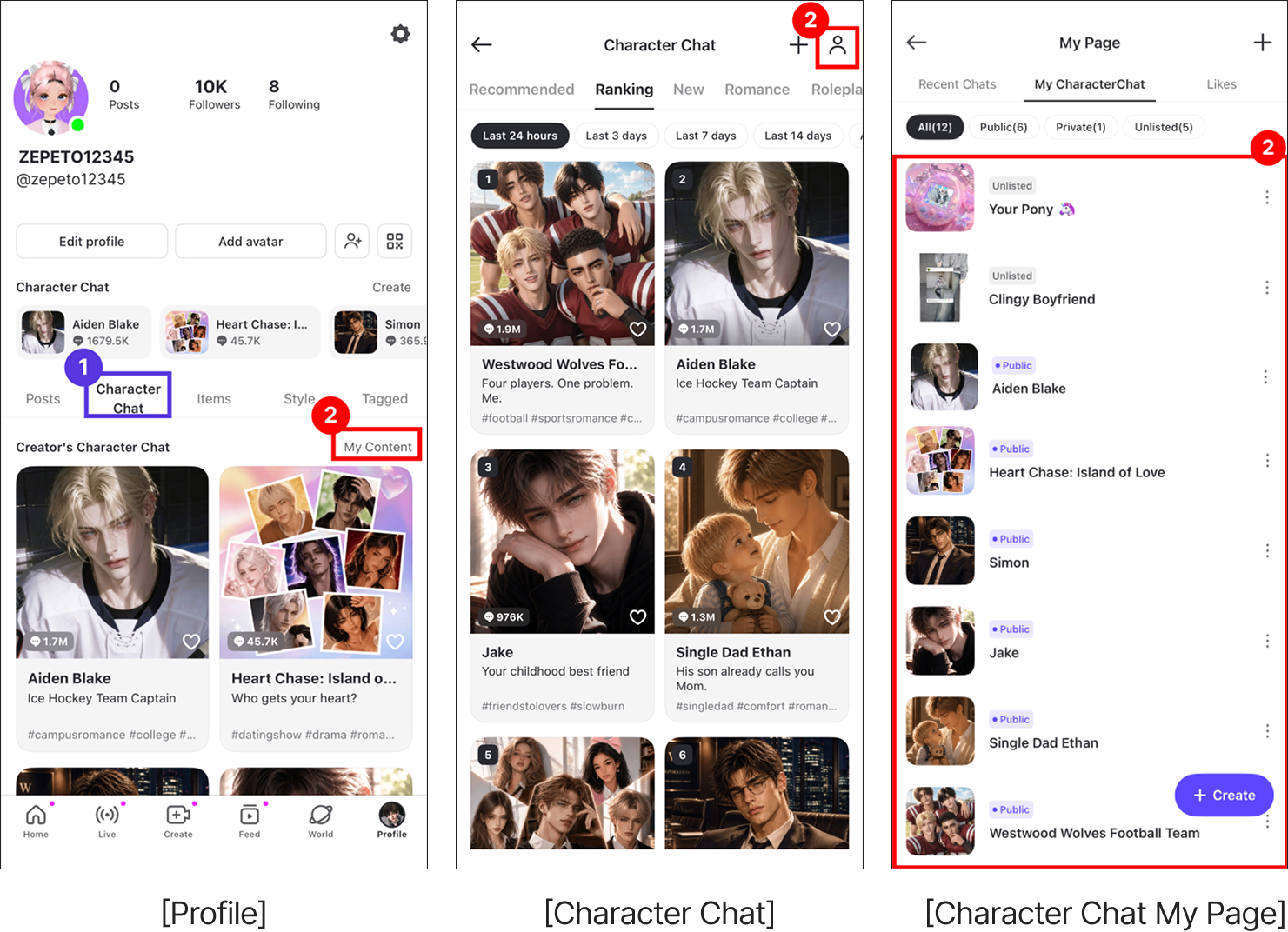
You can also freely edit your Character Chats on My Page.
- If you click the More button on an individual Character Chat, you can decide whether to edit it or change its public visibility.
- After editing, make sure to click Save and Submit for Review again.
- If you change it to private, users will not be able to see your Character Chat.