ไกด์การสร้างผู้เล่นบอท
ผู้เล่นบอทถูกใช้เพื่อเติมเต็มเมื่อไม่มีคนเพียงพอในการเริ่มโลกแบบผู้เล่นหลายคน หรือเมื่อผู้เล่นออกจากโลกในระหว่างนั้น.
พฤติกรรมของผู้เล่นบอทต้องถูกนำไปใช้สำหรับเนื้อหาทุกประเภท.
คู่มือนี้อธิบายวิธีการทั่วไปในการสร้างผู้เล่นบอท.
📘 คู่มือการสร้างผู้เล่นบอทอิงจากคู่มือผู้เล่นหลายคน. [บทเรียนการเล่นหลายคน]
ขั้นตอนที่ 1: สร้างผู้เล่นบอท
1-1. เพิ่มค่าบูลีนที่เรียกว่า IsBot ลงในสคีมาของผู้เล่นหลายคน.
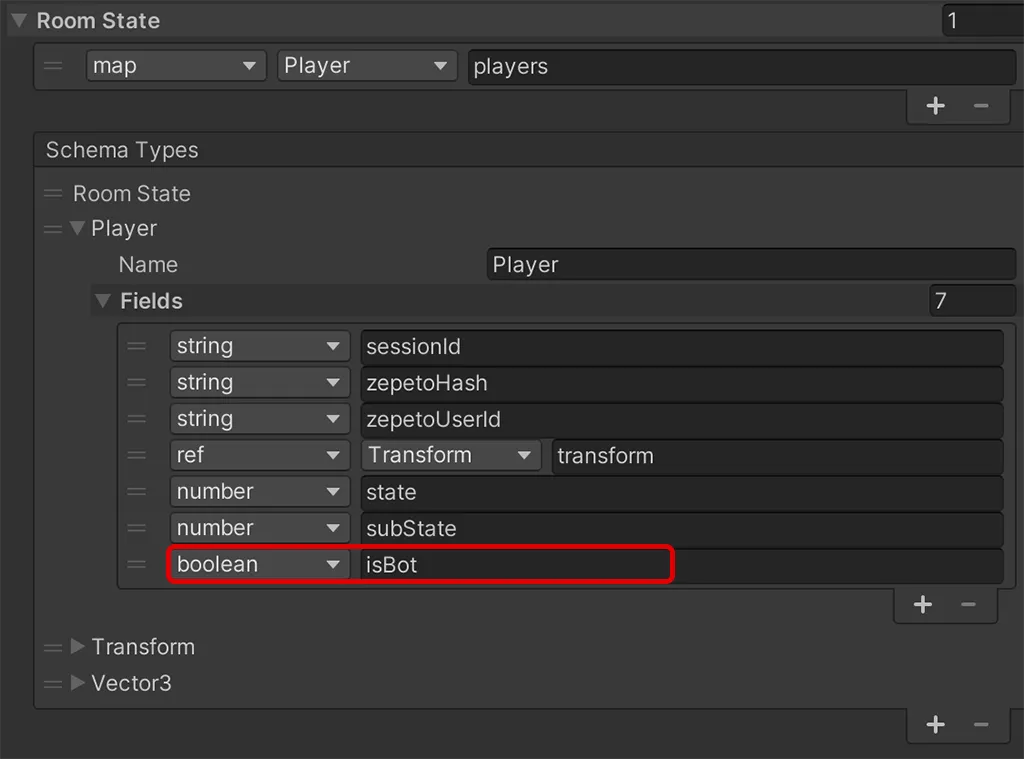
1-2. กำหนดฟังก์ชันด้านล่างเพื่อสร้างผู้เล่นบอทในสคริปต์เซิร์ฟเวอร์ index.ts และเรียกใช้ที่จุดที่ต้องการ.
// วิธีการ `CreateBot()` ใช้เพื่อสร้างผู้เล่นบอทด้วย `userId` ที่กำหนดไว้
CreateBot(userId: string) {

    // สร้าง ID เซสชันสำหรับผู้เล่นบอทโดยใช้ `userId` ที่ให้มา
    const sessionId = "Bot_" + userId;

  	// ตรวจสอบว่ามีผู้เล่นบอทที่มี ID เซสชันเดียวกันอยู่แล้วหรือไม่ ถ้ามี ให้กลับโดยไม่สร้างซ้ำ
    if (this.state.players.has(sessionId)) {
        return;
    }

    // สร้างวัตถุ `Player` ใหม่สำหรับผู้เล่นบอท
    const player: Player = new Player();
    player.sessionId = sessionId;
    if (userId) {
        player.zepetoUserId = userId;
    }
    player.isBot = true;

  	// เพิ่มผู้เล่นบอทลงในแผนที่ผู้เล่นของสถานะโดยใช้ ID เซสชันเป็นกุญแจ
    this.state.players.set(player.sessionId, player);
    this._botMap.set(sessionId, player);
}
👍 เคล็ดลับ
- userId ของผู้ใช้เฉพาะจะถูกเก็บไว้ล่วงหน้าเพื่อสร้างตัวละครผู้เล่นบอท
- คุณสามารถตรวจสอบ UserId ของผู้ใช้เฉพาะได้โดยการตรวจสอบ userId ของไคลเอนต์ที่เชื่อมต่อกับ OnJoin บนเซิร์ฟเวอร์ หลังจากเขียนสคริปต์ด้านล่างในสคริปต์เซิร์ฟเวอร์ เชื่อมต่อจากโลกที่เกี่ยวข้อง
onJoin(client: SandboxPlayer) {
	console.log(client.userId);
}
ขั้นตอนที่ 2: สร้างผู้เล่น Bot บนไคลเอนต์
2-1. หากคุณมีเซิร์ฟเวอร์สร้างผู้เล่น Bot ในบางจุด ไคลเอนต์จะรับรู้ว่าเป็นผู้เล่นใหม่ใน OnJoinPlayer()
- สร้างโปรเจกต์ > สร้าง > ZEPETO > TypeScript และเปลี่ยนชื่อเป็น BotPlayerManager.
- เพิ่มตรรกะใน OnAddedPlayer() เพื่อสร้างผู้เล่นแต่ละคน และเพิ่มตรรกะเพื่อแยกผู้เล่น Bot และสร้างตัวละคร ZEPETO ของพวกเขา
import { ZepetoCharacter, ZepetoPlayers } from 'ZEPETO.Character.Controller';
import { Room } from 'ZEPETO.Multiplay';
import { ZepetoScriptBehaviour } from 'ZEPETO.Script'
import { ZepetoWorldMultiplay } from 'ZEPETO.World';

export default class BotPlayerManager extends ZepetoScriptBehaviour {

    public zepetoWorldMultiplay: ZepetoWorldMultiplay;

 	// ตัวแปรส่วนตัวเพื่อเก็บข้อมูลห้องปัจจุบันและข้อมูลผู้เล่น Bot.
    private _room: Room;
    private _botMapData: Map<string, ZepetoCharacter> = new Map<string, ZepetoCharacter>();

    Start() {

	 	// ฟังเหตุการณ์ `RoomJoined` จากคอมโพเนนต์ `ZepetoWorldMultiplay`.
        this.zepetoWorldMultiplay.RoomJoined += (room: Room) => {
        	this._room = room;
        }

	 	// ฟังเหตุการณ์ `OnAddedPlayer` จาก `ZepetoPlayers.instance` เพื่อจัดการผู้เล่นที่เพิ่มเข้ามาใหม่.
        ZepetoPlayers.instance.OnAddedPlayer.AddListener((userId: string) => {

		 	// รับข้อมูลผู้เล่นปัจจุบันจากสถานะห้องโดยใช้ `userId`.
            const currentPlayer = this._room.State.players.get_Item(userId);

		 	// ตรวจสอบว่าผู้เล่นเป็น Bot หรือไม่ และถ้าใช่ ให้ตั้งค่าพวกเขาเป็นผู้เล่น Bot.
            if (currentPlayer.isBot) {
                this.SetBotPlayer(currentPlayer.sessionId);
            }
        });
    }
}
2-2. เขียนฟังก์ชัน SetBotPlayer เพื่อเพิ่มแท็กและส่วนประกอบการซิงโครไนซ์ให้กับผู้เล่นบอทและสร้างสคริปต์เพื่อควบคุมพวกเขา.
- ตั้งค่า _botMapData เพื่อบันทึกข้อมูลผู้เล่นบอทในรูปแบบแผนที่เพื่อจัดการผู้เล่นบอท.
// วิธีการ `SetBotPlayer()` ใช้เพื่อกำหนดผู้เล่นเป็นบอท.
SetBotPlayer(userId: string) {

    // รับตัวละคร ZEPETO ที่เกี่ยวข้องกับผู้เล่นบอทโดยใช้ `userId` ของพวกเขา.
    const bot = ZepetoPlayers.instance.GetPlayer(userId).character;

    // ตั้งชื่อของตัวละครเป็น `userId` เพื่อการระบุ.
    bot.gameObject.name = userId;

    // เก็บข้อมูลผู้เล่นบอทในแผนที่ `_botMapData` โดยใช้ `userId` ของพวกเขาเป็นกุญแจ.
		this._botMapData.set(userId, bot);
}
👍 เคล็ดลับ คุณสามารถเพิ่มสคริปต์หรือการตั้งค่าเพิ่มเติมใน SetBotPlayer() เพื่อควบคุมพฤติกรรมของผู้เล่นบอท.
ขั้นตอนที่ 3: สร้างปุ่มผู้เล่นบอทบนไคลเอนต์
สำหรับโลกที่ต้องการจำนวนผู้เล่นที่แน่นอนในการเริ่มต้น บางครั้งอาจไม่มีผู้เล่นเพียงพอและคุณต้องรอนานเพื่อให้โลกเริ่มต้น.
ในกรณีนี้ คุณสามารถเริ่มโลกได้โดยการเพิ่มผู้เล่น Bot.
3-1. ลงทะเบียนฟังก์ชันเพื่อเรียกใช้ CreateBot() เมื่อเซิร์ฟเวอร์ได้รับข้อความจากไคลเอนต์ใน index.ts.
async OnCreate() {

	 	// จัดการข้อความ "CreateBot" ซึ่งสร้างผู้เล่นบอทด้วย userId ที่กำหนด
    this.onMessage("CreateBot", (client, message) => {
        this.CreateBot(message);
    });
}
3-2. ในสคริปต์ไคลเอนต์ BotPlayerManager.ts เขียนฟังก์ชันเพื่อส่งข้อความ "CreateBot" ไปยังเซิร์ฟเวอร์.
- วิธีการเรียกใช้ฟังก์ชันคือการส่งข้อความโดยการกดปุ่ม.
- ส่ง user ID ของผู้เล่น Bot ที่จะสร้างเป็นสตริงผ่านข้อความ.
public buttonCreateBot: Button;
public botPlayerId: string;

Start() {

	 	// เพิ่มผู้ฟังการคลิกไปยังปุ่ม "Create Bot" เพื่อส่งข้อความเพื่อสร้างผู้เล่นบอท
	 	this.buttonCreateBot.onClick.AddListener(() => {
            this._room.Send("CreateBot", this.botPlayerId);
    });
}
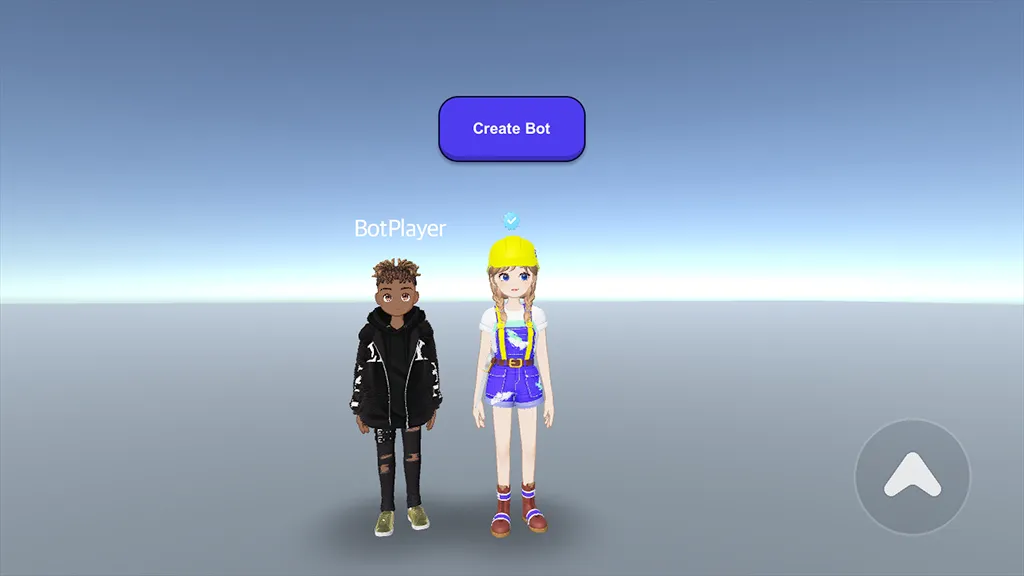
3-3. ตอนนี้ เมื่อคุณรันเซิร์ฟเวอร์และรันไทม์ คุณจะเห็นว่าผู้เล่นบอทถูกสร้างขึ้นเมื่อคุณกดปุ่ม.
ขั้นตอนที่ 4: เริ่มต้นโลกโดยการเพิ่มผู้เล่นบอท
เมื่อมีผู้เล่นไม่เพียงพอในการเริ่มต้นโลก คุณสามารถเพิ่มผู้เล่นบอทเพื่อเริ่มต้นโลกได้.
4-1. ในสคริปต์เซิร์ฟเวอร์ ให้เพิ่มโค้ดต่อไปนี้ในช่วง OnJoin เพื่อตรวจสอบจำนวนผู้เล่นและเริ่มโลกเมื่อมีผู้เล่นอย่างน้อยสี่คน.
- เพิ่มฟังก์ชันเพื่อตรวจสอบจำนวนผู้เล่นใน CreateBot().
- เพิ่มตัวนับสำหรับจำนวนการเล่นในฟังก์ชัน StartWorld().
 async onJoin(client: SandboxPlayer) {

 	// ตรวจสอบจำนวนผู้เล่นในห้องหลังจากผู้เล่นเข้าร่วม.
	this.CheckPlayerNumber();
}

// เมธอด `CheckPlayerNumber()` จะตรวจสอบจำนวนผู้เล่นในห้องและเริ่มโลกหากมีผู้เล่นอย่างน้อยสี่คน.
CheckPlayerNumber() {

	// พิมพ์จำนวนผู้เล่นในห้องปัจจุบันไปยังคอนโซล.
	console.log(`player Number, ${this.state.players.size}`);

	// หากมีผู้เล่นอย่างน้อยสี่คนในห้อง ให้เริ่มโลก.
	if (this.state.players.size >= 4) {
 	this.StartWorld();
	}
}

// เมธอด `CreateBot()` ใช้เพื่อสร้างผู้เล่นบอทด้วย `userId` ที่กำหนด.
CreateBot(userId: string) {

	// สร้าง ID เซสชันสำหรับผู้เล่นบอทโดยใช้ `userId` ที่ให้มา.
	const sessionId = "Bot_" + userId;

	// ตรวจสอบว่ามีผู้เล่นบอทที่มี ID เซสชันเดียวกันอยู่แล้วหรือไม่ หากมี ให้กลับโดยไม่สร้างซ้ำ.
 	if (this.state.players.has(sessionId)) {
	return;
	}

	// สร้างวัตถุ `Player` ใหม่สำหรับผู้เล่นบอท.
	const player: Player = new Player();
 	player.sessionId = sessionId;
	if (userId) {
		player.zepetoUserId = userId;
	}
	player.isBot = true;

	// เพิ่มผู้เล่นบอทลงในแผนที่ผู้เล่นของสถานะโดยใช้ ID เซสชันเป็นกุญแจ.
	this.state.players.set(player.sessionId, player);
	this._botMap.set(sessionId, player);

	// ตรวจสอบจำนวนผู้เล่นในห้องหลังจากเพิ่มผู้เล่นบอท.
	this.CheckPlayerNumber();
}


private playTime: number = 0;

// เมธอด `StartWorld()` จะเพิ่มเวลาเล่นและส่งข้อความ "StartWorld" ไปยังลูกค้าทั้งหมด.
StartWorld() {
		this.playTime += 1;

    // พิมพ์ข้อความที่บ่งบอกถึงการเริ่มต้นของโลกและเวลาเล่นปัจจุบัน.
    console.log("Start World!");
    this.broadcast("StartWorld", this.playTime);
}
- บนเซิร์ฟเวอร์ OnJoin จะถูกเรียกใช้เมื่อผู้เล่นจริงเข้าร่วมห้อง ดังนั้นเมื่อผู้เล่น Bot ถูกสร้างขึ้นผ่าน CreateBot และเมื่อผู้เล่นเข้ามาผ่าน OnJoin, checkPlayerNumber() จะเพิ่มจำนวนคน.
4-2. ในสคริปต์ของไคลเอนต์ BotPlayerManager.ts ให้เขียน StartWorld() ซึ่งจะถูกเรียกใช้เมื่อได้รับข้อความ StartWorld จากเซิร์ฟเวอร์.
Start() {

	// ฟังเหตุการณ์ `RoomJoined` จากคอมโพเนนต์ `ZepetoWorldMultiplay`.
	this.zepetoWorldMultiplay.RoomJoined += (room: Room) => {

 	// เพิ่มตัวจัดการข้อความสำหรับประเภทข้อความ "StartWorld".
	this._room.AddMessageHandler("StartWorld", (playTime: number) => {
    	this.StartWorld(playTime);
  });
}

// เมธอด `StartWorld()` จะถูกเรียกใช้เมื่อโลกเริ่มต้นด้วย `playTime` ที่กำหนด.
StartWorld(playTime: number) {

	// พิมพ์ข้อความเริ่มต้นของโลกพร้อมกับ `playTime`.
  console.log(`Start World : ${playTime}`);
}
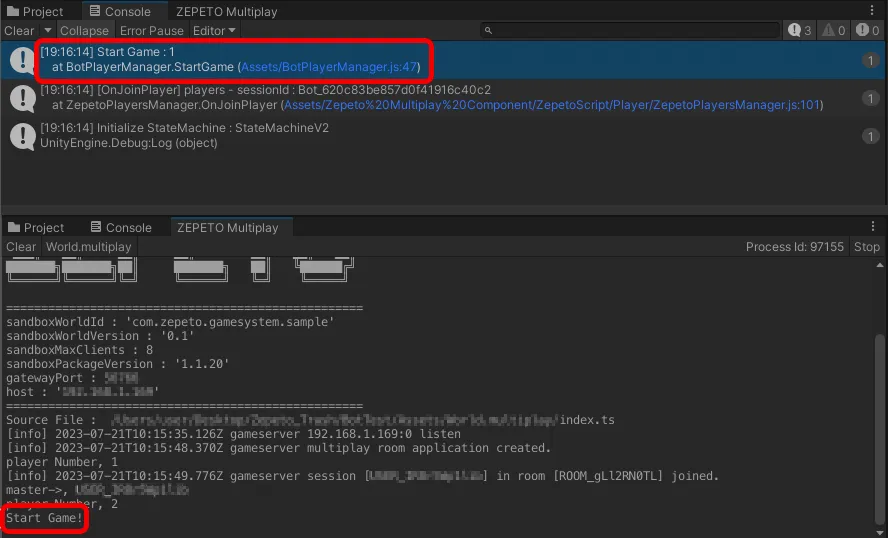
4-3. ในระหว่างการทำงาน เมื่อมีผู้เล่นมากกว่า 4 คนรวมถึงผู้เล่น Bot คุณจะเห็นบันทึกที่เรียกว่า World Start ปรากฏขึ้นในคอนโซลของเซิร์ฟเวอร์และในคอนโซลของไคลเอนต์.
ขั้นตอนที่ 5: ซิงโครไนซ์ตำแหน่งของผู้เล่น Bot
ด้านล่างนี้คือตัวอย่างโค้ดที่ย้ายผู้เล่น Bot ที่เพิ่มเข้ามาไปยังตำแหน่งของผู้เล่นท้องถิ่นและซิงโครไนซ์ตำแหน่งการเคลื่อนไหว.
5-1. ก่อนอื่นให้เขียนโค้ดเพื่อย้ายผู้เล่น Bot เมื่อข้อความ MoveBot ถูกส่งมาจากไคลเอนต์ใน index.ts ของเซิร์ฟเวอร์.
async OnCreate() {

 	// จัดการกับข้อความ "MoveBot" ซึ่งย้ายผู้เล่นบอทไปยังตำแหน่งที่กำหนด
	this.onMessage("MoveBot", (client, message) => {
        this.MoveBot(client, message);
 	});
}

// เมธอด `MoveBot()` ย้ายผู้เล่นบอทไปยังตำแหน่งที่กำหนดตามข้อความที่ได้รับ
MoveBot(client: SandboxPlayer, message: string) {
    // แยกข้อความ JSON ที่ได้รับจากไคลเอนต์เพื่อดึงข้อมูลตำแหน่ง
    const position = JSON.parse(message);

    // สร้างวัตถุข้อความใหม่ด้วย ID เซสชันของผู้ใช้และข้อมูลตำแหน่งที่แยกออก
    const newMessage = {
        user: client.sessionId,
        positionX: position.x,
        positionY: position.y,
        positionZ: position.z
    }

    // กระจายข้อความ "MoveBotToPosition" ไปยังไคลเอนต์ทั้งหมดด้วยข้อมูลข้อความใหม่ในรูปแบบ JSON
    this.broadcast("MoveBotToPosition", JSON.stringify(newMessage));
}
5-2. ในสคริปต์ไคลเอนต์ BotPlayerManager.ts ให้เขียน SendBotPosition() ที่ส่งตำแหน่งของผู้เล่นท้องถิ่นไปยังเซิร์ฟเวอร์เมื่อปุ่มCallBot ถูกกด.
- จากนั้นเขียนโค้ดเพื่อย้ายผู้เล่น Bot ทั้งหมดไปยังข้อมูลตำแหน่งที่รวมอยู่ในข้อความเมื่อได้รับข้อความ MoveBotToPosition จากเซิร์ฟเวอร์.
public buttonCallBot: Button;

Start(){

	// ฟังเหตุการณ์ `RoomJoined` จากคอมโพเนนต์ `ZepetoWorldMultiplay`.
    this.zepetoWorldMultiplay.RoomJoined += (room: Room) => {
    		this._room = room;

        // เพิ่มตัวจัดการข้อความสำหรับประเภทข้อความ "StartWorld".
        this._room.AddMessageHandler("StartWorld", (playTime: number) => {
            this.StartWorld(playTime);
        });

	// เพิ่มผู้ฟังการคลิกไปยังปุ่ม "Call Bot" เพื่อส่งข้อความเพื่อส่งตำแหน่งผู้เล่น Bot.
	this.buttonCallBot.onClick.AddListener(() => {
				this.SendBotPosition();
	});
}

// วิธีนี้ส่งตำแหน่งของตัวละครผู้เล่นท้องถิ่นไปยังเซิร์ฟเวอร์เพื่อการซิงโครไนซ์การเคลื่อนไหวของ Bot.
SendBotPosition() {

    // รับตำแหน่งของตัวละครผู้เล่นท้องถิ่น.
    const localPlayerPosition = ZepetoPlayers.instance.LocalPlayer.zepetoPlayer.character.transform.position;

    // สร้างวัตถุตำแหน่งที่มีพิกัด x, y, และ z ของตัวละครผู้เล่นท้องถิ่น.
    const position = {
        x: localPlayerPosition.x,
        y: localPlayerPosition.y,
        z: localPlayerPosition.z
    }

    // แปลงวัตถุตำแหน่งเป็นสตริง JSON และส่งไปยังเซิร์ฟเวอร์ด้วยประเภทข้อความ "MoveBot".
    this._room.Send("MoveBot", JSON.stringify(position));
    }

MoveBotToPosition(message) {

    // แยกข้อความ JSON ที่ได้รับจากไคลเอนต์เพื่อดึงข้อมูลตำแหน่ง.
    const jsonMessage = JSON.parse(message);
    const position = new Vector3(jsonMessage.positionX, jsonMessage.positionY, jsonMessage.positionZ);

    // ย้ายตัวละคร Bot แต่ละตัวในแผนที่ `_botMapData` ไปยังตำแหน่งที่กำหนดโดยมีการเลื่อนแบบสุ่มเล็กน้อยในแกน x และ z.
    this._botMapData.forEach((character: ZepetoCharacter) => {
        // วิธี `MoveToPosition()` ใช้เพื่อย้ายตัวละครไปยังตำแหน่งที่กำหนด.
        // ที่นี่จะมีการเพิ่มการเลื่อนแบบสุ่มเล็กน้อยไปยังตำแหน่งเป้าหมายเพื่อสร้างการเคลื่อนไหวที่ดูเป็นธรรมชาติสำหรับ Bot.
        character.MoveToPosition(position + new Vector3(Random.Range(0.5, 1), 0, Random.Range(0.5, 1)));
    });
}
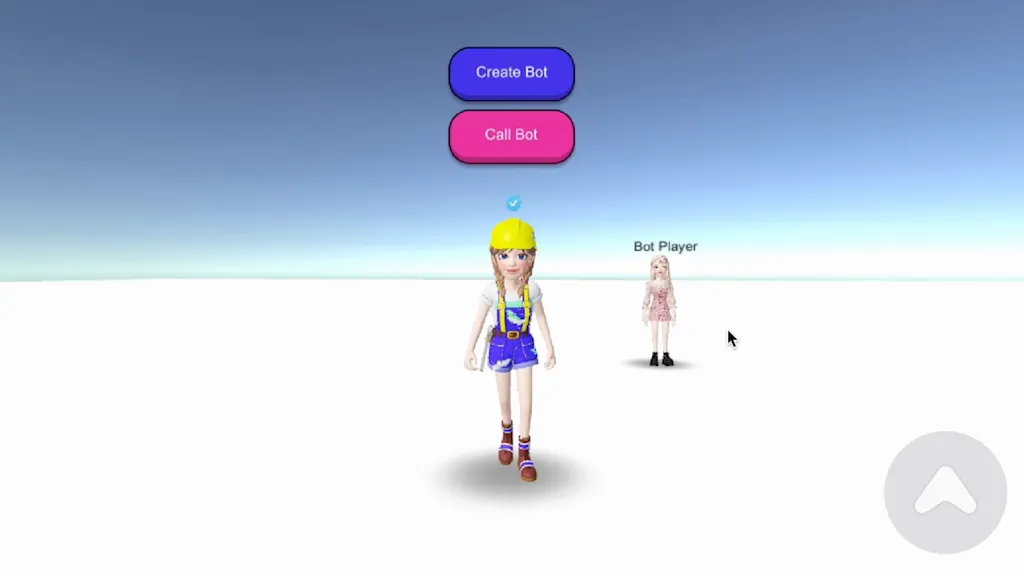
5-3. ตอนนี้ถ้าคุณสร้างผู้เล่น Bot ในระหว่างการทำงานและกดปุ่ม buttonCallBot คุณควรเห็นผู้เล่น Bot ที่สร้างขึ้นเคลื่อนที่ไปยังตำแหน่งตัวละครผู้เล่นท้องถิ่น.
โค้ดทั้งหมดของ BotPlayerManager.ts
import { Random, Vector3 } from 'UnityEngine';
import { Button } from 'UnityEngine.UI';
import { ZepetoCharacter, ZepetoPlayers } from 'ZEPETO.Character.Controller';
import { Room } from 'ZEPETO.Multiplay';
import { ZepetoScriptBehaviour } from 'ZEPETO.Script'
import { ZepetoWorldMultiplay } from 'ZEPETO.World';

export default class BotPlayerManager extends ZepetoScriptBehaviour {

    // Public properties to reference necessary components and settings from the Inspector.
    public zepetoWorldMultiplay: ZepetoWorldMultiplay;
    public buttonCreateBot: Button;
    public buttonCallBot: Button;
    public botPlayerId: string;

    // Private variables to store the current room and bot player data.
    private _room: Room;
    private _botMapData: Map<string, ZepetoCharacter> = new Map<string, ZepetoCharacter>();

    Start() {

        // Listen for the `RoomJoined` event from the `ZepetoWorldMultiplay` component.
        this.zepetoWorldMultiplay.RoomJoined += (room: Room) => {
            this._room = room;

            // Add a message handler for the "StartWorld" message type.
            this._room.AddMessageHandler("StartWorld", (playTime: number) => {
                this.StartWorld(playTime);
            });
        }

        // Listen for the `OnAddedPlayer` event from `ZepetoPlayers.instance` to handle newly added players.
        ZepetoPlayers.instance.OnAddedPlayer.AddListener((userId: string) => {

            // Get the current player data from the room state using the `userId`.
            const currentPlayer = this._room.State.players.get_Item(userId);

            // Check if the player is a bot, and if so, set them as a bot player.
            if (currentPlayer.isBot) {
                this.SetBotPlayer(currentPlayer.sessionId);
            }
        });

        // Add a click listener to the "Create Bot" button to send a message to create a bot player.
        this.buttonCreateBot.onClick.AddListener(() => {
            this._room.Send("CreateBot", this.botPlayerId);
        });

        this.zepetoWorldMultiplay.RoomJoined += (room: Room) => {
            this._room = room;

            this._room.AddMessageHandler("MoveBotToPosition", (message: string) => {
                this.MoveBotToPosition(message);
            });
        }

        // Add a click listener to the "Call Bot" button to send a message to send a bot player position.
        this.buttonCallBot.onClick.AddListener(() => {
            this.SendBotPosition();
        });
    }

    // The `SetBotPlayer()` method is used to set a player as a bot.
    SetBotPlayer(userId: string) {

        // Get the ZEPETO character associated with the bot player using their `userId`.
        const bot = ZepetoPlayers.instance.GetPlayer(userId).character;

        // Set the name of the character to the `userId` for identification.
        bot.gameObject.name = userId;

        // Store the bot player's data in the `_botMapData` map using their `userId` as the key.
        this._botMapData.set(userId, bot);
    }

    // The `StartWorld()` method is called when the world starts with the provided `playTime`.
    StartWorld(playTime: number) {

        // Print the world start message along with the `playTime`.
        console.log(`Start World : ${playTime}`);
    }

    // This method sends the position of the local player's character to the server for bot movement synchronization.
    SendBotPosition() {

        // Get the position of the local player's character.
        const localPlayerPosition = ZepetoPlayers.instance.LocalPlayer.zepetoPlayer.character.transform.position;

        // Create a position object containing the x, y, and z coordinates of the local player's character.
        const position = {
            x: localPlayerPosition.x,
            y: localPlayerPosition.y,
            z: localPlayerPosition.z
        }

        // Convert the position object to a JSON string and send it to the server with the "MoveBot" message type.
        this._room.Send("MoveBot", JSON.stringify(position));
    }

    // This method is called when the server receives the "MoveBot" message from a client and moves the bot characters to the specified position.
    MoveBotToPosition(message) {

        // Parse the JSON message received from the client to extract the position information.
        const jsonMessage = JSON.parse(message);
        const position = new Vector3(jsonMessage.positionX, jsonMessage.positionY, jsonMessage.positionZ);

        // Move each bot character in the `_botMapData` map to the specified position with a small random offset on the x and z axes.
        this._botMapData.forEach((character: ZepetoCharacter) => {
            // The `MoveToPosition()` method is used to move the character to the specified position.
            // Here, a small random offset is added to the target position to create a natural-looking movement for the bots.
            character.MoveToPosition(position + new Vector3(Random.Range(0.5, 1), 0, Random.Range(0.5, 1)));
        });
    }
}
โค้ดเซิร์ฟเวอร์ index.ts เต็มรูปแบบ
นำเข้า { Sandbox, SandboxOptions, SandboxPlayer } จาก "ZEPETO.Multiplay";
import { DataStorage } จาก "ZEPETO.Multiplay.DataStorage";
import { Player, Transform, Vector3 } จาก "ZEPETO.Multiplay.Schema";

export default class extends Sandbox {

    storageMap: Map<string, DataStorage> = new Map<string, DataStorage>();

    // บันทึกข้อมูลแผนที่ของผู้เล่นบอทเป็น _botMap
    private _botMap: Map<string, Player> = new Map<string, Player>();
    private playTime: number = 0;

    constructor() {
        super();
    }

    onCreate(options: SandboxOptions) {

        // ถูกเรียกเมื่อวัตถุห้องถูกสร้างขึ้น
        // จัดการสถานะหรือการเริ่มต้นข้อมูลของวัตถุห้อง

        this.onMessage("onChangedTransform", (client, message) => {

            this.state.players.get(client.sessionId);

            const player = this.state.players.get(client.sessionId);

            const transform = new Transform();
            transform.position = new Vector3();
            transform.position.x = message.position.x;
            transform.position.y = message.position.y;
            transform.position.z = message.position.z;

            transform.rotation = new Vector3();
            transform.rotation.x = message.rotation.x;
            transform.rotation.y = message.rotation.y;
            transform.rotation.z = message.rotation.z;

            if (player) {
                player.transform = transform;
            }
        });

        this.onMessage("onChangedState", (client, message) => {
            const player = this.state.players.get(client.sessionId);
            if (player) {
                player.state = message.state;
                player.subState = message.subState;
            }
        });

        // จัดการข้อความ "CreateBot" ซึ่งสร้างผู้เล่นบอทด้วย userId ที่กำหนด
        this.onMessage("CreateBot", (client, message) => {
            this.CreateBot(message);
        });

        // จัดการข้อความ "MoveBot" ซึ่งย้ายผู้เล่นบอทไปยังตำแหน่งที่กำหนด
        this.onMessage("MoveBot", (client, message) => {
            this.MoveBot(client, message);
        });
    }

    // วิธี `CreateBot()` ใช้เพื่อสร้างผู้เล่นบอทด้วย `userId` ที่กำหนด
    CreateBot(userId: string) {

        // สร้าง session ID สำหรับผู้เล่นบอทโดยใช้ `userId` ที่ให้มา
        const sessionId = "Bot_" + userId;

        // ตรวจสอบว่ามีผู้เล่นบอทที่มี session ID เดียวกันอยู่แล้วหรือไม่ ถ้ามีให้กลับโดยไม่สร้างซ้ำ
        if (this.state.players.has(sessionId)) {
            return;
        }

        // สร้างวัตถุ `Player` ใหม่สำหรับผู้เล่นบอท
        const player: Player = new Player();
        player.sessionId = sessionId;
        if (userId) {
            player.zepetoUserId = userId;
        }
        player.isBot = true;

        // เพิ่มผู้เล่นบอทไปยังแผนที่ผู้เล่นของสถานะโดยใช้ session ID เป็นกุญแจ
        this.state.players.set(player.sessionId, player);
        this._botMap.set(sessionId, player);

        // ตรวจสอบจำนวนผู้เล่นในห้องหลังจากเพิ่มผู้เล่นบอท
        this.CheckPlayerNumber();
    }

    // วิธี `CheckPlayerNumber()` ตรวจสอบจำนวนผู้เล่นในห้องและเริ่มโลกหากมีผู้เล่นอย่างน้อยสี่คน
    CheckPlayerNumber() {

        // พิมพ์จำนวนผู้เล่นในห้องปัจจุบันไปยังคอนโซล
        console.log(`จำนวนผู้เล่น, ${this.state.players.size}`);

        // หากมีผู้เล่นอย่างน้อยสี่คนในห้องให้เริ่มโลก
        if (this.state.players.size >= 4) {
            this.StartWorld();
        }
    }

    // วิธี `StartWorld()` เพิ่มเวลาเล่นและกระจายข้อความ "StartWorld" ไปยังลูกค้าทั้งหมด
    StartWorld() {
        this.playTime += 1;

        // พิมพ์ข้อความที่บ่งบอกถึงการเริ่มต้นโลกและเวลาเล่นปัจจุบัน
        console.log("เริ่มโลก!");
        this.broadcast("StartWorld", this.playTime);
    }

    // วิธี `MoveBot()` ย้ายผู้เล่นบอทไปยังตำแหน่งที่กำหนดตามข้อความที่ได้รับ
    MoveBot(client: SandboxPlayer, message: string) {
        // แยกข้อความ JSON ที่ได้รับจากลูกค้าเพื่อดึงข้อมูลตำแหน่ง
        const position = JSON.parse(message);

        // สร้างวัตถุข้อความใหม่ด้วย session ID ของผู้ใช้และข้อมูลตำแหน่งที่แยกออก
        const newMessage = {
            user: client.sessionId,
            positionX: position.x,
            positionY: position.y,
            positionZ: position.z
        }

        // กระจายข้อความ "MoveBotToPosition" ไปยังลูกค้าทั้งหมดด้วยข้อมูลข้อความใหม่ในรูปแบบ JSON
        this.broadcast("MoveBotToPosition", JSON.stringify(newMessage));
    }

    async onJoin(client: SandboxPlayer) {

        // สร้างวัตถุผู้เล่นที่กำหนดใน schemas.json และตั้งค่าค่าตั้งต้น
        console.log(`[OnJoin] sessionId : ${client.sessionId}, HashCode : ${client.hashCode}, userId : ${client.userId}`)

        const player = new Player();
        player.sessionId = client.sessionId;

        if (client.hashCode) {
            player.zepetoHash = client.hashCode;
        }
        if (client.userId) {
            player.zepetoUserId = client.userId;
        }

        // [DataStorage] การโหลด DataStorage ของผู้เล่นที่เข้ามา
        const storage: DataStorage = client.loadDataStorage();

        this.storageMap.set(client.sessionId, storage);

        let visit_cnt = await storage.get("VisitCount") as number;
        if (visit_cnt == null) visit_cnt = 0;

        console.log(`[OnJoin] จำนวนการเยี่ยมชมของ ${client.sessionId} : ${visit_cnt}`)

        // [DataStorage] อัปเดตจำนวนการเยี่ยมชมของผู้เล่นและบันทึก Storage
        await storage.set("VisitCount", ++visit_cnt);

        // จัดการวัตถุผู้เล่นโดยใช้ sessionId ซึ่งเป็นค่ากุญแจที่ไม่ซ้ำกันของวัตถุผู้ใช้
        // ลูกค้าสามารถตรวจสอบข้อมูลเกี่ยวกับวัตถุผู้เล่นที่เพิ่มโดยการตั้งค่าโดยการเพิ่มเหตุการณ์ add_OnAdd ไปยังวัตถุผู้เล่น
        this.state.players.set(client.sessionId, player);

        // ตรวจสอบจำนวนผู้เล่นในห้องหลังจากผู้เล่นเข้าร่วม
        this.CheckPlayerNumber();
    }

    onTick(deltaTime: number): void {
        // ถูกเรียกซ้ำ ๆ ในแต่ละเวลาที่ตั้งไว้ในเซิร์ฟเวอร์และสามารถจัดการเหตุการณ์ในช่วงเวลาที่แน่นอนได้โดยใช้ deltaTime
    }

    async onLeave(client: SandboxPlayer, consented?: boolean) {

        // โดยการตั้งค่า allowReconnection จะสามารถรักษาการเชื่อมต่อสำหรับวงจรได้ แต่ทำความสะอาดทันทีในคู่มือพื้นฐาน
        // ลูกค้าสามารถตรวจสอบข้อมูลเกี่ยวกับวัตถุผู้เล่นที่ถูกลบโดยการเพิ่มเหตุการณ์ add_OnRemove ไปยังวัตถุผู้เล่น
        this.state.players.delete(client.sessionId);
    }
}