Menambahkan Yang Berikut: Fungsi daftar pengikut
Menggunakan API Sosial dari ZEPETO.Module, Pencipta Dunia dapat memuat daftar teman pengguna.
Pencipta Dunia juga dapat mengikuti pengguna baru atau berhenti mengikuti pengguna yang mereka ikuti.
Cara Menginstal
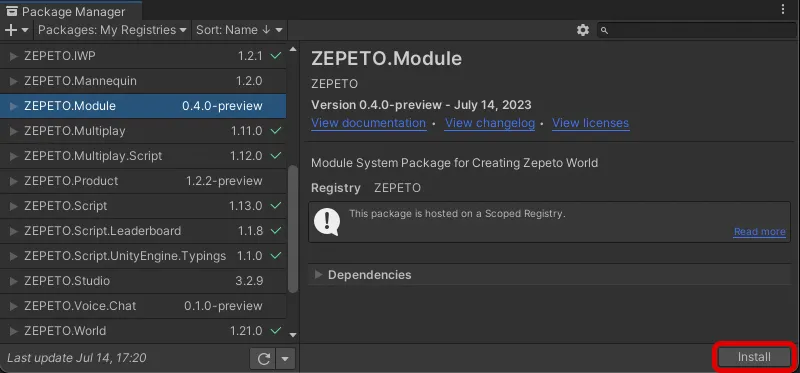
Silakan instal terlebih dahulu Window → Package Manager → ZEPETO.World Package versi 1.21.0 atau yang lebih baru.
Kemudian, instal Paket ZEPETO.Module.
Menggunakan prefab daftar teman pop-up
Paket ZEPETO.Module menawarkan prefab UI untuk Anda dengan mudah membuat daftar yang diikuti/pengikut.
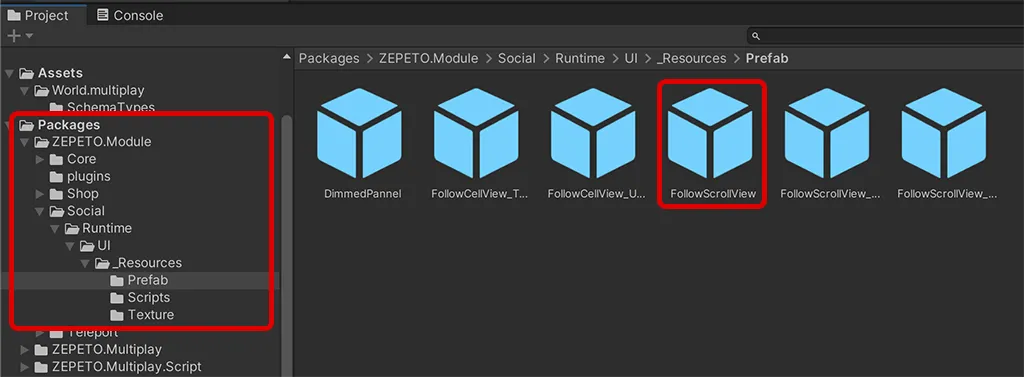
1) Di panel Proyek, pergi ke Packages > ZEPETO.Module > Sosial > Runtime > UI > _Resources > folder Prefab.
2) Dari prefab di folder, seret dan jatuhkan FollowScrollView.prefab ke dalam scene.
❗️ Peringatan Ketika objek EventSystem tidak ada di dalam scene, fitur ini mungkin tidak berjalan dengan benar. Tambahkan objek dengan pergi ke GameObject > UI > EventSystem.
3) Klik tombol Putar untuk melihat popup daftar teman muncul di layar.
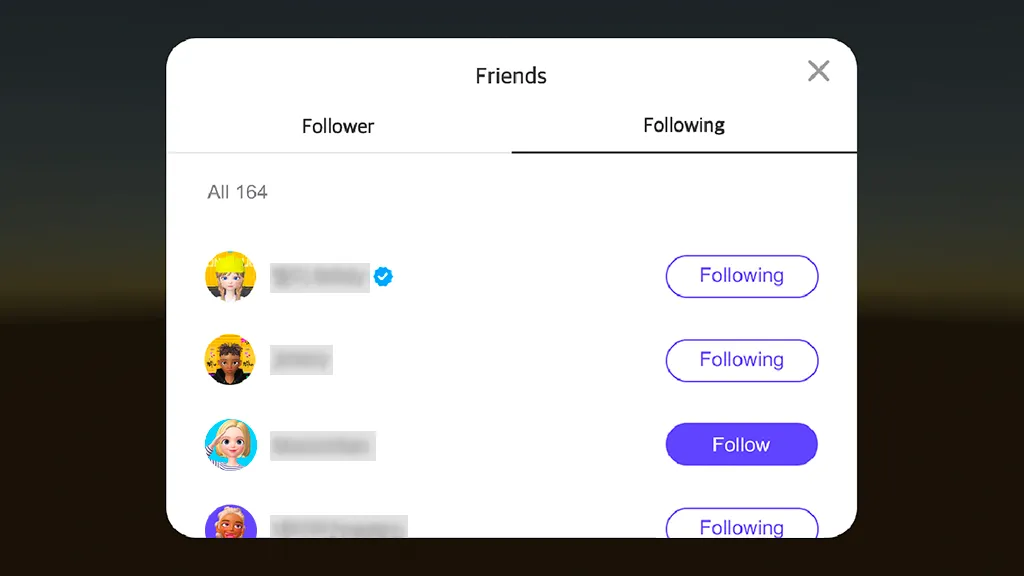
- FollowScrollView.prefab, yang membuat popup daftar teman, menggunakan komponen FollowScrollView untuk memuat dan menampilkan daftar teman serta total jumlah pengguna di layar.
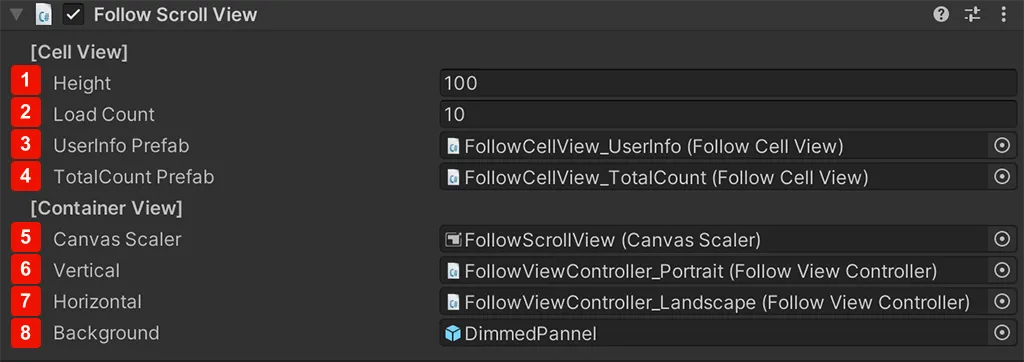
- Informasi yang dikonfigurasi dalam komponen FollowScrollView adalah sebagai berikut.
Komponen Follow Scroll View
1 | Tinggi | Nilai untuk jarak vertikal antara sel info pengguna di tampilan gulir |
|---|---|---|
2 | Jumlah Muatan | Jumlah Muatan Sel: Jumlah data sel yang dimuat saat tampilan gulir digulir. Mengonfigurasi angka tinggi untuk nilai ini dapat mempengaruhi kecepatan pemuatan. |
3 | Prefab Info Pengguna | Prefab UI untuk sel individu untuk menampilkan informasi pengguna |
4 | Prefab Jumlah Total | Prefab yang menampilkan jumlah total pengguna. Teks dapat diterjemahkan secara otomatis dan ditampilkan dalam beberapa bahasa. |
5 | Pengatur Kanvas | Dapat memilih penampilan Kanvas untuk UI daftar teman. Dapat menggunakan Kanvas yang sudah dibuat. |
6 | Vertikal | Daftarkan prefab UI layar vertikal termasuk Pengontrol Tampilan Ikuti. |
7 | Horizontal | Daftarkan prefab UI layar horizontal termasuk Pengontrol Tampilan Ikuti. |
8 | Latar Belakang | Layar hitam semi-transparan yang muncul saat UI daftar teman ditampilkan |
Jika layar dunia dalam mode horizontal saat daftar teman dihasilkan melalui FollowScrollView, FollowScrollView_Landscape diterapkan.
- Ketika layar dalam mode vertikal, FollowScrollView_Portrait diterapkan.
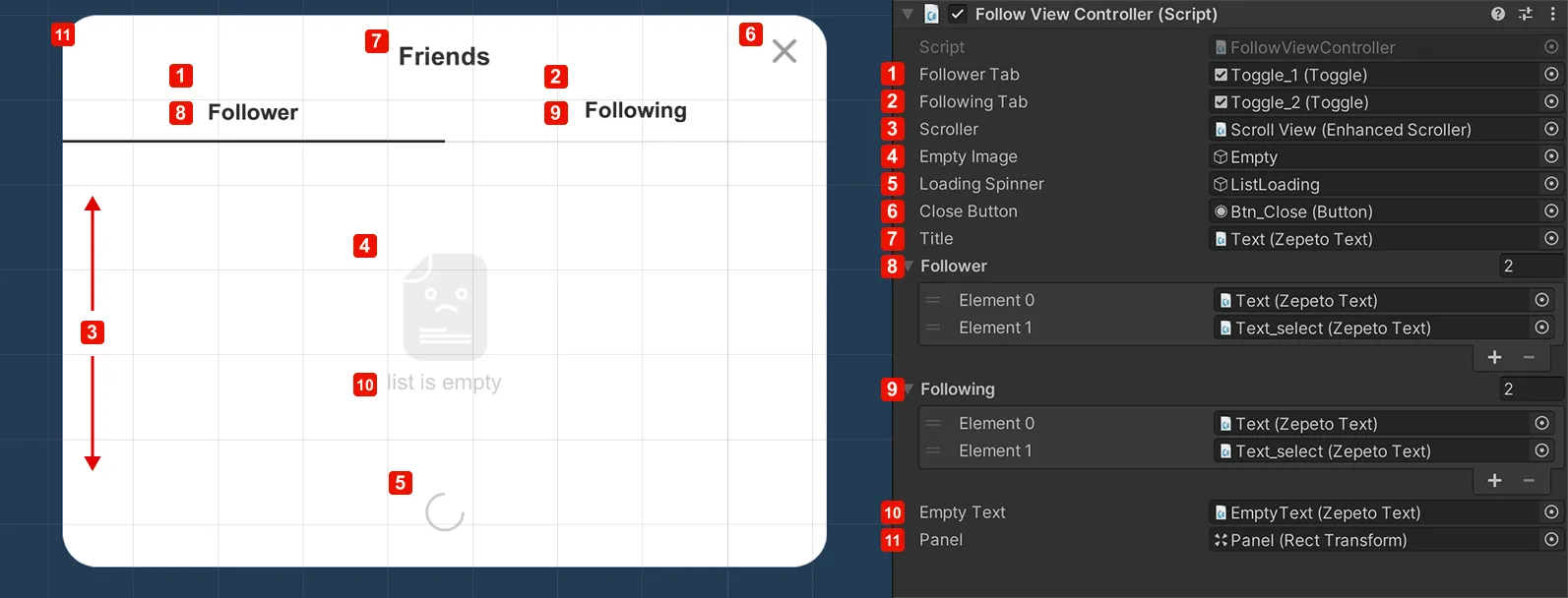
- Informasi yang dikonfigurasi dalam komponen FollowView Controller yang diterapkan pada FollowScrollView_Landscape dan FollowScrollView_Portrait adalah sebagai berikut.
Ikuti Komponen Tampilan
1 | Tab Pengikut | Grup tab pengikut |
|---|---|---|
2 | Tab Mengikuti | Grup tab mengikuti |
3 | Penggulung | Tampilan gulir daftar teman |
4 | Gambar Kosong | Sebuah gambar ditampilkan ketika daftar teman kosong |
5 | Penggulung Memuat | Sebuah gambar ditampilkan saat daftar teman sedang dimuat |
6 | Tombol Tutup | Sebuah tombol untuk menutup popup daftar teman |
7 | Judul | Sebuah judul untuk popup daftar teman |
8 | Pengikut | Teks tombol untuk menampilkan status aktif/tersembunyi dari panel pengikut |
9 | Mengikuti | Teks tombol untuk menampilkan status aktif/tersembunyi dari panel mengikuti |
10 | Teks Kosong | Sebuah teks ditampilkan ketika daftar teman kosong. |
11 | Panel | Seluruh panel UI |
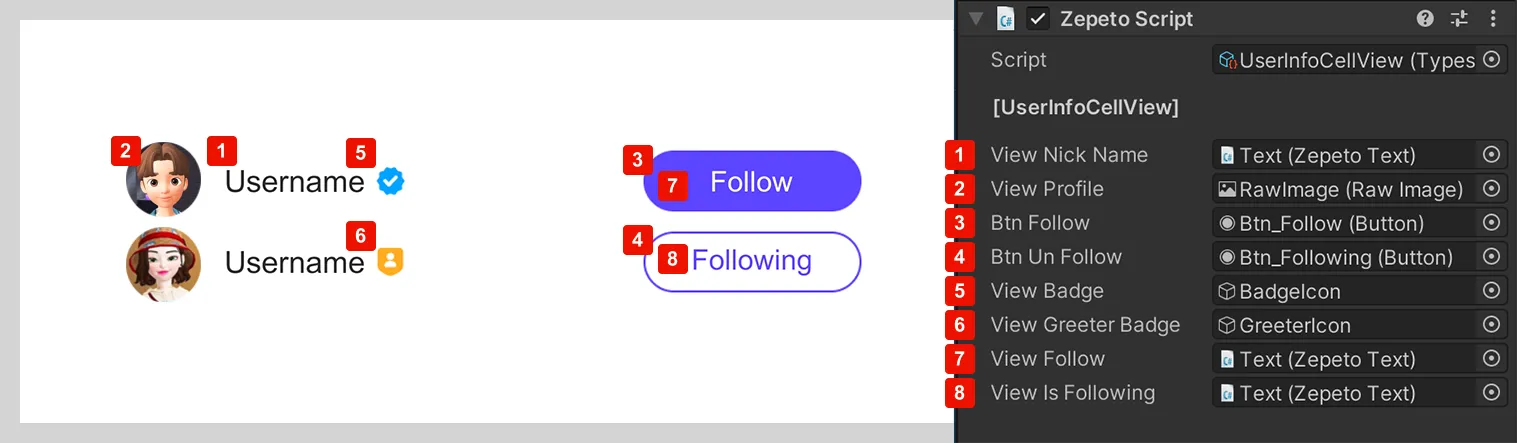
Seperti yang ditunjukkan di bawah, sel tempat informasi teman ditampilkan memiliki komponen Follow Cell View dan UserInfo Cell View yang diterapkan. Informasi dalam setiap komponen adalah sebagai berikut.
Komponen Tampilan Sel Info Pengguna
1 | Nama Tampilan | Teks Nama Pengguna |
|---|---|---|
2 | Lihat Profil | Gambar profil pengguna |
3 | Tombol Ikuti | Tombol ikuti pengguna |
4 | Tombol Unfollow | Tombol tidak mengikuti pengguna |
5 | Lihat Lencana | Gambar ikon lencana |
6 | Lihat Lencana Penyambut | Gambar ikon penyambut |
7 | Lihat Ikuti | Teks tombol ikuti |
8 | Lihat Sedang Mengikuti | Teks tombol tidak mengikuti |
👍 Tips
- Teks ZEPETO mewarisi UnityEngine_UI.Text dan menyediakan beberapa fitur tambahan untuk kenyamanan UI di dalam dunia. Teks dapat dengan mudah diedit dalam mode edit Prefab FollowScrollView.
- Ikon lencana yang ditampilkan di samping nama pengguna adalah ikon yang digunakan untuk menandai pengguna khusus seperti pencipta dan penyambut ZEPETO.
Mengubah UI prefab popup daftar teman
Anda dapat menyesuaikan daftar teman Anda dengan mengubah elemen UI.
Pilih prefab di Packages dan seret serta lepas prefab ke dalam folder Assets untuk menyalin prefab.
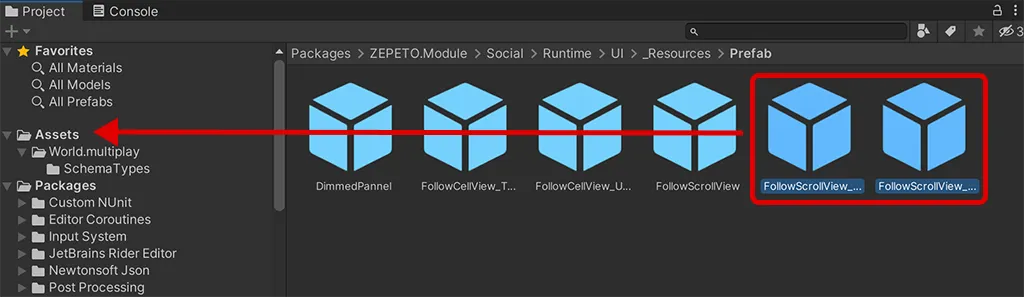
👍 Tips Prefab tidak dapat diubah saat berada di folder Packages, tetapi dapat diubah setelah disalin ke subfolder folder Assets.